

- By YANCHAO
- 2026-09-19
- Beginner's Guide
How to Add an International Credit Card on 1688

Overseas buyers can use a Visa or Mastercard on some 1688 accounts and orders. Depending on the app version and region, the card can be added under Payment Settings → Foreign Currency Payment Management or when an eligible order reaches checkout. Availability still depends on the account, seller, order, region and 1688’s current risk checks. If neither route shows an international-card option, there is no setting that reliably forces it to appear.
This guide was checked on 19 September 2026 against current 1688 payment terms and guidance from WorldFirst, an official 1688 cross-border payment partner.
The short answer
To add an international card in the current app flow, open My Orders, tap the settings icon, choose Payment Settings, open Foreign Currency Payment Management, then tap Manage → Add Credit/Debit Card. If that menu is not available, place an eligible order and check the payment-method list at checkout. Enter the cardholder details exactly as your bank holds them, complete the bank’s verification step and check the final currency, fee and total before confirming payment.
WorldFirst’s current 1688 payment guide lists Visa and Mastercard credit and debit cards and shows a 3% fee for the card method. The same guide says foreign-currency payment methods are available only when 1688 is accessed from outside Mainland China. The amount and terms displayed on your own 1688 payment page take priority because features and fees can change.
What you need before you start
Have these ready before placing the order.
- A registered 1688 account that you can sign in to.
- An eligible Visa or Mastercard that allows online and international transactions.
- The cardholder name, billing address and security code exactly as recorded by the issuer.
- Access to the phone, banking app or email used for your bank’s one-time password or 3-D Secure check.
- Enough available credit or balance for the order, the platform fee and any foreign-exchange or overseas-transaction charge from your bank.
- A valid Chinese delivery address. If you use a forwarding service, copy the warehouse address and your personal warehouse ID exactly.
Do not use a VPN to make the payment option appear. A location mismatch between the account, network, card and verification data can trigger a risk check or decline.
Step 1: sign in and prepare the order
Sign in to 1688 and add the required products to your cart. Check the variation, colour, size, minimum order quantity, domestic freight and seller notes before proceeding.
For a forwarded parcel, enter the warehouse address before payment. A YANCHAO customer should use the address and unique ID shown in the account. The ID allows the Huizhou warehouse to match the seller’s domestic parcel to the correct customer.
An international card pays the seller-side order only. It does not arrange international delivery. The seller still ships to a Chinese address, and a separate forwarding order is created after the goods reach the warehouse.
Step 2: add the card in the 1688 App
The app can expose a card-management route before checkout. The wording below follows a real 1688 App walkthrough published by TNG Digital; the menus may move or be translated differently in another country or app version.
- Open My Orders and tap the settings icon in the top-right corner.
- Open Payment Settings.
- Select Foreign Currency Payment Management.
- In the international-payment page, find Credit/Debit Card and tap Manage.
- Choose Add Credit/Debit Card.
- Enter the card number, expiry date, CVV and cardholder name, then tap the orange add button.
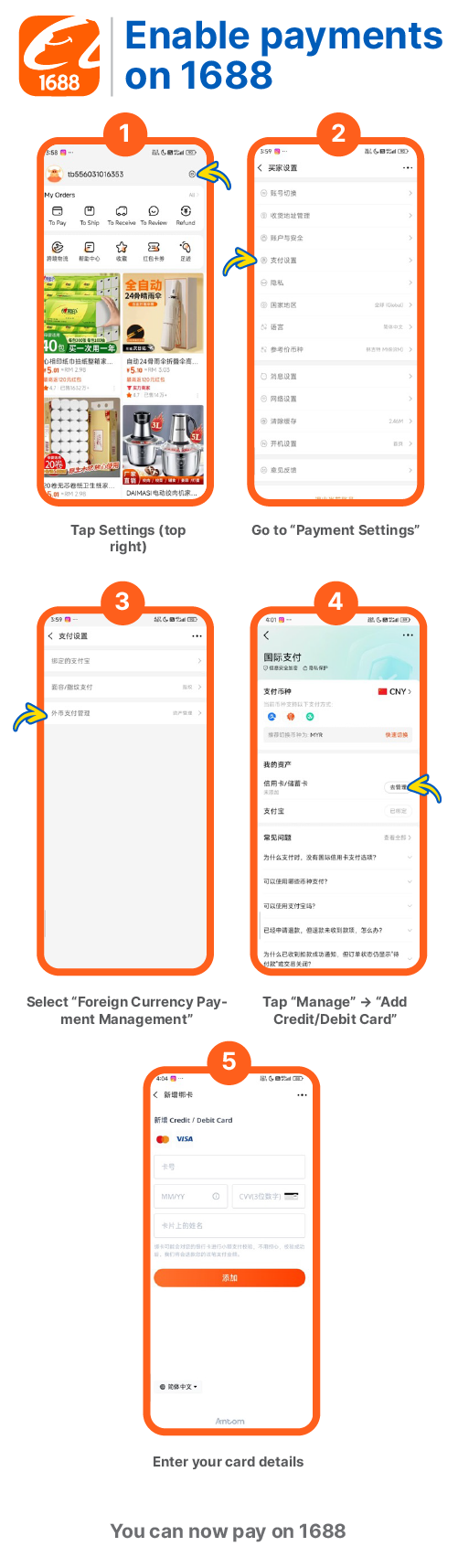
Real 1688 App interface published by TNG Digital. The screenshot is a navigation reference, not a promise that every account will show the same menus. Source: TNG Digital 1688 payment walkthrough image, reviewed 19 September 2026.
If Foreign Currency Payment Management or Add Credit/Debit Card is absent, update the official 1688 app and check again while signed in to the correct account. If it is still absent, move to the checkout method below. Do not use a VPN, false identity or invented billing address to make the menu appear.
Step 3: add the card at checkout when the settings menu is missing
Proceed to checkout and review the order total. Open the payment-method area. The English translation can vary, but look for a card choice such as Credit/Debit Card, International Card, Visa or Mastercard.
If the card method is shown, choose it. On first use, 1688 should prompt you to add or link the card to the account as part of payment. The page layout differs between the desktop site, mobile site and app.
If the option is not shown, stop there. It usually means that this account, order, seller or regional flow is not eligible at that moment. See the troubleshooting section below instead of repeatedly refreshing or changing location details.
Step 4: enter the card details carefully
Complete the card form with the details requested by the payment page. This normally includes the card number, expiry date, security code, cardholder name and billing information.
Use the name and address held by the issuing bank. Do not replace the billing address with the Chinese warehouse address unless the bank itself has that address on file. The shipping address and card billing address serve different purposes.
Before continuing, check that:
- the card number and expiry date are correct;
- the cardholder name matches the bank record;
- the billing country and address are accurate;
- online, overseas and foreign-currency payments are enabled;
- the available limit covers the full final amount.
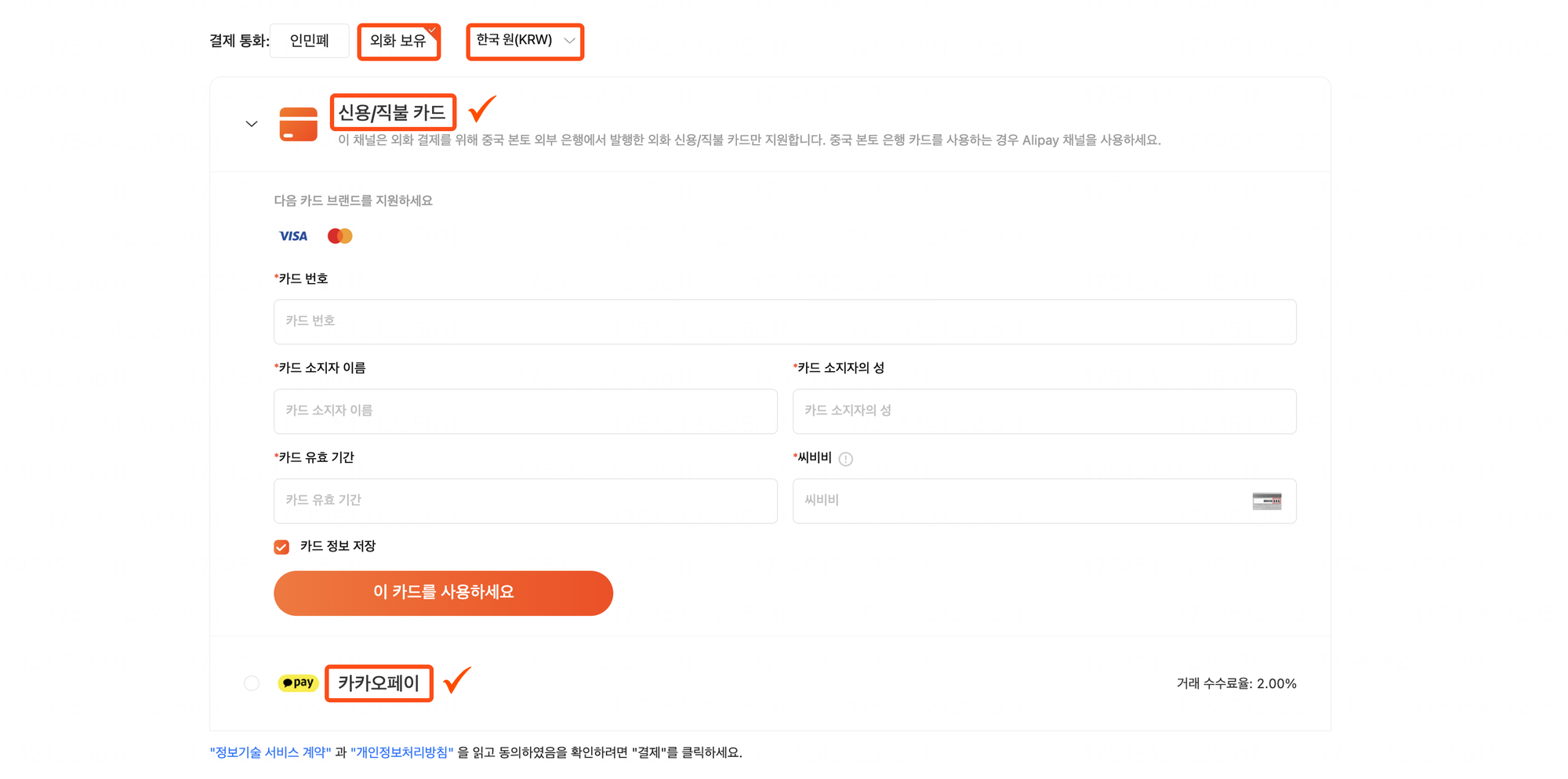
Real 1688 foreign-currency payment form shown in a Korean-market walkthrough. The highlighted labels mean foreign-currency balance, credit/debit card and card fields. Country-specific methods such as KakaoPay will not appear in every market. Source: Windly 1688 payment guide, published 8 August 2025 and reviewed 19 September 2026.
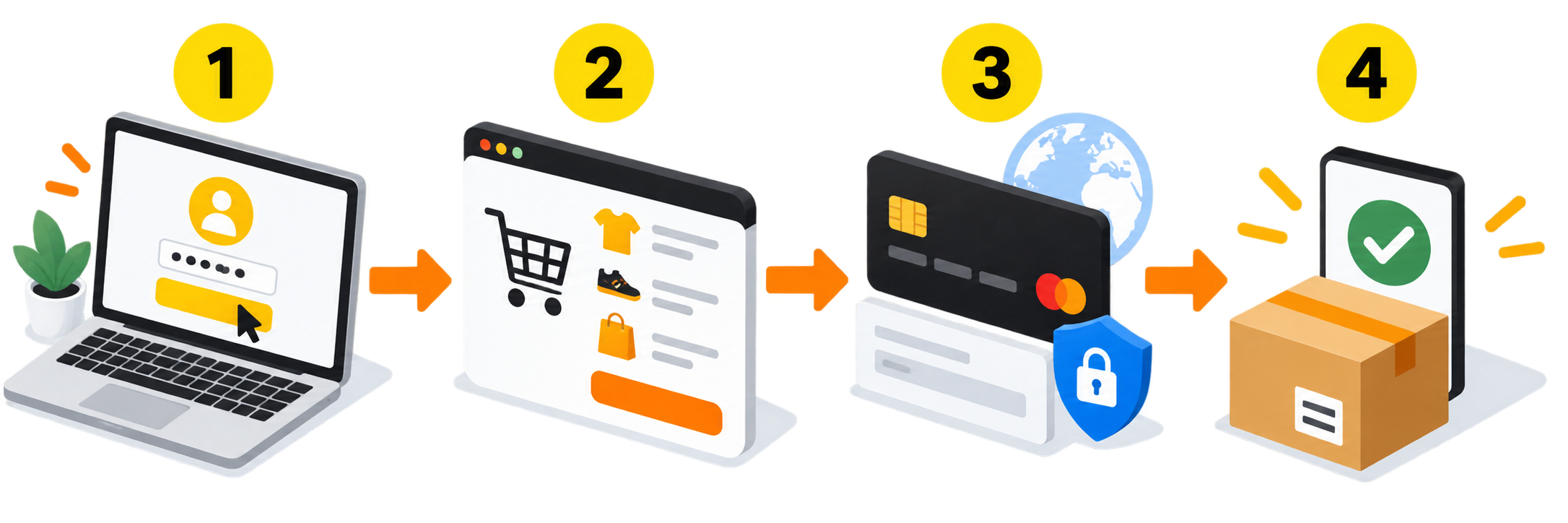
The illustration above summarises the sequence; use the real interface screenshots and the labels visible in your own app for navigation.
Step 5: complete the bank verification
Your bank may ask for an SMS code, an approval in its mobile app or another 3-D Secure check. Complete it promptly without closing the 1688 payment window.
A successful bank verification does not always mean the 1688 order has been paid. Return to 1688 and confirm that the order status has changed to paid. If the banking app shows a pending charge but 1688 still shows unpaid, do not submit the payment again immediately. Save both screens and wait for the pending result or contact the card issuer and 1688 support.
Step 6: read the total before confirming
WorldFirst’s current official-partner guide shows a 3% fee for 1688 Visa and Mastercard payments. On a ¥1,000 eligible order, a 3% platform fee would be ¥30, giving a ¥1,030 platform total before any separate issuer fee or currency conversion.
| Cost element | Who controls it | What to check |
|---|---|---|
| Product price and domestic delivery | 1688 seller/order | Final checkout subtotal |
| Card-payment fee | 1688 payment page | Current percentage and amount shown before payment |
| Exchange rate | Payment service or card issuer | Billing currency and converted amount |
| Foreign-transaction fee | Card issuer | Card terms or banking app |
| International forwarding | Forwarding provider | Charged later after warehouse packing |
The 3% figure is a current reference, not a permanent promise. Use the exact amount displayed at your checkout. Your bank may add its own foreign-transaction or currency-conversion fee, which is separate from 1688’s payment charge.
Step 7: keep the order and payment records
After payment, save the 1688 order number, seller name, product list, payment confirmation and card charge. These records help if the seller changes the order, a refund is issued or the warehouse needs help identifying the parcel.
When the seller dispatches the goods, copy the Chinese domestic tracking number into your forwarding account. A forwarding warehouse cannot identify an order from a card statement alone.
Why the international-card option may be missing
1688 does not present the same payment choices to every overseas buyer. Current official-partner pages also differ by region, which is a good reason not to treat card support as universal.
The card option can be absent when:
- the account or order is not in an eligible overseas payment flow;
- 1688 detects access from Mainland China;
- the seller or product listing does not support that payment method;
- the order currency, amount or transaction type is outside the available card flow;
- account verification is incomplete;
- 1688 or its payment provider applies a risk-control restriction;
- the interface or regional programme has changed.
Changing the browser language does not create eligibility. Neither does using an invented address or another person’s identity. If the card method is missing, use an available official method or a purchasing service.
Why a Visa or Mastercard payment may be declined
Work through this list once rather than submitting the same transaction many times.
- Check the issuer settings. Enable online, international and foreign-currency transactions.
- Check the details. Correct the cardholder name, billing address, expiry date and security code.
- Check the limit. Allow room for the order, platform fee and currency movement.
- Finish 3-D Secure. Reopen the banking app or request a fresh code if the first verification expired.
- Ask the issuer. Confirm that the bank is not blocking a China e-commerce transaction.
- Review the 1688 order. Try a different eligible listing only when the seller or product is the source of the restriction.
- Stop after repeated failures. Multiple rapid attempts can create duplicate pending authorisations or additional risk controls.
The 1688 payment-service agreement allows payment methods to be restricted or declined for compliance and risk-control reasons. Approval by your card issuer therefore does not guarantee approval by 1688’s payment system.
What to use if the card option is unavailable
Choose an alternative according to who is buying and how much control you need.
| Alternative | Usually suits | Important point |
|---|---|---|
| World Pay (跨境宝) | Overseas business buyers making regular 1688 purchases | Official 1688/WorldFirst cross-border method; account verification and linking are required |
| WorldFirst Balance | Eligible overseas buyers with larger orders | Current guidance shows a ¥1,000 minimum and requires verified WorldFirst and 1688 accounts |
| Alipay with a Mainland China bank account | Buyers who already have the required Chinese banking setup | Current partner guidance says the Mainland bank requirement makes this difficult for many overseas users |
| Purchasing agent | Buyers who want the agent to place and pay for the order | The agent pays the seller; the buyer should confirm service fees, exchange rate, inspection and refund handling |
YANCHAO offers an optional purchasing service for customers who cannot complete a 1688 payment themselves. The service can place an approved order and receive it at the YANCHAO warehouse. It does not make an ineligible card eligible or bypass 1688’s controls. Send the exact product link, variation, quantity and seller instructions before payment, and confirm the purchasing fee and refund process shown for the order.
If you prefer to buy directly, the 1688 agent guide for international buyers explains when direct purchasing is practical and when an agent is more useful.
Refunds do not always appear immediately
A seller refund normally follows the original payment route, but the display time depends on 1688, the payment provider and the issuing bank. The refunded amount can also differ from the original card statement when exchange rates move or the issuer does not return its own fee.
Keep the 1688 refund record and card statement. If 1688 shows the refund as completed but it has not appeared after the issuer’s normal processing window, give the bank the refund date, amount and reference. Do not send card details or one-time passwords to a seller in chat.
A two-minute payment check
Before pressing the final payment button, confirm all of the following.
- The seller, product, specification, quantity and domestic freight are correct.
- The Chinese delivery address includes your warehouse ID if a forwarder is receiving the parcel.
- The payment page itself offers Visa or Mastercard for this order.
- The cardholder and billing details match the bank’s records.
- The currency, card fee and final total are visible and acceptable.
- You can complete the issuer’s OTP or 3-D Secure check.
- You understand how a cancellation or refund returns to the original payment method.
- You have saved the order number after payment.
Frequently asked questions
Can every overseas buyer add a credit card to 1688?
No. Current official-partner guidance says Visa and Mastercard are supported in an eligible foreign-currency flow, but access depends on the account, location, seller, listing and risk checks. Some regional guidance does not offer the card method at all. The payment choices shown on the actual order are decisive.
Can I add the card before placing an order?
Sometimes. Current app walkthroughs show Payment Settings → Foreign Currency Payment Management → Manage → Add Credit/Debit Card. If those menus are missing for your account or region, create an eligible order and check the payment options at checkout instead.
Which international cards does 1688 support?
The current WorldFirst 1688 payment guide specifically lists Visa and Mastercard credit and debit cards. Other networks may appear in certain payment products or regions, but do not assume support unless your checkout names the network.
How much is the 1688 international-card fee?
WorldFirst’s current guide lists a 3% fee for the card method. Check the fee and total shown on your own 1688 payment page before confirming. Your card issuer may charge a separate foreign-transaction or currency-conversion fee.
Does paying by card include international shipping?
No. The card pays the 1688 order and Chinese domestic delivery shown at checkout. If the goods go to a forwarding warehouse, consolidation and international transport are charged separately after packing. The YANCHAO step-by-step guide explains that later process.
Is it safe to send my card details to a 1688 seller?
No. Enter the card only on the authorised 1688 or payment-provider page. A seller does not need your full card number, security code, banking password or one-time verification code.
Sources and review date
- WorldFirst, 1688 payment solutions, reviewed 19 September 2026. Official-partner guidance for World Pay, WorldFirst Balance and Visa/Mastercard payments.
- Alipay, 1688 platform payment service agreement, reviewed 19 September 2026. Governs payment-service availability, fees and risk controls.
- 1688, Terms of Use for overseas users, reviewed 19 September 2026.
- Apple App Store, 1688: Factory Direct, reviewed 19 September 2026. The current official app listing names Visa, Mastercard, Alipay and payments in 26 currencies, while actual access remains market- and account-dependent.
- TNG Digital, 1688 app card-management walkthrough image, reviewed 19 September 2026. Real app navigation screenshots used in this guide.
- Windly, 1688 payment methods, published 8 August 2025 and reviewed 19 September 2026. Real foreign-currency card-entry screen used for visual navigation.
Last reviewed by the YANCHAO Content Team on 19 September 2026. Payment eligibility, interfaces, fees and supported regions can change. The options and amount displayed on the live 1688 checkout page take priority.

About the author
YANCHAO Team
Cross-Border Shipping Experts
This article is brought to you by the YANCHAO team - the people behind our self-developed warehouse platform and 5,000 m2 Huizhou facility. We help over 5 million international students and overseas shoppers ship safely and affordably from China to 100+ countries.
More about YANCHAO