Tag: Shopping in China

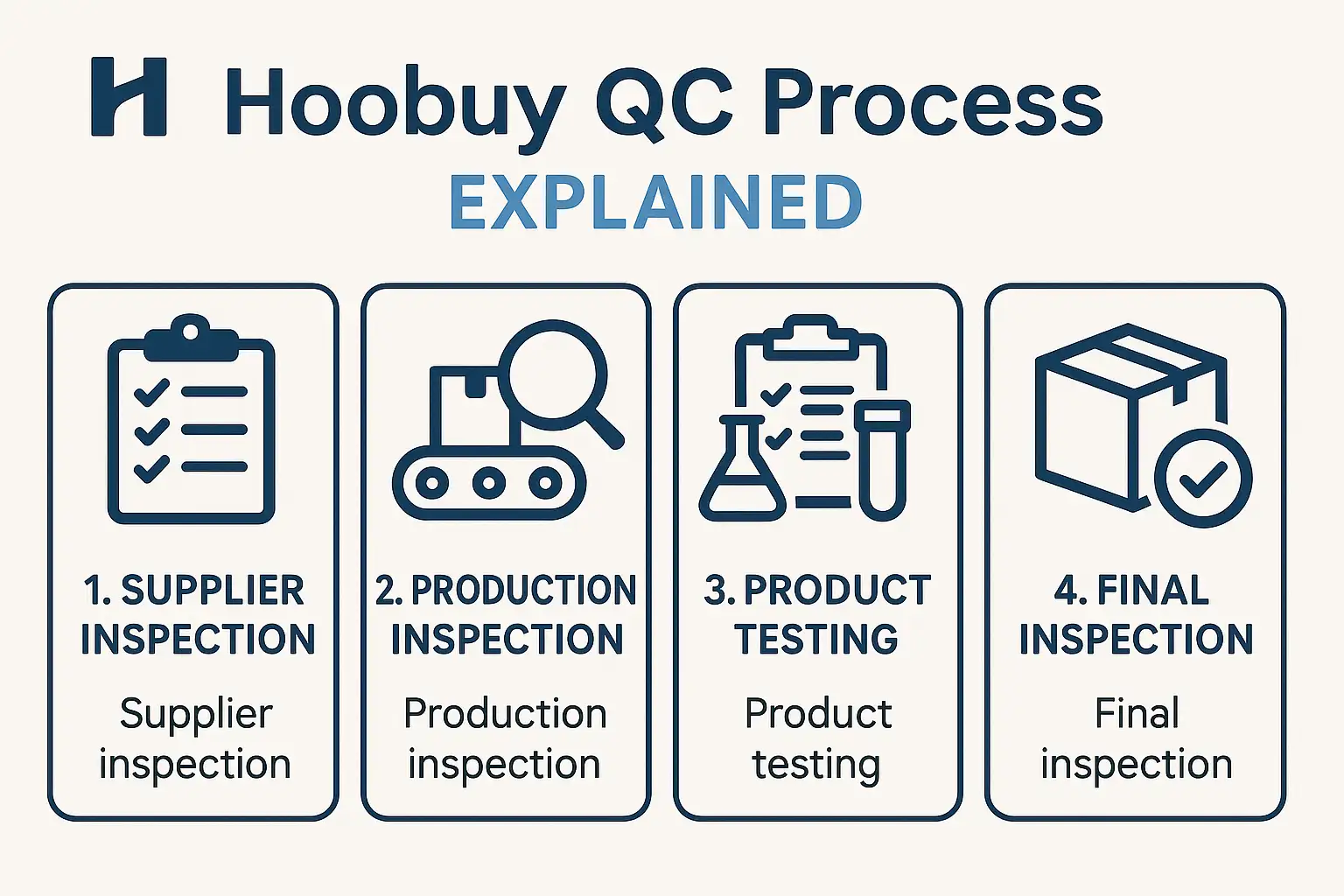
Step-by-Step Hoobuy QC Process Explained

Navigating the world of international shopping agents can seem complex, but at the heart of a successful purchase lies one critical process: the quality check. The Hoobuy QC (Quality Check) is a systematic, multi-step inspection designed to give you ultimate control over your items before they ever leave the warehouse. It is your first line of defense against quality issues, sizing errors, and seller mistakes. Understanding this process is not just helpful—it’s essential for a stress-free and rewarding shopping experience.

This comprehensive guide will walk you through every single stage of the Hoobuy QC process. We will begin with the moment you place your order, follow your item as it arrives at the warehouse, go behind the scenes of the detailed inspection, and finally, empower you to analyze the resulting Hoobuy qc pics to make a confident decision. Whether you are purchasing your first item or your fiftieth haul of Hoobuy reps, this step-by-step breakdown will provide the clarity you need to use this service to its fullest potential and ensure you receive the quality you expect.

What is the Hoobuy QC Process and Why is it Essential?

Before diving into the “how,” it’s crucial to understand the “what” and the “why.” The Hoobuy QC process is a value-added service where Hoobuy’s warehouse staff act as your personal inspectors. After an item you’ve ordered from a third-party seller arrives at their facility, they don’t just put it on a shelf. Instead, they carefully unpack it, perform a detailed visual inspection, take a series of high-quality photographs, and upload them to your account. This gives you a virtual, in-hand look at your product before you commit to the expensive and often final step of international shipping.

The importance of this process cannot be overstated. Online shopping, especially from vast marketplaces, comes with inherent risks. The seller’s photos might be of a different batch, the sizing information could be inaccurate, or there could be unforeseen manufacturing defects. The QC process is your safety net. It transfers the risk of discovery from your doorstep—thousands of miles away and weeks later—to the Hoobuy warehouse, where returns and exchanges are still a simple, viable option. It is the single most important tool for ensuring buyer satisfaction and protection.

GET IN TOUCH

Let us Send You a Quote

The Core Function of a Quality Check (QC) in Your Order

At its core, the function of the Hoobuy QC is verification. It serves to verify three critical things:

  • Identity: Is this the correct item you ordered? Does the model, color, and size match what you requested?
  • Quality: Does the item have any noticeable flaws? This includes stains, tears, poor stitching, scuffs, or any other manufacturing defects.
  • Accuracy: Do the physical measurements of the item align with the seller’s provided size chart?

By performing this pre-shipment inspection, Hoobuy provides you with the crucial data needed to make an informed decision. It moves the transaction from a blind purchase to a verified one, giving you the power to accept or reject the item based on tangible evidence.

Why You Shouldn’t Skip the Hoobuy QC, Especially for Hoobuy Reps

While the QC process is vital for any purchase, it is absolutely non-negotiable when dealing with the world of Hoobuy reps. The quality of replica items can vary dramatically from seller to seller, and even from batch to batch from the same seller. What one buyer receives could be vastly different from what you get. The seller’s stock photos almost always show a perfect example of the product, which may not reflect the actual quality of the item you receive.

Skipping the Hoobuy QC in this context is a significant gamble. You could receive an item with glaringly obvious flaws, incorrect sizing that renders it unwearable, or a product that is a lower-tier version than what was advertised. The cost and complexity of an international return from your home country are often so high that you are simply stuck with the disappointing product. The QC process is your low-cost insurance policy against this outcome, ensuring you can vet the quality and accuracy of every single piece before it’s truly yours.

Stage 1: Setting Up for Success – From Hoobuy Login to Warehouse Arrival

The quality check process doesn’t just begin when the item is being unpacked. Your active involvement starts much earlier. This first stage covers the foundational steps you take as a buyer, from creating your account and placing an order to the moment your item arrives at the Hoobuy facility. Getting these initial steps right ensures a smooth transition into the hands-on inspection stage. Think of this as setting the stage for a successful performance; the work you do here lays the groundwork for everything that follows.

This phase is all about clear instructions and diligent tracking. It starts with your Hoobuy login, which is your portal to the entire ecosystem. From there, every action you take—pasting a product link, adding notes to your order, and monitoring its status—contributes to the overall process. Understanding how Hoobuy handles your order from the moment of purchase to the point of reception is key to appreciating the logistical chain that enables the detailed QC process.

Placing Your Order and Awaiting Seller Shipment

Your journey begins on the Hoobuy website. After using your Hoobuy login, you will use the search bar to input the URL of the product you wish to buy from a platform like Weidian, Taobao, or Yupoo. Hoobuy’s system will fetch the product information. Here, you will select the correct size, color, and quantity. It is also where you can add specific notes to the agent, though these are typically for the purchasing process, not the QC stage.

Once you submit and pay for the item, Hoobuy’s purchasing agents place the order with the seller on your behalf. The order status in your dashboard will change to “Ordered.” The seller then ships the item domestically to the Hoobuy warehouse. You can track this domestic leg of the journey through the order details. This period is a waiting game, but it’s an active one where you can monitor the progress as your item makes its way to the inspection point.

The Moment of Arrival: How Hoobuy Receives and Logs Your Item

When the package from the seller arrives at the Hoobuy warehouse, it triggers a precise check-in procedure. The warehouse staff first inspect the outer packaging for any damage during domestic transit. They then scan the shipping label to match the package to your order in the system. Your order status will be updated to “Arrived” or “Stored.”

Each item is assigned a unique barcode and is entered into Hoobuy’s inventory management system. This electronic tagging is crucial for ensuring your item is never mixed up with another customer’s. It creates a clear, traceable path for your product as it moves from the receiving dock to the QC station, and finally to its storage location. You will receive an automated notification that your item has been received, signaling that it is now in the queue for Stage 2: the detailed QC inspection.

Stage 2: The Main Event – A Look Inside the Hoobuy QC Examination

This is the heart of the entire Hoobuy QC operation. Once your item is checked in and queued, it is moved to a dedicated inspection station where the real work begins. This stage is methodical, detailed, and focused on one thing: generating a clear, unbiased record of your product’s condition and specifications. The warehouse inspectors are trained to be systematic, looking at each item with a critical eye and documenting their findings through a standardized photography and measurement process.

The goal here is not to judge the item’s style but to assess its objective quality. The bright, even lighting of the photography stations and the use of high-resolution cameras are all designed to capture details that might be missed in a casual glance. This meticulous process ensures that the Hoobuy qc pics you receive are a true and accurate representation of the item that has arrived, providing you with the best possible information to make your decision.

Step 1: Unpacking and Initial Verification Against Your Order

The first step of the physical inspection is to carefully unpack the item. The inspector immediately cross-references the product with your order details. They check the fundamentals: Did the seller send the correct size? Is it the right color? Does the product model match what was ordered? This initial verification is crucial for catching the most basic—and surprisingly common—seller errors. The inspector will also perform a quick visual scan of the entire item to spot any major, immediately obvious defects like large stains, tears, or significant damage. This preliminary check ensures that the item is the correct one before proceeding to the more time-consuming detailed documentation.

Step 2: Meticulous Photography for Your Hoobuy QC Pics

This is arguably the most important step in the process. The inspector places the item in a well-lit area, typically a light box, to ensure color accuracy and clarity. They then take a series of standardized, high-resolution photographs. A typical set of Hoobuy qc pics includes:

  • An overall shot: A photo of the entire item from the front and back to show its general appearance.
  • Detail shots: Close-up photos of key features like logos, tags, buttons, zippers, and hardware.
  • Stitching and material shots: Magnified views of the stitching on seams and the texture of the fabric.
  • Flaw shots: If any defects are found (e.g., a stain, a scuff, a loose thread), the inspector will take a specific, clear close-up to highlight the issue for you.

These photos are not meant to be glamorous product shots; they are documentary evidence. Their purpose is to be as informative and objective as possible.

Step 3: Documenting Measurements and Other Key Details

Alongside photography, taking measurements is a vital part of the Hoobuy QC process, especially for clothing and footwear. Sizing can be inconsistent between sellers, and their charts are not always reliable. The inspector will lay the garment flat and use a tape measure to record key dimensions, such as the bust/chest width, the overall length, and the shoulder width. For shoes, they will often measure the insole length. These measurements are photographed with the tape measure clearly visible in the frame. This provides you with hard data that you can compare against the seller’s size chart and your own body measurements to confirm the fit, which is one of the biggest challenges in remote shopping.

Stage 3: Your Decision – How to Analyze Hoobuy QC Pics and Take Action

Once the warehouse team has completed their meticulous inspection and photography, the focus of the Hoobuy QC process shifts to you. This is the interactive stage where you, the buyer, step in to review the evidence and make the final call. Hoobuy has provided you with all the necessary information; now it is your responsibility to analyze it carefully and decide the fate of your item. This stage is arguably the most empowering part of the entire process, as it puts you in complete control of the quality of your haul.

Your decision will determine whether the item is stored in your warehouse to await international shipping or is sent back to the original seller for a return or exchange. Taking this step seriously is the key to a successful shopping experience. A thorough analysis of the Hoobuy qc pics can save you from the disappointment of receiving a flawed product, while a hasty approval could lead to regret. Let’s break down the steps you need to take to make a well-informed decision.

GET IN TOUCH

Let us Send You a Quote

Accessing and Interpreting Your QC Photo Gallery

After the inspection is complete, you will receive a notification. By using your Hoobuy login and navigating to the “My Warehouse” or “My Orders” section of your dashboard, you will find the item with its status updated to “QC Photos Available.” Clicking on it will open a gallery of the high-resolution images taken by the inspection team.

Interpreting these photos is a skill. Here’s how to do it effectively:

  • Don’t Rush: Take your time. Open each image and use the zoom function to inspect details closely.
  • Compare and Contrast: Open a new tab with the original seller’s product page. Compare the Hoobuy qc pics to the seller’s stock photos. Look for discrepancies in color, material, pattern placement, and logo quality.
  • Create a Checklist: Mentally check off key areas. Examine the stitching, scrutinize the logos, verify the tags, and assess the overall symmetry and construction. For Hoobuy reps, this level of detail is paramount.
  • Verify Measurements: Look at the measurement photos. Compare the numbers shown on the tape measure to the seller’s size chart and your own requirements. Confirm that the size you received is what you need.

This systematic review will allow you to build a complete picture of the item’s quality and accuracy.

The ‘Green Light’ (GL): Approving Your Item for International Shipment

If, after a thorough review of the Hoobuy qc pics, you are satisfied with the item’s quality and it meets your expectations, you will give it the “Green Light” (GL). This is the term used in the community for approving an item. Within the QC photo gallery on the Hoobuy website, there will be a clear button to “Accept” or “Approve” the product.

Once you click this button, you are confirming your satisfaction. The Hoobuy QC process for this specific item is now complete. The warehouse staff will receive this confirmation, carefully repackage your item, and move it to its designated storage location in your virtual warehouse. The item’s status will update to “Stored” or “Available for Shipment.” It will now wait securely until you are ready to create a new parcel, consolidating it with other items you have purchased to be shipped internationally to your doorstep.

The ‘Red Light’ (RL): How to Initiate a Return or Exchange

If your analysis of the QC photos reveals a significant flaw, a sizing error, or that you’ve received the wrong product entirely, you will give it the “Red Light” (RL)—community slang for rejecting an item. Instead of clicking “Accept,” you will choose the option to “Return/Exchange.”

The system will prompt you to provide a reason for the return. It is crucial to be clear, concise, and specific. Refer directly to the flaws shown in the Hoobuy qc pics. For example: “The logo on the chest is crooked (see photo #3)” or “The bust measurement is 110cm, but the seller’s chart stated 120cm for this size (see photo #5).” This clear communication helps the Hoobuy agent effectively argue your case to the seller. Once you submit the request, the agent will handle all communication to arrange the return based on the seller’s policy. This is the critical function of the Hoobuy QC process: catching problems when they are still easy and affordable to fix.

Pro Tips for Getting the Most Out of Your Hoobuy QC Experience

  • Research Sellers First: The best QC experience is one that finds no flaws. Before you even buy, use community resources like Reddit or Discord to find sellers known for consistent quality. This reduces the likelihood of needing to return items.
  • Understand Product Tiers: Especially in the reps market, understand that quality often correlates with price. Don’t expect perfection from a budget batch. Set your expectations realistically before the Hoobuy qc pics even arrive.
  • Communicate Clearly: When requesting returns, be polite and factual. The agent is your ally. Providing them with clear, objective reasons helps them resolve your case successfully.
  • Consider Value-Added Services: If you have a very specific quality concern about an item (e.g., the glow-in-the-dark feature on a pair of sneakers), consider paying the small fee for a specific extra photo request. It’s a small investment for guaranteed peace of mind.
  • Keep Your Own Records: Take a screenshot of the seller’s size chart when you order. This way, you have your own record to compare against the measurement photos you receive, preventing any confusion later.

Frequently Asked Questions (FAQs)

  1. What is the difference between a standard Hoobuy QC and a value-added inspection? The standard Hoobuy QC is the free service that includes a set of general photos and basic measurements. A value-added inspection is a paid service where you can request specific, additional photos or measurements, such as a close-up of a particular seam or an insole measurement.
  2. How long do I have to make a decision after receiving my Hoobuy qc pics? While there isn’t a strict time limit, it is highly recommended to review your photos and make a decision within a few days. This is because a seller’s return window (typically 7 days from warehouse delivery) is limited. The sooner you act, the more likely a return will be processed smoothly.
  3. Will Hoobuy tell me if an item has a flaw? Hoobuy inspectors are trained to photograph any visible flaws they notice. However, they do not make a judgment call for you. Their job is to provide objective photographic evidence; the final decision to accept or reject the item based on those photos is yours.
  4. Can I get a refund for shipping if I return an item? When you return an item from the Hoobuy warehouse, you will be refunded the cost of the item itself. The domestic shipping fee paid to the seller is often non-refundable, as the shipping service was already rendered.
  5. What should I do if the color in the QC pics looks different from the seller’s photos? Be aware that the bright, white lighting in the warehouse can sometimes make colors appear slightly different. However, if the difference is dramatic (e.g., you ordered navy blue and received black), you should absolutely initiate a return. For minor shade differences, you will have to use your judgment.
  6. Is it possible to talk to the person taking my QC photos? You cannot speak directly to the warehouse inspector. All communication should be done through the messaging system in your order details, where you can contact your assigned agent with any specific requests or questions about your return.

Conclusion

The step-by-step Hoobuy QC process is the cornerstone of a secure

and successful international shopping strategy. It demystifies the process of buying from remote sellers and places the power of quality control directly into your hands. From the initial Hoobuy login and order placement to the critical analysis of your Hoobuy qc pics, each stage is designed to protect your investment and ensure your satisfaction.

By familiarizing yourself with this workflow and actively participating in the decision-making stage, you transform from a hopeful buyer into an empowered consumer. You are no longer gambling on quality; you are verifying it. This systematic approach allows you to build your hauls with confidence, knowing that every item you approve has met your personal standard, making the final unboxing at your home an exciting and rewarding experience every time.


Is Taobao Spreadsheet 2025 Worth It? A Complete Review

Introduction: Why Taobao Sellers Need the Right Tools

Running a Taobao shop in 2025 is no small task. Sellers need to juggle product listings, supplier communications, customer orders, shipping logistics, and profit tracking—all while competing in one of the largest e-commerce markets in the world.

Without proper tools, this process can quickly become overwhelming. That’s why spreadsheets remain one of the most trusted resources for Taobao sellers. In this Taobao Spreadsheet 2025 review, we’ll explore whether the newest version is worth your time, how it compares to older versions, and if the free template is enough for your needs.

What is the Taobao Spreadsheet 2025?

Overview of the Template

The Taobao Spreadsheet 2025 is a pre-designed template available in Excel and Google Sheets formats. It’s built specifically for e-commerce sellers to simplify business management.

It includes:

  • Order tracking sheets
  • Inventory management sections
  • Automated profit and expense formulas
  • Multi-currency support for international sellers

Who is It Designed For?

The template is primarily designed for:

  • New Taobao sellers who want a free, easy tool.
  • Dropshippers working with multiple suppliers.
  • Small businesses looking for cost-effective management solutions.

Taobao X GoNest

Taobao shopping, GoNest consolidated shipping

Fast and safe, your goods come home!

Key Features Reviewed

Order and Inventory Management

The 2025 spreadsheet makes it easy to record product details, SKU codes, and stock availability. Sellers can log new orders and automatically update inventory, reducing the risk of overselling.

Automated Profit and Expense Tracking

Built-in formulas automatically calculate profits after deducting supplier costs, transaction fees, and shipping expenses. This provides a clear overview of real margins.

Multi-Currency and Exchange Rate Options

Cross-border sellers benefit from the multi-currency feature, which helps manage sales in both RMB and foreign currencies.

Compatibility Across Devices

The template works seamlessly in both Excel and Google Sheets, making it accessible on desktop, laptop, and mobile devices.

Pros of Using Taobao Spreadsheet 2025

  • Saves Time and Reduces Errors – Pre-set formulas save hours of manual calculations.
  • Free and Beginner-Friendly – No cost, ideal for new sellers.
  • Customizable to Any Business Model – Works for clothing, electronics, home goods, and more.

Cons of Using Taobao Spreadsheet 2025

  • Limited Automation – Unlike SaaS tools, manual data entry is required.
  • Learning Curve for Beginners – Some may find spreadsheets intimidating if new to Excel.
  • Requires Manual Updates – Supplier costs, orders, and shipping fees must be updated regularly.

Free vs. Paid Versions: Which One Should You Choose?

Advantages of the Free Version

  • No upfront cost
  • Suitable for small businesses and solo sellers
  • Flexible and customizable

When a Paid Tool Makes Sense

If you manage hundreds of orders daily, a paid tool with automation, real-time inventory sync, and API integrations may be more efficient.

Who Should Use the Taobao Spreadsheet 2025?

  • New Sellers and Beginners – Test Taobao selling without investing heavily.
  • Dropshippers Managing Multiple Suppliers – Stay organized with multiple suppliers, shipping methods, and prices.
  • Small-to-Medium Businesses – Provides sufficient functionality before scaling to enterprise level.

Expert Tips for Getting the Most Out of Taobao Spreadsheet 2025

  • Regularly update supplier costs to ensure accurate profit margins.
  • Use Google Sheets for collaboration to share real-time updates with team members.
  • Add macros to automate repetitive tasks like generating sales summaries.

User Feedback and Community Reviews

Positive Experiences from Sellers

Most sellers highlight simplicity and zero cost as key benefits. It helps them start without advanced tools.

Common Complaints and Issues

Main complaints include manual data entry and limited advanced analytics compared to premium solutions.

Overall Rating

⭐ 4.3 out of 5 – Great for beginners and small businesses, but limited for advanced sellers.

FAQs About Taobao Spreadsheet 2025 Review

  1. Is the free template reliable? Yes, for small to medium sellers with consistent updates.
  2. Can it handle large-scale stores? Best for smaller operations; large stores may need paid tools.
  3. Does it work on PC and mobile? Yes, via Excel and Google Sheets.
  4. How is it different from older versions? Improved layouts, updated formulas, and multi-currency support.
  5. Where to download? Seller forums, Excel template sites, and Alibaba’s Taobao Seller Help Center.

Conclusion: Is Taobao Spreadsheet 2025 Worth It?

The Taobao Spreadsheet 2025 review shows this tool is worth it for new and small-scale sellers. It’s free, customizable, and beginner-friendly, helping manage orders, track inventory, and calculate profits efficiently.

Limitations exist for high-volume sellers, but for most Taobao sellers starting in 2025, the free version is an excellent and smart choice.

Taobao Spreadsheet 2025: Free Template for Sellers

Introduction to Taobao Spreadsheet 2025

Running a successful online store on Taobao requires more than just attractive product listings. Sellers need a reliable system to track sales, manage inventory, calculate profits, and keep business records organized. That’s where the Taobao Spreadsheet 2025 comes in. Designed with updated features, this free template makes business management simpler, faster, and more accurate for sellers of all levels.

Whether you’re just starting out or already running a large Taobao shop, having the right spreadsheet can be a game-changer. In this guide, we’ll cover everything you need to know about the Taobao Spreadsheet 2025 free template—from its features and benefits to practical usage tips and expert advice.

Taobao X GoNest

Taobao shopping, GoNest consolidated shipping

Fast and safe, your goods come home!

What is a Taobao Spreadsheet?

A Taobao spreadsheet is a digital tool that sellers use to record, organize, and analyze their shop’s activities. Traditionally, sellers kept manual records of sales and expenses. However, spreadsheets such as those built in Excel or Google Sheets have become the standard, thanks to their flexibility and ability to automate calculations.

The 2025 version of the Taobao spreadsheet has been specifically optimized for modern sellers. It includes built-in templates that are ready to use, saving time and reducing the learning curve for beginners.

Why Sellers Need an Updated Spreadsheet in 2025

The e-commerce market is constantly changing, and Taobao sellers face increased competition each year. In 2025, sellers are dealing with:

  • More product categories than ever before.
  • Fierce competition from international sellers.
  • Data-driven decision making, where success depends on analyzing numbers.

Using the Taobao Spreadsheet 2025 free template allows sellers to stay ahead of these challenges by keeping their business organized and efficient.

Key Features of the Taobao Spreadsheet 2025

Easy Product Management

Sellers can list all their products with SKU codes, descriptions, and prices in a single sheet. This helps avoid duplicate listings and makes stock control effortless.

Automatic Sales Tracking

Every order can be logged with automatic calculations for revenue, discounts, and net sales. This reduces manual errors and saves hours of work.

Profit & Expense Calculation

The template comes with pre-built formulas to calculate profit margins, track shipping fees, and monitor advertising costs. Sellers can instantly see which products are profitable.

Multi-Currency Support for Global Sellers

With more international buyers shopping on Taobao, the 2025 spreadsheet includes multi-currency options, allowing smooth conversions for cross-border transactions.

Benefits of Using a Free Taobao Spreadsheet 2025 Template

  • Saves Time – Automated formulas let sellers focus more on marketing and customer service.
  • Reduces Human Errors – Pre-set formulas minimize risks of mistakes.
  • Improves Business Insights – Monthly and yearly reports provide a clear overview of trends and performance.

Step-by-Step Guide: How to Use the Taobao Spreadsheet 2025

Downloading the Free Template

Sellers can download the template from forums, communities, or Taobao resources and open it in Excel or Google Sheets.

Customizing Columns for Your Business

Columns can be tailored to your niche—clothing (size, color), electronics (warranty, serial number), etc.

Tracking Orders and Inventory

Orders update stock counts automatically, preventing overselling.

Generating Monthly Reports

At month’s end, the spreadsheet summarizes sales, profits, and top products for better planning.

Free vs. Paid Taobao Spreadsheet Templates

Advantages of Free Templates

  • No cost for beginners.
  • Easy to set up and customize.
  • Suitable for small to medium stores.

When to Upgrade to Paid Versions

Larger stores with thousands of transactions may need paid tools with automation, API integrations, and analytics.

Taobao X GoNest

Taobao shopping, GoNest consolidated shipping

Fast and safe, your goods come home!

How the Taobao Spreadsheet 2025 Helps New Sellers

  • Easy Start – Ready-to-use layout for beginners.
  • Pre-Built Formulas – No advanced Excel knowledge required.

Advanced Tips for Maximizing Spreadsheet Efficiency

  • Use macros to automate repetitive tasks.
  • Integrate with Excel or Google Sheets for flexibility.
  • Enable cloud storage & collaboration for team use.

Common Mistakes to Avoid

  • Not updating inventory regularly.
  • Ignoring expense tracking.
  • Adding too much unnecessary data.

FAQs About Taobao Spreadsheet 2025

  1. Is the spreadsheet free? Yes, available in seller communities.
  2. Can I use it on PC and mobile? Yes, via Excel or Google Sheets.
  3. How often should I update? Ideally daily.
  4. Does it support multiple languages? Many templates support English and Chinese.
  5. Can I migrate old data? Yes, by importing past records.
  6. Where to download? Taobao forums, seller groups, or the official help center.

Conclusion: Why Every Seller Should Use the Taobao Spreadsheet 2025

The Taobao Spreadsheet 2025 free template is a powerful yet simple solution for managing sales, inventory, and profits. It saves time, reduces errors, and provides valuable insights to grow a shop.

Whether you’re a beginner or experienced seller, using this tool effectively ensures smoother operations and better business performance in the competitive Taobao marketplace.

How to Use GoNest for Shipping Your Joyagoo Packages

You can seamlessly use Joyagoo’s shopping features and have your packages shipped to our GoNest warehouse. We readily accept packages from the Joyagoo warehouse, making it convenient for you to consolidate your purchases.

In addition to Joyagoo, we also welcome packages from other popular platforms like CNfans. You are welcome to have parcels from any of these services forwarded to our GoNest facility. This guide will walk you through the process of shopping on Joyagoo and using GoNest to ship your items to your home country.

Video Tutorial: Shopping on Joyagoo and Shipping with GoNest

This tutorial is specifically designed to show you how to link the Joyagoo platform with your GoNest warehouse address. The key step is adding your unique GoNest warehouse address to your Joyagoo account. This allows you to transfer packages from the Joyagoo warehouse directly to ours for international shipping.

Please watch the video tutorial for a step-by-step demonstration:

For a faster, text-based guide on how to forward your packages to our warehouse, please continue reading below.

GET IN TOUCH

Let us Send You a Quote

Forwarding Your Joyagoo Packages to the GoNest Warehouse

Step 1: Install the Joyagoo App

First, you’ll need to download the Joyagoo application. You can find it on the Google Play Store for Android or the App Store for iOS. As this is a standard installation process, we won’t provide detailed instructions here.

Step 2: Register or Log In to Your GoNest Account

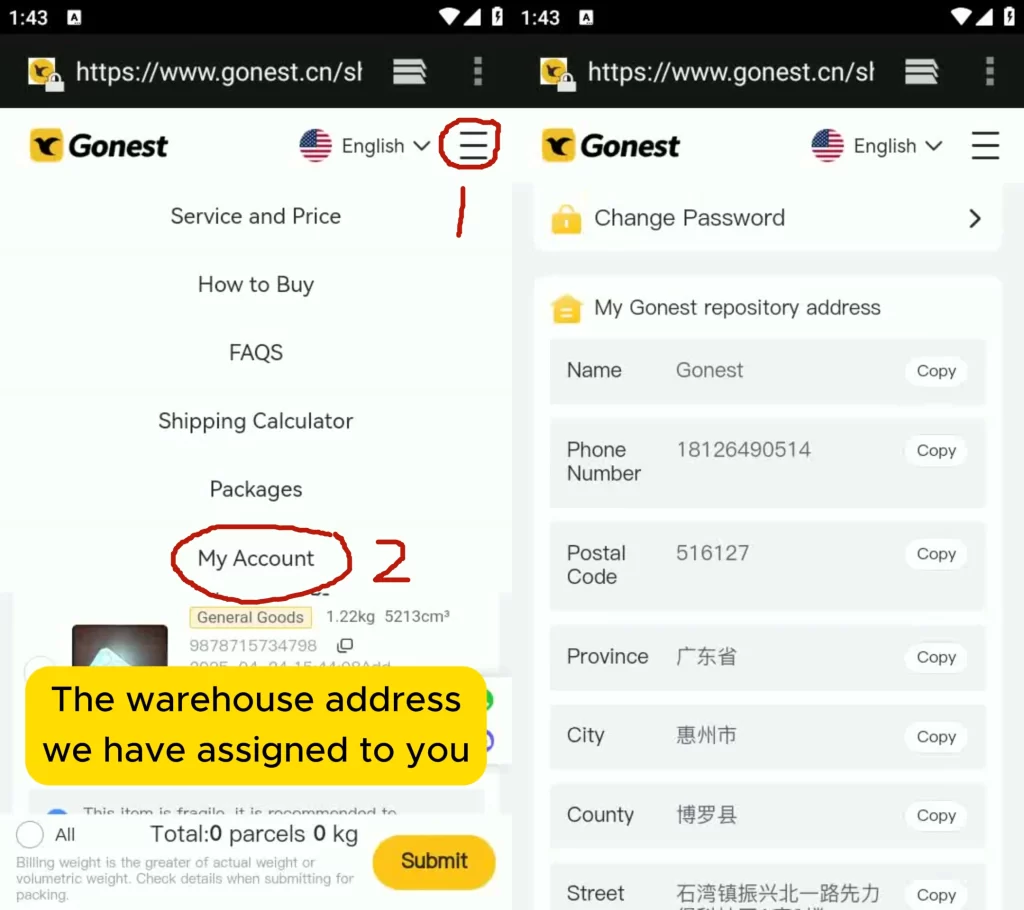
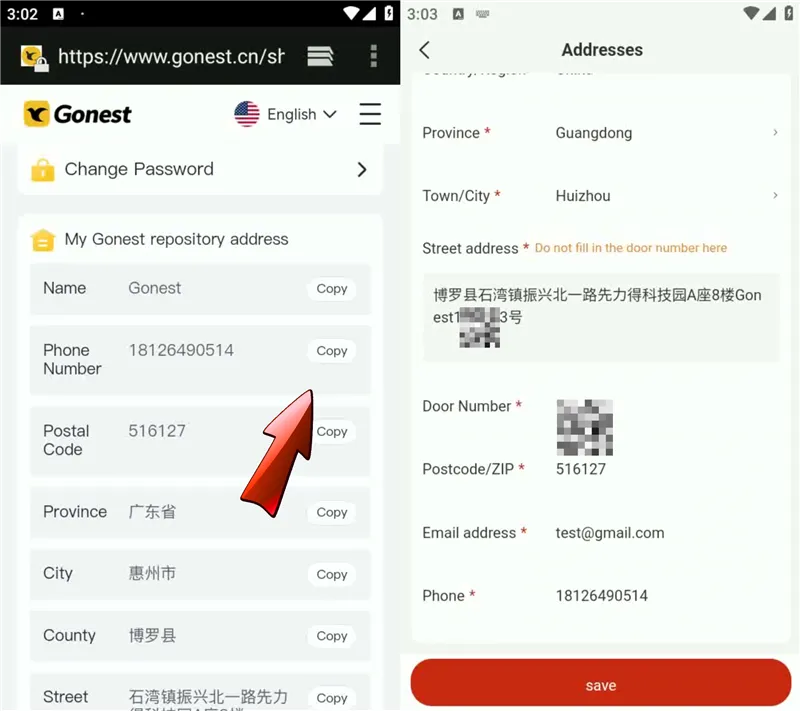
Next, you will need to retrieve your personal GoNest warehouse address. You can get this by registering for a new GoNest account. If you already have an account, simply log in to find your address. Each user is assigned a unique warehouse address, which is why registration is necessary to obtain yours.

You can find your address here after completing the registration:

Step 3: Add Your GoNest Warehouse Address to Joyagoo

You will now need to add the GoNest warehouse address we provided into your Joyagoo account. Please follow the steps below to enter the information correctly:

Use the following details:

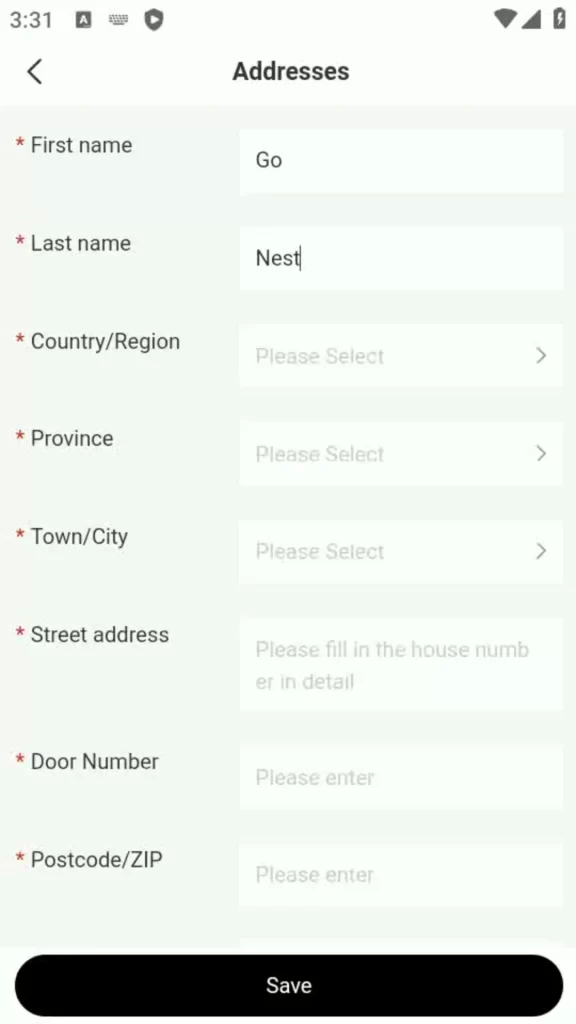
  • Last Name: Go
  • First Name: nest

Here is how the initial fields should be filled out:

Next, complete the rest of the address information:

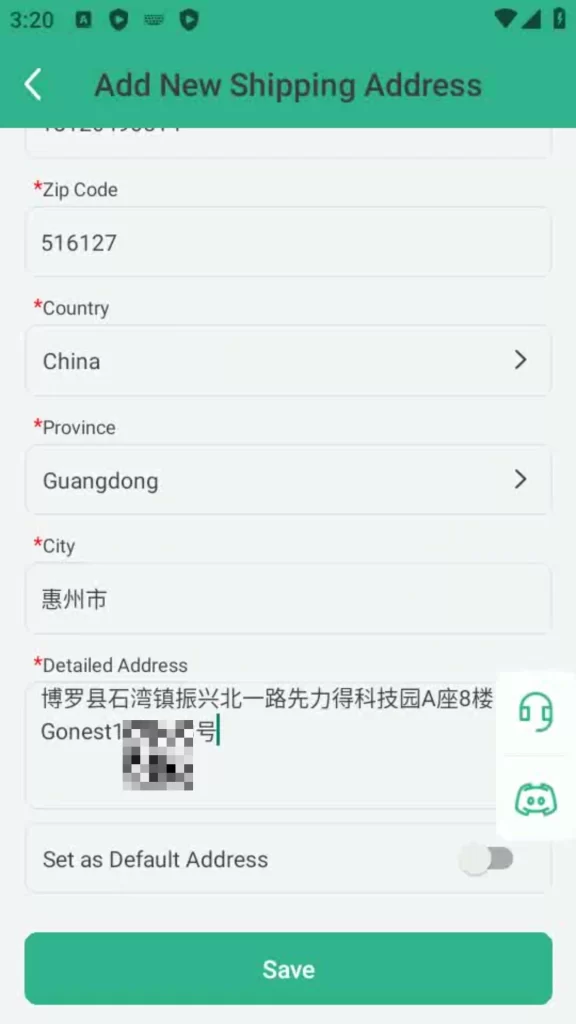
  • Country: China
  • Province: Guangdong
  • City: Huizhou
  • Phone Number: 18126490514
  • Zip Code: 516127
  • Email Address: Fill in using your own email address.

Finally, copy the full, detailed address line from your GoNest account and paste it into the designated address field in the Joyagoo app.

The final, completed address should look like this:

Shopping on Joyagoo and Shipping to GoNest

You can now start shopping on Joyagoo. Once your items have arrived at the Joyagoo warehouse, you can submit a request to have all your packages consolidated and forwarded to your GoNest warehouse address. To do this, simply go to the parcel submission page, select the packages you want to ship, choose the GoNest address you just added, and submit them for packing and shipping.

Frequently Asked Questions

How do you identify that the packages shipped to the GoNest warehouse belong to me?

Your GoNest address includes a unique identification number (UID) in the format of 123-456-78. This UID is how we identify and assign incoming packages to your account. It is crucial that you include this entire address, with the UID, when you enter it into your Joyagoo account.

Do I need to pay for shipping on Joyagoo? How much will it cost?

Yes, you will need to pay a domestic shipping fee to forward your parcels from the Joyagoo warehouse to ours. This fee is charged by Joyagoo, not by GoNest.

Based on our experience, this domestic shipping fee typically ranges from ¥10 to ¥100. The exact amount will depend on the rates charged by Joyagoo.

Can I use GoNest’s services without shopping through Joyagoo?

Absolutely! You can use GoNest’s services directly. We offer a purchasing service where you can buy items and use our shipping services all in one place.

Furthermore, we support direct shopping from major Chinese platforms like Weidian, Taobao, 1688, and Pinduoduo. Simply use your GoNest warehouse address as the shipping destination when you place orders on these sites, and all your packages will be delivered directly to us.

CNFans Accessories Spreadsheet Template for Sellers

Introduction to CNFans Accessories Spreadsheet

In the fast-paced world of online selling, keeping your product data organized can make the difference between success and chaos. The CNFans accessories spreadsheet is designed specifically for sellers who want an easy, efficient, and accurate way to manage their business operations. Whether you’re running a small online store or managing a large-scale marketplace presence, this template is built to simplify your workflow.

Why CNFans Is a Game-Changer for Sellers

CNFans has quickly become one of the most trusted platforms for accessory sellers, offering powerful tools for product listing, marketing, and order management. The CNFans accessories spreadsheet template complements these features by giving you a central hub to monitor inventory, track sales, and forecast profits with precision.

Key Features of the CNFans Accessories Spreadsheet

  • Pre-built formulas for cost, revenue, and profit margin calculations.
  • Category-specific tabs for organizing different product lines.
  • Sales tracker that updates in real time.
  • Compatibility with Excel, Google Sheets, and other spreadsheet software.

Benefits of Using the CNFans Accessories Spreadsheet Template

Streamlined Inventory Management

Instead of juggling multiple files and notes, the spreadsheet centralizes all your stock data. You can quickly see how many items are in stock, which products are running low, and when to reorder.

Accurate Sales Tracking

Every transaction is recorded with essential details like date, order ID, customer name, and quantity sold — ensuring your records are always up to date.

Easy Profit Margin Calculations

Thanks to automated formulas, you no longer need to manually calculate profit margins. Simply input your cost price and selling price, and the spreadsheet does the math for you.

Time-Saving Automation Tools

Built-in automation saves hours of manual work, allowing you to focus more on marketing and customer service.

CNFans X GoNest

How to shop on CNfans?

How to use GoNest to transport parcels?

How the CNFans Spreadsheet 2025 Improves Seller Efficiency

Real-Time Data Updates

With the CNFans spreadsheet 2025, you can update product and sales information on the fly. If you’re using it with Google Sheets, changes sync instantly across devices, meaning you can check inventory or update sales figures even while you’re away from your desk.

Customization for Different Product Categories

Not every seller offers the same products, so flexibility matters. This spreadsheet allows you to create separate tabs or sections for categories like phone cases, chargers, cables, or other accessories. Custom columns can be added for specifications, colors, or size variations.

Mobile-Friendly Accessibility

As more sellers work remotely or manage their business on the go, having a mobile-friendly spreadsheet is essential. The CNFans template is optimized for both desktop and mobile viewing, ensuring you can edit and monitor your business anytime, anywhere.

Step-by-Step Guide: Setting Up Your CNFans Accessories Spreadsheet

Downloading the Template

Start by visiting the CNFans seller resources section or downloading from the official template link. Make sure you choose the latest CNFans spreadsheet 2025 version for the most up-to-date features.

Inputting Your Product Data

Enter basic details such as product name, SKU, supplier, purchase price, and selling price. You can also add columns for wholesale and retail prices if you cater to multiple customer segments.

Configuring Formulas for Profit Analysis

Set up automated calculations to determine net profit per item and overall profit for your store. Most of these formulas come pre-loaded, but you can modify them for more specific reporting needs.

Adding Filters and Sorting Options

Filters help you quickly find best-selling products or those that need restocking. Sorting can be applied to view items by profit margin, sales volume, or stock level.

Advanced Tips for Maximizing Your Spreadsheet

Integrating with CNFans Marketplace Tools

By linking your spreadsheet to CNFans’ internal seller tools, you can auto-import order data and reduce manual entry errors. This integration ensures accuracy and saves hours of work each month.

Using Conditional Formatting for Quick Insights

Highlight low-stock items in red, high-profit products in green, and slow-moving items in yellow. This visual cue helps you make inventory decisions faster.

Exporting Data for Reports and Taxes

At the end of the month or quarter, export your spreadsheet into a CSV or PDF format. This makes accounting and tax reporting much simpler, especially if you work with a bookkeeper or accountant.

Common Mistakes Sellers Make (and How to Avoid Them)

  • Overcomplicating the Layout: Some sellers add too many unnecessary columns or complicated formulas, making the spreadsheet harder to use. Keep it simple — only include data that’s essential to your operations.
  • Forgetting Regular Updates: A spreadsheet is only as useful as the data inside it. Set a routine to update your inventory and sales figures daily or weekly to ensure accuracy.
  • Not Backing Up the File: Always keep a backup, either on cloud storage or an external hard drive. This protects you from losing months of valuable data in case of file corruption or accidental deletion.

Comparing CNFans Accessories Spreadsheet to Other Seller Tools

CNFans vs. Generic Excel Templates

While standard Excel templates can be adapted for inventory tracking, the CNFans accessories spreadsheet is built specifically for accessory sellers. It includes pre-set categories, profit calculations, and CNFans-compatible formats — saving you hours of customization.

CNFans vs. Paid Inventory Software

Paid software often comes with a monthly subscription, advanced analytics, and automation tools. However, for many small to medium-sized sellers, the CNFans template offers a cost-effective alternative without sacrificing core features.

FAQs About CNFans Accessories Spreadsheet

  • Q1: Is the CNFans Accessories Spreadsheet Free? Yes, CNFans provides a free downloadable template for sellers. Some advanced versions may be available for a small fee.
  • Q2: Can I Use It Without a CNFans Seller Account? You can download and use the spreadsheet without an account, but certain integrations require a registered CNFans seller profile.
  • Q3: Does It Work on Google Sheets? Absolutely. The spreadsheet is fully compatible with Google Sheets for online use.
  • Q4: Can I Customize It for My Product Niche? Yes. You can add, remove, or rename columns and tabs to suit your specific inventory needs.
  • Q5: How Often Should I Update It? For best results, update it daily or after each sales session to keep your data accurate.
  • Q6: What If I Need More Advanced Features? You can integrate third-party tools or upgrade to a premium CNFans seller plan for more analytics and automation options.

Conclusion: Why Every Seller Needs the CNFans Accessories Spreadsheet 2025

In today’s competitive online marketplace, organization is more than a convenience — it’s a necessity. The CNFans accessories spreadsheet 2025 is designed to give sellers a clear, efficient, and customizable tool to track inventory, monitor sales, and boost profitability. Whether you’re just starting or scaling your business, this template offers the structure and flexibility needed to succeed without the complexity or cost of advanced software.

For sellers serious about growth, adopting the CNFans accessories spreadsheet isn’t just a smart move — it’s a game-changer.

How to Ship from ACBuy with GoNest: A Step-by-Step Guide

If you’re looking to shop on ACBuy and have your purchases shipped through GoNest, you’re in the right place. We readily accept packages from ACBuy, and this guide will walk you through the simple process of linking the two services for a seamless shopping and shipping experience.

Video Tutorial: Shipping from ACBuy to GoNest

For a visual walkthrough, please follow our video tutorial carefully. Correctly entering the provided warehouse address is crucial for a smooth start to your shopping and shipping journey. If you encounter any issues, don’t hesitate to contact our support team.

For a quicker overview, you can also refer to our illustrated text guide below.

Setting Up Your GoNest Warehouse Address on ACBuy

Step 1: Install the ACBuy App

This initial step is straightforward, just like installing any other application. You can download the ACBuy app from the Google Play Store or the Apple App Store.

Step 2: Open the ACBuy App

Launch the application on your device.

Step 3: Register or Log In to Your Account

To get started on ACBuy, you’ll need to register for an account using your email address. If you already have an account, simply log in.

Step 4: Navigate to Address Management

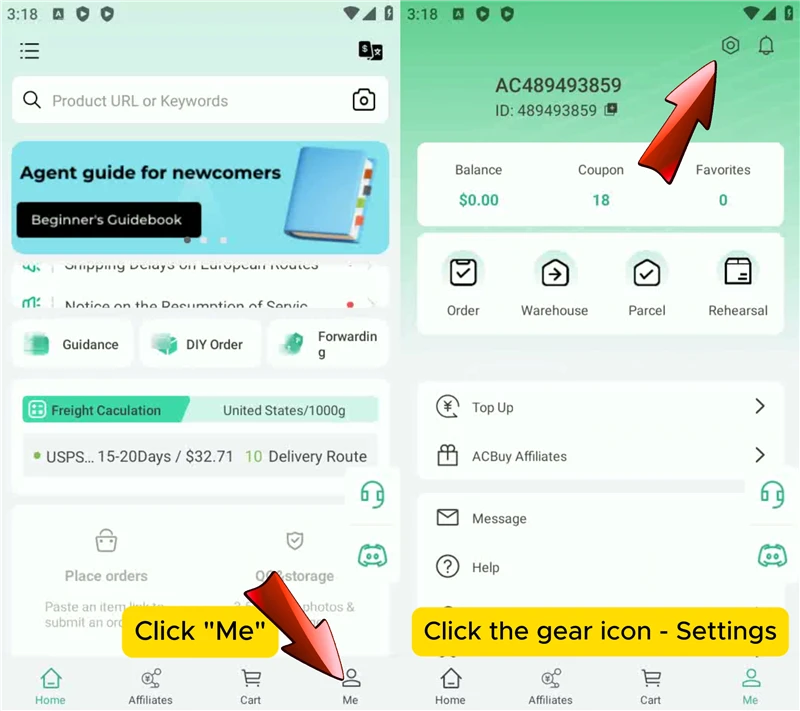
  • Click on the “My” tab.
  • Tap the “Settings” icon to enter the submenu.
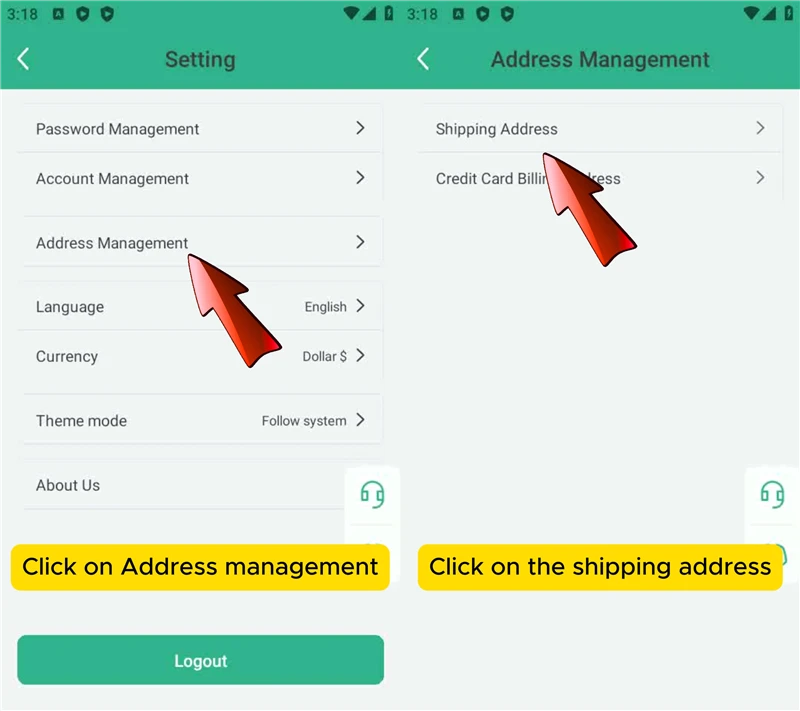
  • In the submenu, select “Address Management” and then “Shipping Address.”
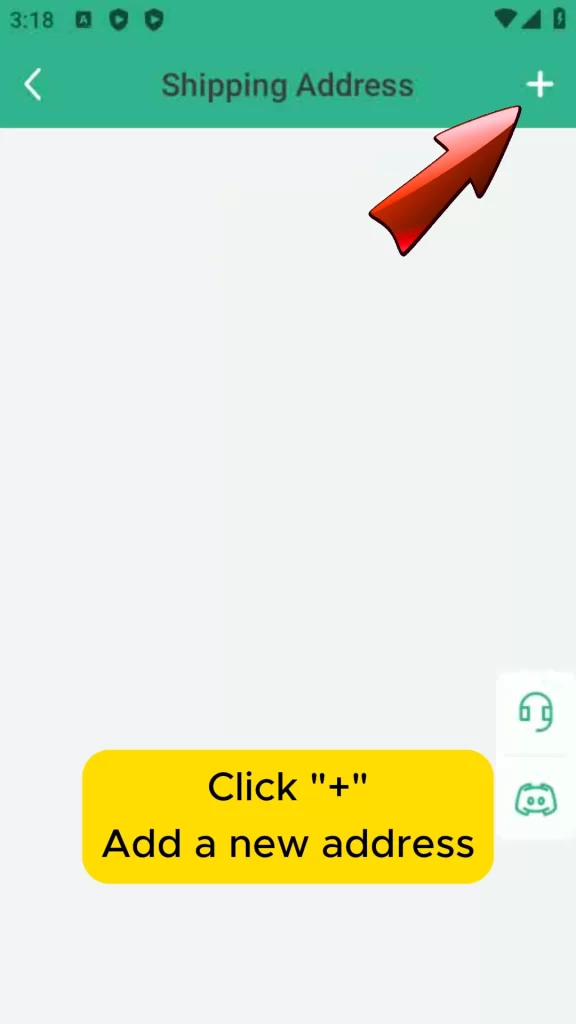
  • Click the “+” icon in the top right corner to add a new address.

Step 5: Register for a GoNest Account to Get Your Warehouse Address

To receive your unique GoNest warehouse address, you’ll need to create an account on the GoNest website. Each user is assigned a distinct address, which can only be obtained through registration.[1] Once registered, you will find your personalized address on your dashboard.[1]

Step 6: Enter the GoNest Address into ACBuy

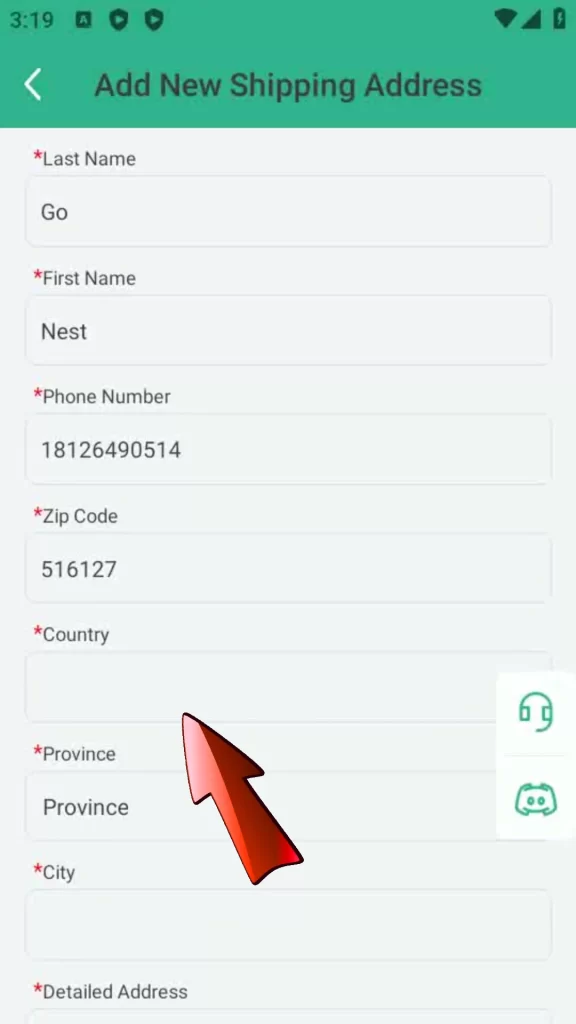
Return to the ACBuy app and fill in the address fields with the following information:

  • Last Name: Go
  • First Name: nest
  • Phone Number: 18126490514
  • Zip Code: 516127

The initial fields should look like this:

Next, complete the remaining address details:

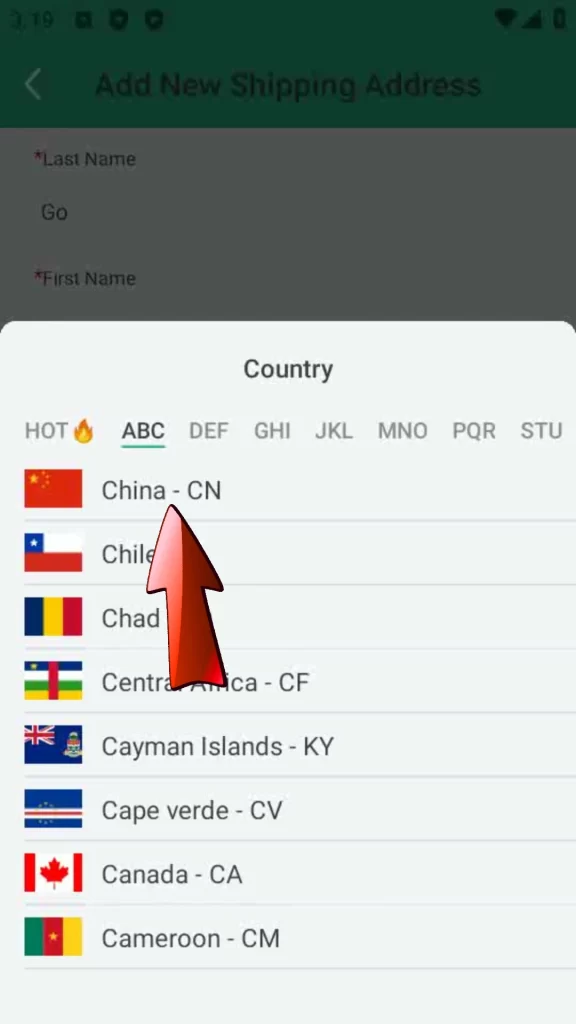
  • Country: China
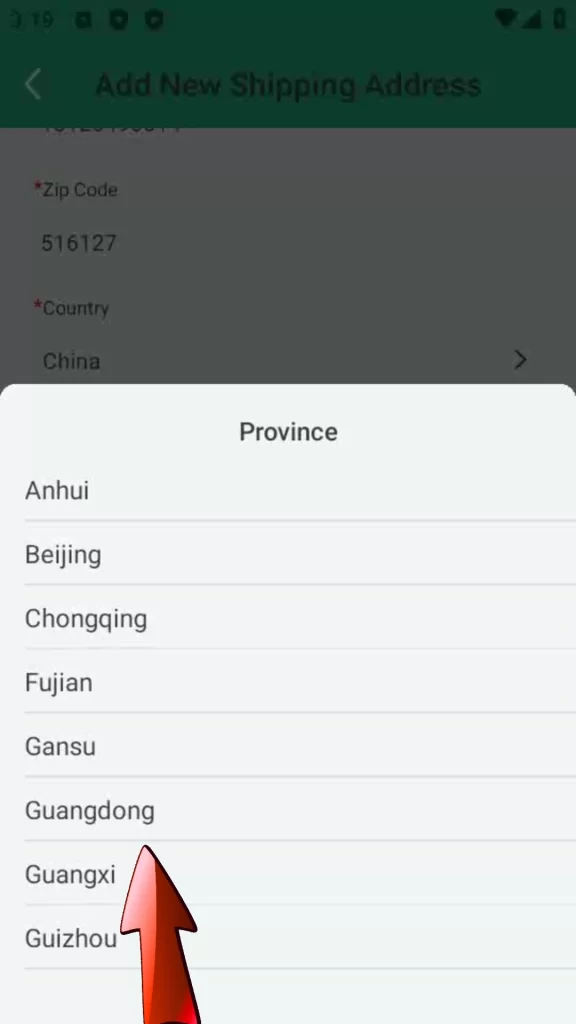
  • Province: Guangdong
  • City: 惠州市

Finally, copy the detailed address line from your GoNest account and paste it into the corresponding field in the ACBuy app.

Here is how the completed address form should appear:

Shopping and Shipping to GoNest

You can now shop on ACBuy. Once your packages have arrived at the ACBuy warehouse, you can submit a request to have them all consolidated and forwarded to your GoNest warehouse. Simply select the packages you wish to ship on the submission page, choose the GoNest address you just added, and submit them for packing and transportation.

Frequently Asked Questions

How do you identify my packages when they arrive at the GoNest warehouse?

Your unique GoNest address includes a user identification number (UID) in the format of 123-456-78. This UID allows us to correctly assign the packages to your account. It is essential that this number is included in the shipping address you provide on ACBuy.

Do I need to pay for shipping on ACBuy? How much will it cost?

Yes, you will need to pay a domestic shipping fee to forward your parcels from the ACBuy warehouse to ours. This fee is charged by ACBuy, not by GoNest.

Based on our experience, this domestic shipping fee typically ranges from ¥10 to ¥100. The exact amount will depend on the rates charged by ACBuy.

Can I use GoNest’s services without shopping through ACBuy?

Absolutely! You can use GoNest’s services directly. We offer a purchasing service where you can buy items and use our shipping services all in one place.

Furthermore, we support direct shopping from major Chinese platforms like Weidian, Taobao, 1688, and Pinduoduo. Simply use your GoNest warehouse address as the shipping destination when you place orders on these sites, and all your packages will be delivered directly to us.

CNFans and GoNest: How to Shop and Ship

GoNest accepts parcels from CNFans. We welcome packages from any third-party warehouse, including CNFans, ACBuy, DHgate, Joyagoo, and others. As long as you can set our warehouse address as the destination on these agent platforms, you can shop through them and use GoNest to ship the items to your country.

How to Connect CNFans with GoNest

We have created a step-by-step video tutorial to guide you through the process. If you already have a GoNest account, you can skip the registration section and start from the address setup instructions.

How to Add the GoNest Warehouse Address on CNFans

For those who prefer a text-based guide, we have also created a streamlined version of the tutorial. This guide is designed for users who already have a CNFans account and will skip the registration process.

If you do not have an account and need help with registration, please refer to the video tutorial for detailed instructions.

Step 1: Register for a GoNest Account

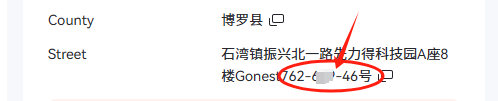
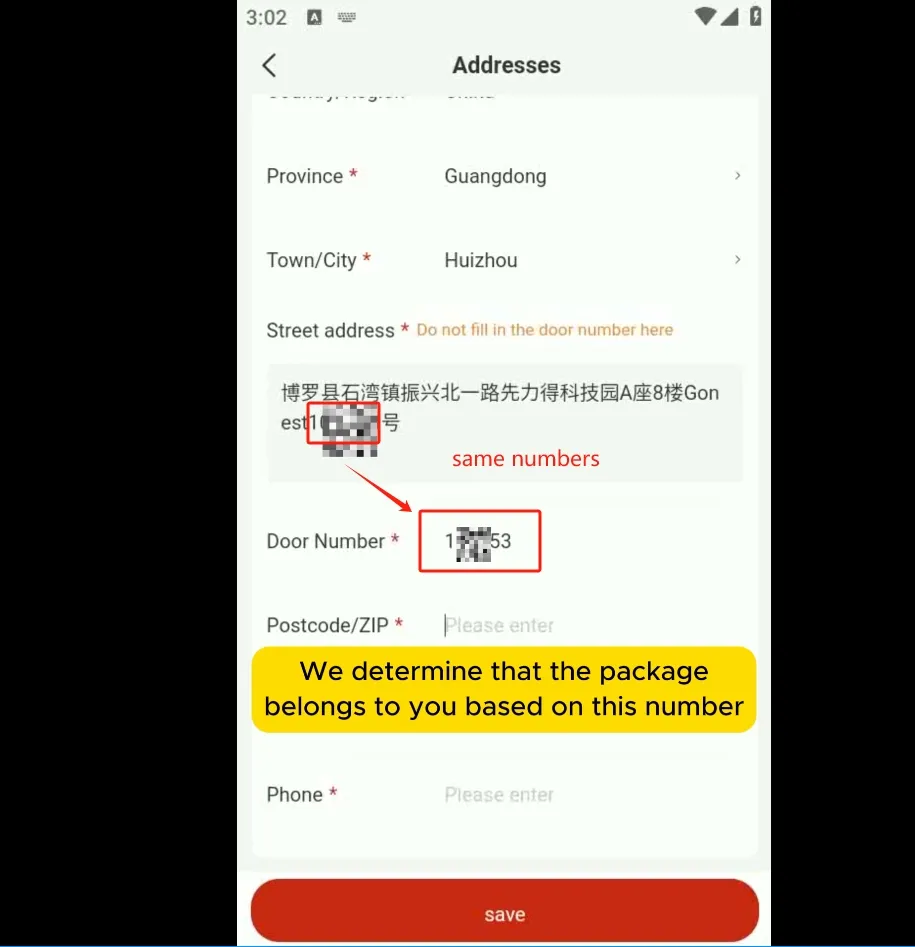
You will need to create a GoNest account to be assigned your unique warehouse address. This address contains your user information, which will appear as an eight-digit number in the format 123-456-78. This number serves as your suite or apartment number and is the primary identifier we use to recognize your parcels.

Step 2: Add a New Address on CNFans

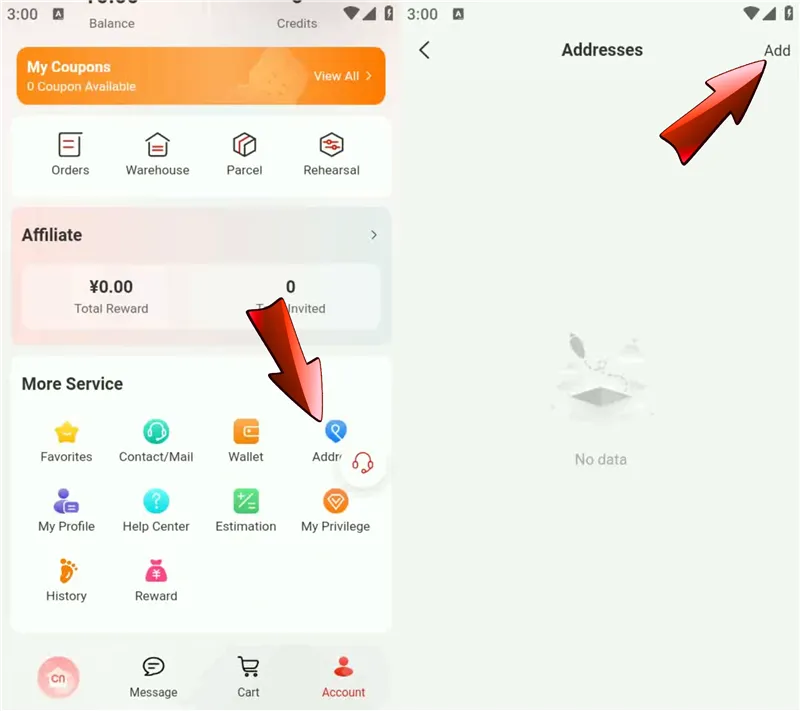
Follow the steps below to navigate to the “Add Address” function on CNFans:

Add a New Address on CNFans

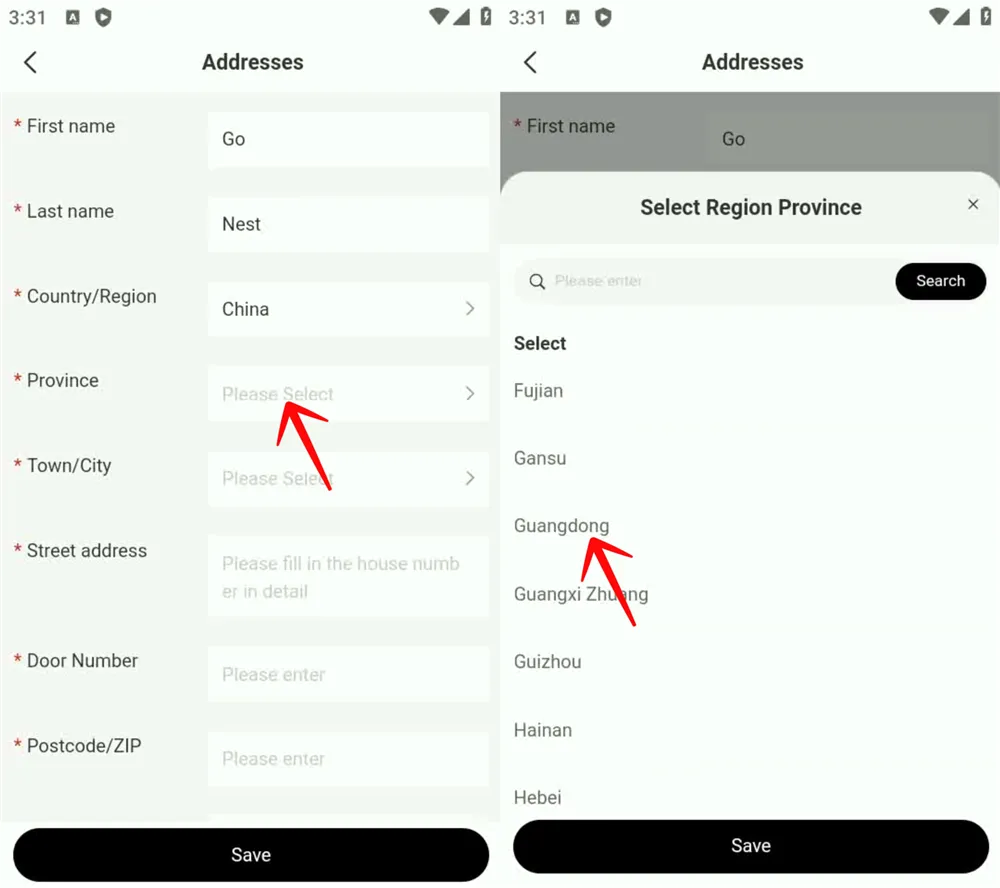
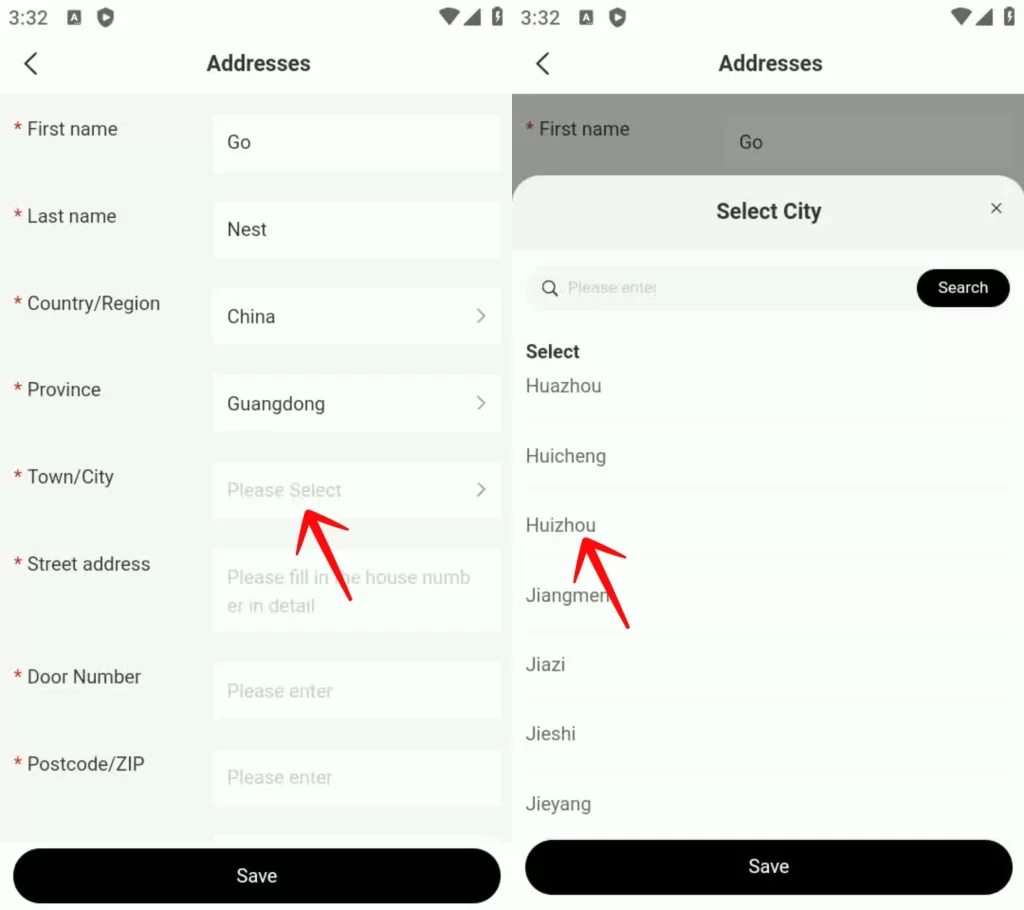
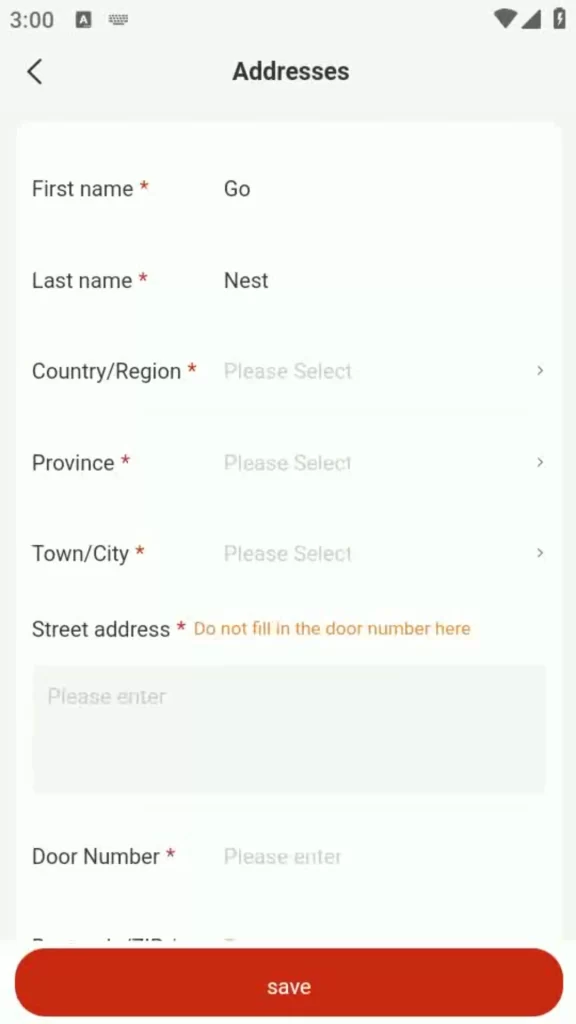
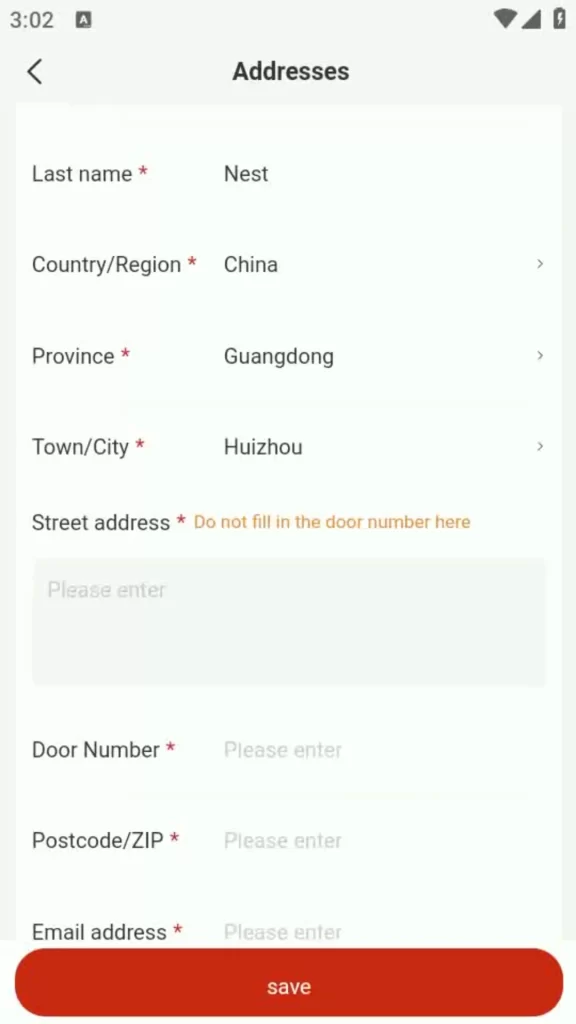
On the address entry page, please input the following information:

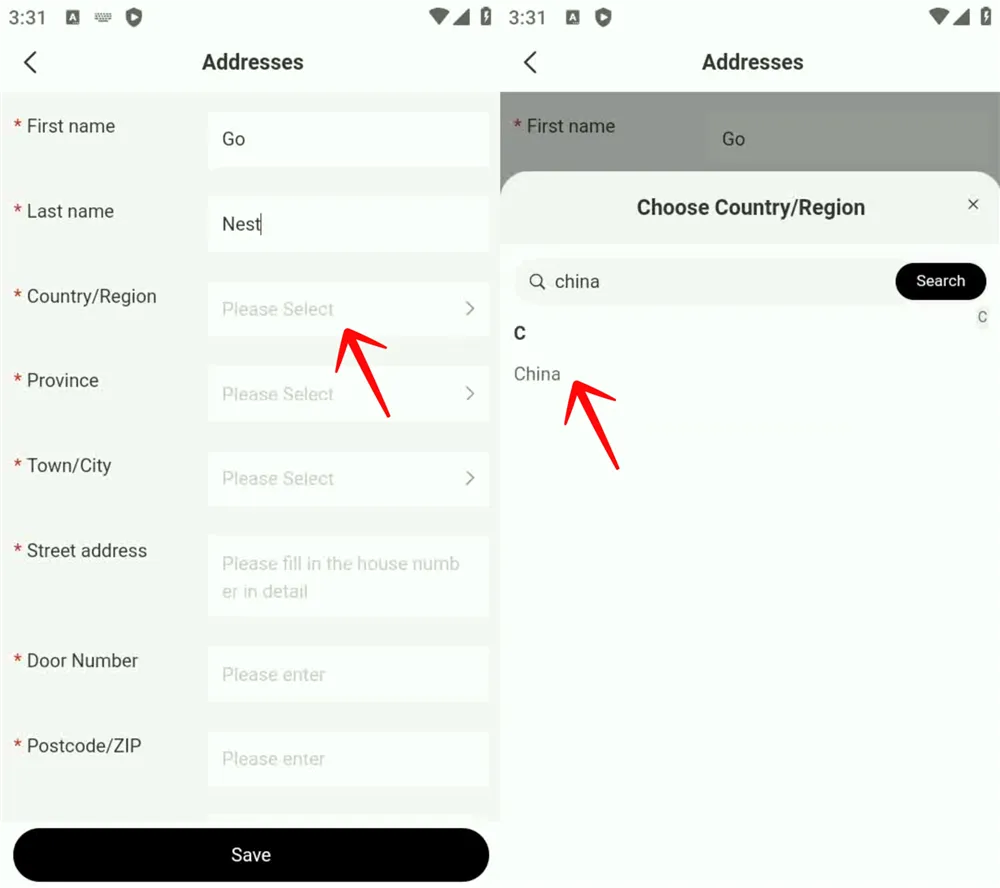
  • First Name: Go
  • Last Name: Nest
  • Country/Region: Select “China”
  • Province: Select “Guangdong”
  • Town/City: Select “Huizhou”

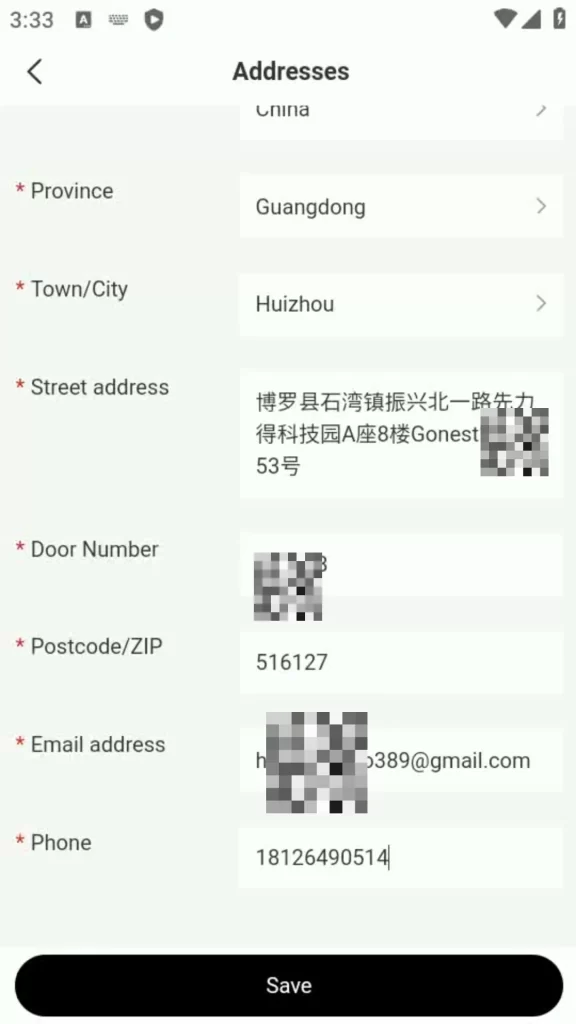
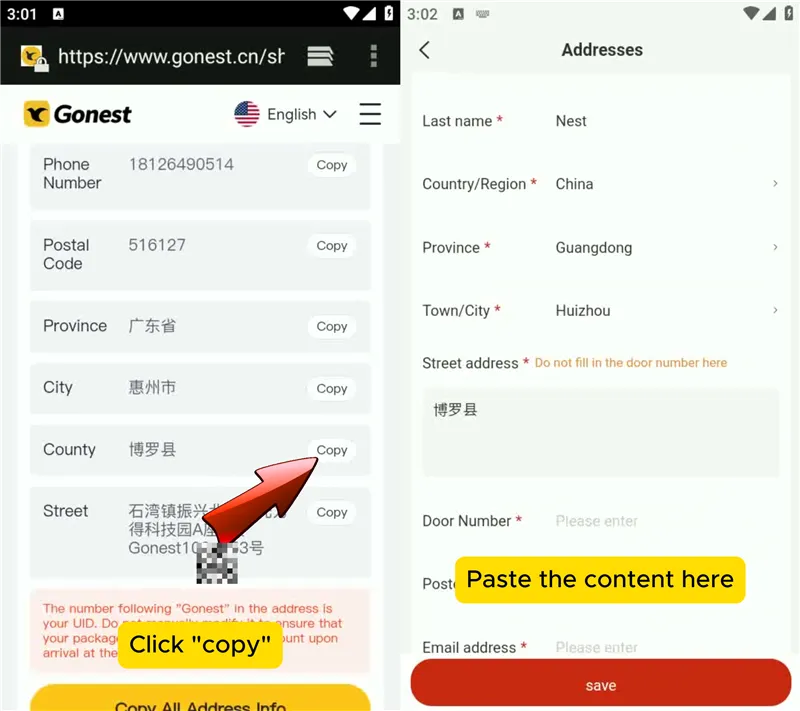
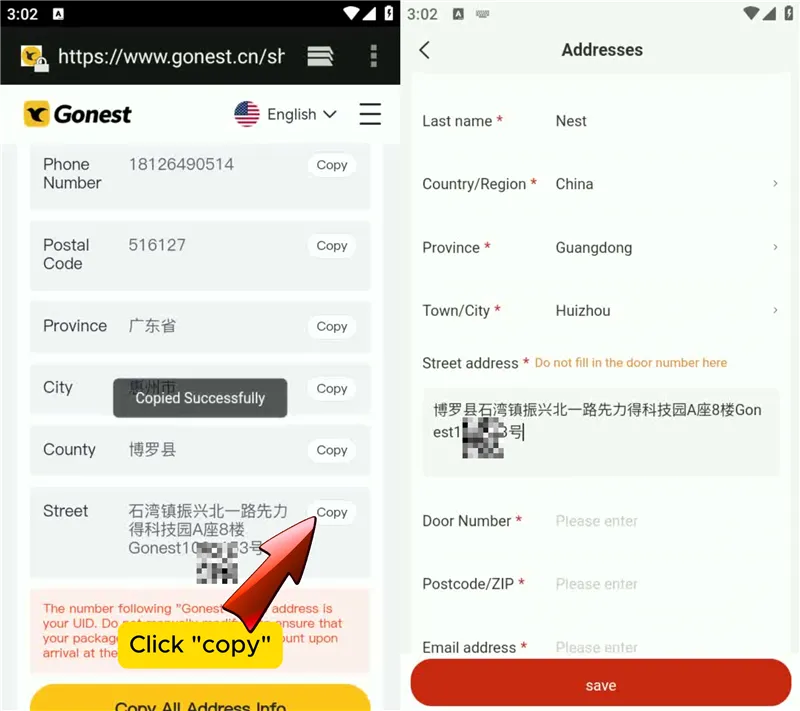
Next, you will fill in the street address. Return to your GoNest warehouse address page and copy the required information into the input fields as shown below:

Step 1:

Step 2:

Now, enter your unique eight-digit suite number that we mentioned earlier. This number should be entered into the apartment or suite number field.

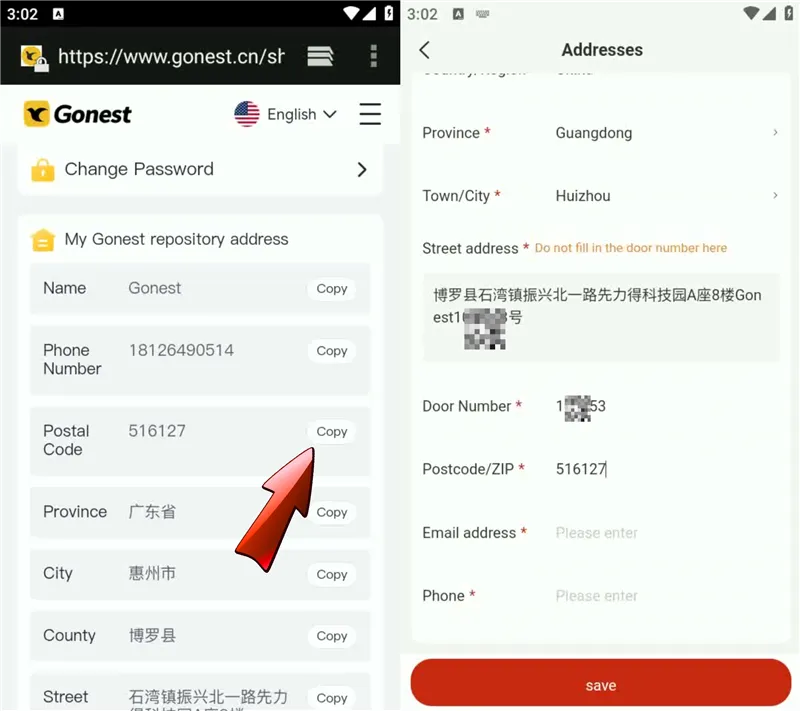
Postal Code:

Email Address: Please use your own email address.

Phone Number: Please enter the phone number as instructed below:

Finally, save this address and set it as your default shipping address on CNFans.

If you encounter any issues regarding the use of CNFans and GoNest, please contact us. Our customer service team will help you solve the problem.

GET IN TOUCH

Let us Send You a Quote

How to Ship Your Purchased Items to GoNest

You can shop on CNFans as you normally would. Once your items arrive at the CNFans warehouse, you will need to submit them for packing. When prompted, select the GoNest warehouse address you just added as the final shipping destination.

This will ensure that all parcels shipped from CNFans are sent directly to your GoNest warehouse address.

Do I need to pay for shipping on CNFans? How much will it cost?

Yes, you will need to pay a domestic shipping fee to forward your parcels from the CNFans warehouse to ours. This fee is charged by CNFans, not by GoNest.

Based on our experience, this domestic shipping fee typically ranges from ¥10 to ¥100. The exact amount will depend on the rates charged by CNFans.

Can I use GoNest’s services without shopping through CNFans?

Absolutely! You can use GoNest’s services directly. We offer a purchasing service where you can buy items and use our shipping services all in one place.

Furthermore, we support direct shopping from major Chinese platforms like Weidian, Taobao, 1688, and Pinduoduo. Simply use your GoNest warehouse address as the shipping destination when you place orders on these sites, and all your packages will be delivered directly to us.

Inside Nike’s China Warehouse: What You Should Know

Introduction to Nike’s Operations in China

Nike is one of the most recognized sportswear brands in the world, and its presence in China is both vast and strategically vital. While many consumers are familiar with Nike’s sleek retail stores or popular sneaker releases, fewer know about the logistical backbone that makes this possible — the Nike warehouse in China.

These facilities are crucial nodes in Nike’s global supply chain, ensuring that products reach both domestic and international markets efficiently. In recent years, China has become more than just a manufacturing hub for Nike; it’s also a fast-growing consumer market.

Nike’s Global Supply Chain and China’s Role

Nike operates one of the most sophisticated supply chains in the global apparel and footwear industry. While its headquarters is based in Beaverton, Oregon, Nike’s production and distribution span multiple continents — and China plays a pivotal role.

How China Fits into Nike’s Manufacturing Strategy

  • Skilled manufacturing labor
  • Advanced logistics networks
  • Proximity to raw material suppliers
  • Access to Asia-Pacific markets

GET IN TOUCH

Let us Send You a Quote

Nike Factory in China Location: Key Hubs and Cities

While Nike doesn’t disclose all its facility locations for security reasons, several Chinese cities are known for Nike operations:

  • Dongguan (Guangdong Province) – Footwear production
  • Quanzhou (Fujian Province) – Sports apparel manufacturing
  • Jiangsu Province – Warehouse and logistics centers
  • Shanghai – Regional HQ and distribution hub

Inside a Nike Warehouse in China

Nike’s warehouses in China are highly automated distribution centers that move thousands of products daily. They are designed for maximum efficiency — far beyond simple storage.

Layout and Design

  • Inbound docks for receiving goods from factories
  • Automated sorting systems
  • High-density storage racks
  • Outbound areas for packing and shipping

Technology and Automation

RFID tracking, AI-driven inventory management, and automated conveyors help ensure timely and accurate product delivery.

Quality Control

Before leaving the warehouse, every product undergoes rigorous quality checks to guarantee authenticity and performance.

Nike Factory in China: Production Insights

China’s Nike factories are some of the most productive in the company’s global network, blending traditional expertise with high-tech innovation.

Footwear vs Apparel Manufacturing

  • Footwear: Precision stitching, sole molding, assembly.
  • Apparel: Sportswear, jackets, and performance gear.

Sustainability Efforts

  • Use of recycled polyester
  • Water-saving dyeing processes
  • Energy-efficient machinery

Nike’s Move to Zero initiative is actively applied in its Chinese operations.

Nike Wholesale Distributors in China

Nike uses a broad wholesale network to reach smaller retailers and online platforms.

How Wholesale Works

  • Distributors buy in bulk from Nike warehouses.
  • They resell to sports stores, e-commerce platforms, and independent sneaker shops.

Partnerships with Retailers

Nike partners with platforms like JD.com and Tmall to deliver exclusive drops and nationwide reach.

Nike China Store and Retail Network

Flagship vs Outlet Stores

  • Flagship: Located in top cities, offering the newest releases and custom experiences.
  • Outlet: Sell past-season gear at discounts, usually sourced directly from Nike warehouses.

The Rise of E-Commerce

During events like Double 11 (Singles’ Day), Nike’s online sales soar, with products shipped directly from regional warehouses.

Are Nikes Made in China Real?

Yes — if you buy from authorized retailers or online stores. Nike products made in China are authentic and high quality.

How to Identify Real Nike Products

  • Check stitching and materials
  • Look for clean, clear logos
  • Match the SKU number on the box and tag

Red Flags for Fakes

  • Sloppy glue marks or poor stitching
  • Misspelled labels or distorted logos
  • Unrealistically low prices from unverified sources

Where Are Nike Factories Located Globally?

  • China: Advanced infrastructure and logistics
  • Vietnam: Now Nike’s largest footwear producer
  • Indonesia: Strong in apparel production
  • Thailand & Cambodia: Smaller-scale footwear operations

Diversification Strategy

Nike is expanding production across Southeast Asia to reduce costs and navigate global trade tensions, while still keeping China as a key player.

Economic and Social Impact in China

Job Creation and Skills

Nike warehouses employ thousands in China, offering training in logistics, automation, and quality control.

Community Engagement

  • Sponsorship of local sports programs
  • Donations to schools and charities
  • Partnerships with NGOs on environmental projects

Challenges and Controversies

Labor Practices

Nike has faced scrutiny over working conditions in some factories. The company now encourages third-party audits and increased transparency.

Trade Policy Issues

US-China tensions have impacted production costs, prompting Nike to expand in other regions while maintaining Chinese operations.

Future Outlook

Trends to Watch

  • AI-driven demand forecasting
  • Expansion of automated warehouses
  • Increased use of sustainable materials

Long-Term Strategy

While Nike continues to diversify manufacturing, China’s warehouses will remain central to its Asia-Pacific logistics network.

Conclusion

The Nike warehouse in China is more than just a storage center — it’s a high-tech logistics powerhouse that keeps the brand globally competitive. Whether buying from a Nike China Store or through wholesale and e-commerce channels, it’s the strength of this infrastructure that ensures you get your gear on time.

FAQs

Are Nikes from China cheaper?
Sometimes. Prices may be lower due to local promotions and reduced shipping costs.
Does Nike still manufacture in China?
Yes, though production has expanded to Vietnam and other countries as well.
How do I verify my Nike sneakers are authentic?
Buy only from official retailers, check SKU numbers, and inspect the quality.
Which cities in China have Nike factories?
Dongguan, Quanzhou, Jiangsu, and Shanghai are key hubs.
Is Nike planning to leave China?
No, but it is diversifying production across Asia.
How long does shipping from a Nike China warehouse take?
1–3 days for domestic orders; international delivery depends on location.

Where Is the Nike Warehouse Located in China?

For sneakerheads and bargain hunters worldwide, it’s a modern-day treasure hunt. The dream is to find the source: a massive Nike warehouse in China where you can buy authentic gear for a fraction of the retail price. The logic seems simple—buy direct from where the action is and cut out the middleman.

But what if the map everyone is using leads to a place that doesn’t operate the way you think it does?

The quest to find a public-facing Nike warehouse for direct purchases is one of the biggest myths in global shopping. The reality is far more complex, but the goal of securing authentic Nike products at a better price from China is absolutely achievable. You just need to know the right way to do it.

The Myth of the Public Nike Warehouse

Let’s address the core question first. When people search for a “Nike warehouse,” they’re usually picturing a giant outlet store where they can buy last season’s stock for cheap. This does not exist in China.

Instead, Nike operates a state-of-the-art logistics network. The heart of its operation is the Nike China Logistics Center (CLC) located in Taicang, Jiangsu province. This facility is a technological marvel, spanning over 200,000 square meters. However, its purpose is critical to understand:

  • It’s a Distribution Center, not a retail store.
  • It serves Nike’s vast network of thousands of authorized retail stores across Greater China.
  • It handles logistics for Nike China online shopping platforms, like its official app and Tmall store.
  • It is a secure, closed-loop facility that is not open to the public for direct sales.

So, while Nike certainly has massive warehouses in China, you cannot walk in and buy a pair of sneakers. Trying to find a “Nike warehouse in China price” at the source is impossible because they don’t sell to individuals there.

Frequently Asked Questions (FAQ)

  • Q: Where are Nike factories in China?

    A: This is another common misconception. Nike itself owns very few factories. Instead, it contracts production to massive, independent manufacturers. Major partners like the Yue Yuen Industrial Holdings and Pou Chen Group operate sprawling factory complexes in China and other parts of Asia. These factories produce goods for Nike (and other brands) but are not owned by Nike and do not sell directly to the public.
  • Q: Does Nike have warehouses?

    A: Yes, absolutely. As mentioned, the China Logistics Center in Taicang is one of the largest and most advanced in the world. Nike operates these massive distribution warehouses in key regions globally to manage its supply chain efficiently. Their function is purely logistical—to store products and distribute them to retailers and online customers—not to act as a public marketplace.

The Real Way to Score Nike Deals in China

If you can’t buy from a warehouse or a factory, how do you access the great prices and exclusive releases available in the Chinese market? The answer lies in mastering Nike China online shopping.

The Chinese market is hyper-competitive, leading to frequent and aggressive Nike China sales events with discounts you won’t find elsewhere. Here’s where to look:

  • The Official Nike Tmall Flagship Store: This is Nike’s primary online storefront in China, hosted on Alibaba’s Tmall platform. It carries the widest selection and is the epicenter of major sales.
  • The Nike App (China Region): The Chinese version of the Nike App often has exclusive releases (like region-specific drops) and member-only promotions.
  • Authorized Retailers on JD.com & Tmall: Major authorized sportswear retailers also run their own flagship stores on these platforms, often competing on price.

The key is to shop during major sales events like Singles’ Day (11.11) and the 618 Shopping Festival. During these periods, you can find authentic Nike gear for prices that feel like “warehouse prices.”

The Final Hurdle: Getting Your Nike Gear Shipped Globally

You’ve navigated Tmall, found the perfect Air Jordans on sale, and you’re ready to check out. But you hit a brick wall: the seller only ships to addresses in mainland China.

This is the exact problem GoNest was created to solve.

GoNest is a freight forwarding and consolidation service that acts as your personal logistics partner in China. It breaks down the final barrier for international shoppers by providing you with your own Chinese warehouse address.

GET IN TOUCH

Let us Send You a Quote

Here’s how it works:

  • Shop Like a Local: You can buy from the Nike Tmall store or any other Chinese platform and use your personal GoNest warehouse address at checkout.
  • Consolidate and Save Big: Did you buy shoes from Nike, a shirt from another store, and some accessories from a third? Ship them all to your GoNest address. They will hold your packages and combine them into a single, efficient international shipment, drastically cutting down on your shipping costs.
  • Expert and Secure Handling: GoNest manages the entire process—from receiving your parcels to preparing customs documentation and providing door-to-door tracking.

The GoNest Workflow: From Taobao to Your Doorstep

  • Step 1: Get Your GoNest Address: Sign up with GoNest to receive your dedicated Chinese warehouse address and unique customer ID.
  • Step 2: Find Your Deals: Go to the Nike Tmall store or the Nike App during a major sale.
  • Step 3: Checkout with Your GoNest Address: When you’re ready to pay, enter your GoNest address as the “ship to” location.
  • Step 4: Consolidate and Ship Home: Once your items arrive at the GoNest warehouse, log into your GoNest account, select the items you want to ship, and have them sent to your home country in one consolidated package.

Final Thoughts

The hunt for a secret Nike warehouse in China may be a myth, but the opportunity to access incredible deals on authentic products is very real. The modern, savvy shopper understands that the treasure isn’t a physical location, but a smart process.

By pairing the vast marketplace of Nike China online shopping with the powerful logistics solution of GoNest, you can bypass the limitations of geography. You get access to better prices, exclusive releases, and the full breadth of products available in the Chinese market, all delivered securely and affordably to your doorstep. The ultimate prize isn’t finding a warehouse—it’s building your own personal supply chain.

How to Use a CNFans Accessories Spreadsheet to Track Orders

Introduction to CNFans Accessories Spreadsheets

In today’s competitive e-commerce environment, keeping your orders organized is essential. A CNFans accessories spreadsheet offers a simple yet powerful way to track every order, from initial sale to final delivery. Whether you sell phone cases, chargers, or jewelry, a well-designed spreadsheet helps maintain order accuracy and customer satisfaction.

GET IN TOUCH

Let us Send You a Quote

Why Order Tracking Matters for Sellers

Every missed order or shipping delay risks losing a customer. Order tracking ensures that nothing slips through the cracks, reducing disputes and returns.

Overview of CNFans Spreadsheet Capabilities

The best CNFans spreadsheet isn’t just for inventory; it’s a full-scale management tool. It can track order numbers, customer details, payment status, shipping progress, and even product variations.

Benefits of Using the Best CNFans Spreadsheet for Order Tracking

  • Centralized Data Management — All order information is stored in one place, eliminating the need to juggle multiple files or notes.
  • Accuracy in Order Fulfillment — With clear records, sellers can double-check items before shipping, reducing errors.
  • Improved Customer Satisfaction — Quickly resolving order inquiries builds trust and increases repeat purchases.
  • Time Efficiency and Reduced Errors — Automated calculations and dropdown menus speed up data entry, minimizing mistakes.

Key Features of the CNFans Accessories Spreadsheet

  • Pre-Configured Order Tracking Columns — order ID, customer name, product type, quantity, status, and tracking number.
  • Inventory Auto-Updates — stock levels adjust automatically when you mark an order as shipped.
  • Integration with CNFans Seller Tools — linking saves hours of manual entry.

Step-by-Step Guide: Using a CNFans Accessories Spreadsheet to Track Orders

  1. Setting Up Your Spreadsheet — Download the latest CNFans template and customize columns to fit your product range.
  2. Inputting Order Data — Enter details as soon as orders come in to keep records up to date.
  3. Updating Inventory Automatically — Use formulas or integrations to adjust stock when an order is confirmed.
  4. Monitoring Delivery and Returns — Add a delivery status column and mark items as delivered, pending, or returned.
  5. Generating Sales Reports — Use built-in filters to generate monthly or quarterly summaries.

How to Adapt the CNFans Spreadsheet for Jewelry and Specialty Products

Using a CNFans Jewelry Spreadsheet for Custom Orders

Jewelry orders often require more detailed tracking than standard accessories. Sellers can add columns for personalization details such as engraving text, gift wrapping, or special delivery instructions to ensure each order is processed as expected.

Tracking Size, Color, and Material Variants

Jewelry often comes in multiple sizes, colors, or materials. Adding variant-specific columns like “Ring Size” or “Metal Type” ensures correct fulfillment and reduces returns.

Advanced Tips for Maximizing the Best CNFans Spreadsheet

  • Using Conditional Formatting for Order Status — Green for completed deliveries, yellow for pending orders, red for delayed shipments.
  • Automating Order Number Generation — Automatically assign unique order IDs to avoid duplicates.
  • Linking to Customer Databases — Auto-fill customer details by linking to a separate customer list.

Common Mistakes to Avoid When Tracking Orders

  • Skipping Regular Updates — daily updates keep data accurate.
  • Forgetting Backup and Version Control — store in cloud and enable version history.
  • Overcomplicating the Spreadsheet Design — keep it simple and functional.

FAQs About CNFans Accessories Spreadsheets for Order Tracking

  • Q1: Is the CNFans Accessories Spreadsheet Free? — Yes, with optional premium upgrades.
  • Q2: Can It Be Used Without a CNFans Seller Account? — Yes, but no live data integration.
  • Q3: Is It Compatible with Google Sheets? — Yes.
  • Q4: Can It Handle Bulk Orders? — Yes, scalable for large volumes.
  • Q5: How Often Should I Update It? — Daily for active sellers.
  • Q6: Does It Work for Jewelry and Custom Items? — Yes, designed for variations and personalization.

Conclusion: Why Every Seller Should Use a CNFans Accessories Spreadsheet for Order Tracking

Order tracking isn’t just about recording sales — it’s about building trust and staying in control. The CNFans accessories spreadsheet is customizable, efficient, and integrates with CNFans tools to manage the full order process. Whether selling tech accessories, fashion, or jewelry, it’s adaptable to your needs and helps ensure timely, accurate deliveries.