If you’re planning to purchase items from Taobao, Weidian, or 1688 via an agent, you’ve likely asked: “Is Cnfans legit?” The short answer is yes — but it’s important to understand both the strong points and typical issues that real buyers have encountered.
What Is Cnfans?
Cnfans is a Chinese shopping agent that helps international users buy items from domestic platforms by:
Ordering and consolidating purchases
Providing translated listings and QC photos
Handling domestic shipping and final delivery
Supporting buyers in over 100 countries
Think of it as your personal purchasing assistant for China-based goods.
Is Cnfans Legit? Pros from Real Buyers
Verified deliveries worldwide — users across Reddit and Discord confirm receiving their packages.
QC photos catch issues early — buyers say they’ve successfully rejected flawed goods before shipment.
Smooth payment protection — payments are processed via trusted providers like Stripe or Wise.
“It saved me from shipping a flawed pair. QC tool is clean.” — Kiplo on Discord
Common Complaints: What Could Go Wrong
Slow customer support — email-based responses often take several days.
QC limitations — sometimes photos don’t show all defects.
Hidden fees — shipping surcharges or repackaging costs can catch buyers off-guard.
These aren’t red flags, but they do require awareness.
Real Buyer Feedback on Cnfans
“I’ve used Cnfans 15 times… shipping takes longer than Superbuy, but always received my stuff.”
“They refunded me when the QC photos showed damage.”
These quotes reflect buyer trust—with a caveat regarding speed.
How Cnfans Compares to Other Agents
Feature
Cnfans
Superbuy
Wegobuy
QC photos
✔️ Yes
✔️ Yes
✔️ Yes
Fee transparency
✔️ Low
⚠️ Higher
⚠️ Medium
Live chat support
❌ Limited
✔️ 24/7
✔️ Often available
Dashboard tools
✔️ QC Finder
❌
❌
Including GoNest Reviews in Your Decision
Considering shipping cost and reliability is key. GoNest, a logistics service often paired with buying agents, has strong reviews:
Trustpilot score 4.3/5 from 8 reviewers describing it as fast, reliable, and great customer support
A reviewer shipped items to the UK, praising 5-day delivery and excellent support
GeeseNest analysis: “GoNest is the most reliable for sensitive shipments… free DDP, transparent pricing, consistent delivery.”
Combining Cnfans for purchase and GoNest for shipping gives you a solid experience overall.
Before you click that “Approve QC” button on your latest Cnfans order, you might be wondering — can I really trust what I see in the photos? The Cnfans QC process is designed to protect you from receiving low-quality items. But does it really work? Or is it just a formality?
Let’s break it down.
What Is Cnfans QC and Why Does It Matter?
Cnfans QC (Quality Check) is the final inspection step before your order leaves the warehouse. It gives you:
A set of Cnfans QC photos
Basic item details and sizing
The ability to approve or reject the product
This step is critical. Once you approve, the item gets shipped — and returns become much harder.
What’s Included in a Typical Cnfans QC Check?
Here’s what buyers usually receive:
High-angle photos of your item (top view, side, tag, box, etc.)
Basic item description (color, size, SKU)
Sometimes: measurement snapshots or brief notes if requested
But is it detailed enough? That’s where some controversy begins.
Can You Trust Cnfans QC Photos?
Strengths
Weaknesses
Clear lighting in most cases
Limited number of photos
Multiple angles (usually)
Angles can hide defects
Shows tags, soles, stitching
Some sellers provide misleading reps
Some buyers say the Cnfans QC photos look great — until they receive the item and find flaws that were hidden, cropped, or missed entirely.
What You Can Do:
Zoom in on toe boxes, stitching, logos
Compare with authentic photos
Use Reddit or Discord communities for a second opinion
How Thorough Is the Cnfans QC Process Really?
The harsh truth: Cnfans QC is visual-only.
No functionality tests (e.g., zippers, electronics)
No smell or touch inspection
No try-ons or fitting tests
They won’t notice glue smell, creasing, or minor flaws unless it’s visible in photos. That means you, the buyer, are the final inspector.
Real User Reviews: Praise vs. Complaints
Praise:
“Photos are clear and timely.”
“Saved me from shipping a flawed pair of sneakers.”
“Easy to approve and reject.”
Complaints:
“Approved a shoe with obvious flaws I didn’t notice.”
“Photos were too zoomed-out to inspect quality.”
“Rejected an item, but the replacement was worse.”
You’ll find both positive and negative experiences across Reddit, RepSneakers, and Weidian forums.
Common Issues Buyers Face With Cnfans QC
Stitching defects not shown clearly
Overexposed lighting hides color flaws
Wrong sizing tags missed by inspector
No re-QC after a failed rejection unless you push
It’s rare, but some buyers have had items shipped even after requesting rejection — usually due to system errors or miscommunication.
Can You Request Better QC Checks?
Yes — but it depends on how you ask.
Use the “Reject” button and leave specific instructions
Ask for additional angles or a photo of a specific part
Mention what defect to look for (e.g., glue marks, midsole curve)
However, there’s no guarantee Cnfans will take additional photos unless the issue is obvious.
How Cnfans QC Compares to Other Agent QC Services
Agent
QC Quality
Recheck Policy
Extras
Cnfans
Basic
1 recheck allowed
QC finder tool
Wegobuy
More detailed
Rephotos on request
Better box shots
Superbuy
Consistent
Clear return policies
Measurement photos
Sugargoo
Average
Slower rechecks
Limited QC archive
Who Should Rely on Cnfans QC (and Who Shouldn’t)?
Buyer Type
Recommended?
Why
First-time shopper
Yes
Good for learning what to expect
Sneaker collector
Maybe
Use additional QC tools
Bulk reseller
Caution
Photos may not catch factory defects
Gift buyer
Yes
Simple approval process
Cnfans QC Pros and Cons Summary
Pros
Cons
Fast and easy photo delivery
No physical quality testing
Simple approve/reject system
Limited photo angles
Central QC Finder dashboard
Rare but critical approval errors
Clean interface
No live communication with QC staff
6 Essential Tips to Make the Most of Your Cnfans QC
Join a QC community (Reddit, Discord) for second opinions
Can Cnfans QC guarantee no flaws? No — it’s a visual check only. Some issues are easily missed.
Do they check inside the shoes or clothing? Not usually. Interior defects are often not photographed unless requested.
How long does it take to receive QC photos? Usually 24–72 hours after the seller ships to the warehouse.
Can I reject QC and request another item? Yes, but it depends on item stock and seller return policy.
Do they refund if the item arrives flawed after approval? No. Once approved, it’s your responsibility — so review carefully.
Can I trust the QC team’s judgment? They don’t make recommendations — you must decide based on photos alone.
Final Verdict: Is Cnfans QC Worth Trusting?
Cnfans QC is reliable — within limits. It works best for experienced buyers who know what to look for. The photos are helpful, but the burden is on you to inspect carefully and reject items with visible flaws.
If you’re expecting perfection or a professional-grade inspection, you may be disappointed. But if you treat it as a basic visual filter — it’s a powerful, useful tool that adds control to your buying experience.
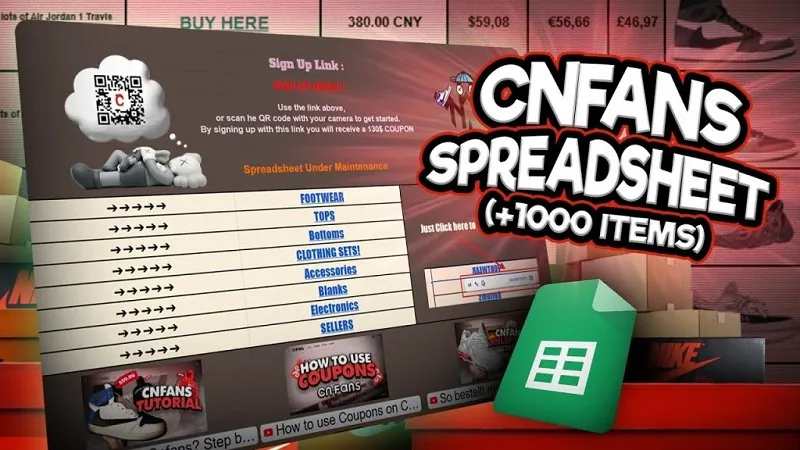
If you’ve been exploring fashion finds and CN-based deals over the past few years, chances are you’ve come across the CNFans Spreadsheet 2025. This isn’t just another rep list—it’s a living, updated resource packed with curated products, trusted sellers (aka “reps”), and community-approved deals. Whether you’re a returning user or a newcomer, the 2025 edition delivers improved usability, niche categories, and verified shopping links.
Why 2025’s Version Matters More Than Ever
More niche categories like golfwear and electronics
Fresh batch of user-vetted reps added monthly
Compatibility with international shipping tools like GoNest
Smarter tagging and product filtering
What Makes This Year’s Spreadsheet Better Than Before?
From clearer formatting to verified reviews and pricing insights, the 2025 version answers the demands of thousands of global users. Curators now separate fashion, gadgets, and cheap essentials into clean, searchable tabs for easier browsing.
Overview of the Top Reps Featured in 2025
The term “Top Reps” refers to the most trusted, high-performing Chinese sellers listed in the spreadsheet. These sellers have been consistently delivering quality replicas or original finds with reliable service and good customer feedback.
Criteria Used to Rank “Top Reps”
Product quality
Accuracy of photos/descriptions
Customer service responsiveness
Speed and reliability of shipping
Consistency over time
Most Trusted CN-Based Sellers According to the Spreadsheet
“Ying’s Closet” – known for premium-grade women’s apparel
“GolfKing88” – specializes in high-quality golfwear reps
“Shenzhen GearStore” – electronics and gadgets with verified reviews
“HoodieHeavenCN” – top-selling CNFans rep for casual streetwear
Highlighted New Entries Added in Mid-2025 Update
“NeoVibe Gadgets” – minimalist lifestyle tech
“RepliLuxe Store” – upscale but affordable accessory line
“K-Replica House” – idol-inspired clothing at mid-tier pricing
Safety and Authenticity Checks for 2025 CNFans Entries
How to Verify Product Links and Rep Quality
Double-check seller ratings on Weidian or Taobao
Use Xiaohongshu or RED to verify real photos
Watch user review videos linked in the spreadsheet (often under “Notes”)
Spotting Scams, Broken Links, or Outdated Entries
Avoid listings with dead links or missing prices
If it seems too good to be true, it probably is
Report broken entries to spreadsheet curators when possible
User Feedback and Community Votes on Top Reps
What Reddit, Discord, and TikTok Users Are Saying
Redditors praise the electronics section for desk gadgets
Discord channels frequently pin the “cheap finds” tab
TikTok creators link to their favorite reps in bio
Creator Endorsements That Boost Trust and Reach
Creators often spotlight items in hauls or OOTD videos. These usually include spreadsheet links in comments or bio linktrees.
What’s New in the Mid-2025 Spreadsheet Update
New Categories Added
Lifestyle gadgets
School supplies
K-pop inspired fan gear
Anime figure reps
Dropped Reps and Why They Were Removed
Reps with repeated complaints (e.g., poor QC, late shipping)
Sellers that went offline or changed names without notice
Comparison with Similar Tools and Directories
Feature
CNFans Spreadsheet
Linktree
Weidian Guides
Focus
Curated product links
Creator links only
Shopping tutorials
Interactivity
Filterable, search-enabled
Basic
Moderate
Best For
Shoppers & fans
Influencers
DIY resellers
What Makes CNFans Spreadsheet Stand Out in 2025
Its community-driven curation, weekly updates, and product-level insights make it irreplaceable for niche fashion and electronics shoppers.
FAQs About CNFans Spreadsheet 2025
How often is it updated? Weekly, with major overhauls every quarter.
Are “top reps” verified? Yes, based on reviews, curator checks, and user feedback.
Can I suggest new sellers to be added? Some versions have submission forms—check the first tab for instructions.
What to do if a link is broken? Report using the form or note on the spreadsheet, or contact curators via Discord.
Is GoNest the only forwarding option for CNFans users? No, but it’s one of the most reliable for global forwarding. Alternatives include Superbuy, CSSBuy.
Are golf/electronics reps safe to order from? Generally yes—just double-check seller reputation and product reviews.
Conclusion: Should You Still Use the CNFans Spreadsheet in 2025?
Without a doubt, yes. With updated rep lists, niche categories like golfwear and gadgets, and a smooth shipping method like GoNest, the CNFans Spreadsheet 2025 remains a top-tier resource. Whether you’re hunting cheap fashion, viral gadgets, or premium reps, it’s your ultimate CN shopping roadmap.
Whether you’re an international student waiting for a care package, a shopper ordering from a U.S. retailer, or a global seller tracking your delivery — understanding how FedEx tracking works internationally can help you avoid delays and reduce stress.
This guide explains how to use FedEx Tracking, track by phone number or address (if possible), and resolve common issues with international deliveries.
Why FedEx Tracking Is Crucial for International Deliveries
International shipments involve more steps and more risk. That’s why tracking is critical, especially for:
Why hasn’t my international FedEx package updated in 3 days?
It could still be in transit, or awaiting a customs scan. Use Delivery Manager or call support if it persists.
Can I track FedEx by my phone number?
Not directly. FedEx requires a tracking number, but support may assist with additional info.
Does FedEx provide tracking for all international services?
Yes, all standard international services offer full tracking visibility.
What does “Clearance Delay” mean?
Your parcel is held at customs. FedEx or customs may require payment or documents.
Can FedEx deliver to remote addresses abroad?
Yes, but it may take longer. Remote areas may require additional delivery time.
Is FedEx faster than regular postal services internationally?
In most cases, yes. FedEx offers faster customs clearance and door-to-door tracking.
Conclusion: Master International FedEx Tracking with Confidence
FedEx offers powerful tools to track your international shipment — from door to customs to delivery. Whether you’re a shopper, seller, or student abroad, understanding FedEx tracking, using the FedEx tracking phone number, and exploring options like FedEx tracking by address (via Delivery Manager) puts you in full control of your package journey.
If you’ve placed an order through Cnfans and received your first QC report, you might be asking — what does this all mean? Whether you’re buying sneakers, clothing, or accessories, understanding how to interpret your Cnfans QC is crucial to ensure you’re happy with your purchase before it ships.
This beginner-friendly guide will walk you through Cnfans QC photos, how to use the Cnfans QC Finder, and what to look for when you check your items.
What Is Cnfans QC?
Cnfans QC (Quality Check) is the inspection process that happens after your item arrives at the warehouse but before it’s shipped to you. The goal is to:
Show you real photos of your item
Let you approve or reject it
Catch any visible defects before it’s too late
This process adds transparency and control, especially when ordering replicas or high-value items.
When and Why You Receive a Cnfans QC Report
You’ll typically receive your QC report:
24–72 hours after the seller delivers to Cnfans
Once the warehouse team has had time to inspect and upload photos
Before shipping or consolidation
You need to approve the QC before your parcel can move forward.
What’s Inside a Typical Cnfans QC Report
A standard QC report includes:
Cnfans QC Photos: Multiple angles of the item
Inspector Comments: Notes about condition, sizing, packaging
Basic Measurements: For shoes or apparel (sometimes optional)
These reports are designed to give you visual confirmation of what you ordered.
How to Access Your Cnfans QC Report
To view your QC report:
Log in to your Cnfans account
Go to “My Orders” or “Pending QC”
Click the order number to view your report
Or use the Cnfans QC Finder:
Visit the QC Finder tab or search by tracking/order ID
It shows all past and present QC reports in one dashboard
Mobile-friendly access is also available via browser or Cnfans app.
Understanding Cnfans QC Photos
QC photos are the heart of your inspection. Here’s what you’ll see:
Photo Type
Purpose
Shoe top view
Shows shape and logo placement
Sole shot
Reveals glue marks or wear
Stitching close-up
Helps spot errors or sloppiness
Tag and box photos
Confirms size, authenticity tags, labels
Tip: Compare the QC images with authentic product references to judge accuracy.
How to Use the Cnfans QC Finder
The Cnfans QC Finder makes tracking multiple QCs simple:
Search by order ID, tracking number, or product keyword
Filter by status: pending, approved, rejected
View photo galleries of all items in one place
This tool is especially useful for bulk buyers or resellers.
What to Look for During Your QC Check
What to approve:
Clean stitching
Good logo alignment
No major color discrepancies
Complete accessories (laces, tags, dust bags)
What to reject:
Visible glue stains or tears
Major toe box warping
Missing logos or incorrect labels
Incorrect size or style
If unsure, ask in sneaker or replica forums for second opinions.
Approving or Rejecting Your Cnfans QC
You’ll see two buttons:
Approve QC: Moves item to warehouse or shipping step
Request Recheck/Return: Send it back to seller or ask for replacement
Always leave a note if requesting a recheck, so Cnfans knows what to inspect.
How Long Does the QC Process Take?
Step
Time Estimate
Item arrives at warehouse
1–2 business days
QC photos uploaded
Within 24–48 hours
Your approval required
No time limit, but delays shipping
During peak seasons, it may take longer. You’ll be notified when your QC is ready.
Can You Request Additional Cnfans QC Photos?
Generally, Cnfans provides enough photos to make a decision. But:
You can request recheck photos if something looks off
You cannot request unlimited extra angles for free
VIP or premium users may get additional options
Use your recheck wisely — overuse may slow your overall order flow.
Cnfans QC Tips for First-Time Buyers
Use a QC checklist (available on Reddit or forums)
Watch YouTube unboxings for reference
Compare your item to official photos
Ask questions in Discord or QC communities before approval
What does “QC Passed” mean? It means the warehouse has uploaded photos and is waiting for your approval.
Can I skip QC and ship directly? No. QC is mandatory for most Cnfans orders.
Can I get Cnfans QC photos in higher resolution? The platform provides standard image quality. Screenshots can be zoomed, but no HD option is currently available.
How do I request a return based on QC? Click “Reject” and choose a reason. Add a note if needed. The warehouse will return it to the seller.
Can I see other users’ QC reports? No, each QC report is private to your account.
How do I use the Cnfans QC Finder efficiently? Search by product name or order ID. You can also filter by date or status for easy navigation.
Conclusion: Be a Smarter Buyer with Cnfans QC
Understanding your Cnfans QC report empowers you to make smarter decisions. By learning how to read QC photos, using the QC finder tool, and knowing what to look for, you can avoid surprises and receive exactly what you expect.
Always double-check before you approve — because once it ships, there’s no going back!
If your FedEx tracking hasn’t updated in days, or seems stuck on “In Transit,” you’re not alone. It’s a common frustration for millions of customers — but in most cases, the package isn’t lost, and there are steps you can take.
This guide breaks down why FedEx tracking gets stuck and offers practical fixes to help you stay calm, informed, and in control of your delivery.
What Does It Mean When FedEx Tracking Is “Stuck”?
A “stuck” tracking number means there have been no updates for a prolonged period — typically:
No scan for 24–72 hours
It’s stuck on “In Transit” with no delivery estimate
It shows “Label Created” for multiple days with no movement
This can happen at any point in the delivery process — and doesn’t always mean something is wrong.
7 Most Common Reasons FedEx Tracking Stops Updating
Missed Scan Packages sometimes pass through hubs without being scanned, especially during high-volume times.
Package Not Picked Up Yet FedEx knows about the shipment, but the seller hasn’t handed it off yet.
Weather or Natural Delays Bad weather, road closures, or natural disasters can pause package movement.
Sorting Backlog Large volumes at regional hubs can cause a processing delay of several days.
Wrong or Damaged Barcode If the barcode was printed incorrectly or damaged, it may not scan properly.
Package Misrouted Items occasionally get sent to the wrong facility — delaying scans and delivery.
Technical Glitch Rarely, tracking system outages can temporarily affect visibility.
Conclusion: Stuck Tracking Doesn’t Always Mean Lost
FedEx tracking delays are annoying — but often temporary. Before jumping to conclusions, understand the scan process, give it some time, and know when to act.
With the tips above, you’ll be able to fix most FedEx tracking problems confidently — and avoid stress the next time your delivery takes a detour.
Shopping online can be overwhelming—especially when you’re juggling multiple platforms, currencies, and items. That’s where the CNFans spreadsheet 2025 comes in. Designed specifically for international buyers, especially fans purchasing from Chinese platforms, this spreadsheet simplifies the process of organizing shopping lists, tracking orders, and managing budgets.
So, what exactly is the CNFans spreadsheet? It’s a pre-designed Excel or Google Sheets file that helps shoppers monitor every item they plan to buy—complete with prices, sellers, shipping costs, and total spend. And the 2025 version is packed with even more smart features and usability improvements than ever before.
Whether you’re a total beginner or someone trying to save time and money, this tool is for you.
Why Use the CNFans Spreadsheet for Shopping?
Many buyers struggle to keep track of what they’ve ordered—especially during big sales like Double 11 or 618. CNFans spreadsheets provide a clean, organized layout that keeps all your orders visible in one place.
Top Benefits:
Transparency: Know exactly how much you’re spending.
Efficiency: Avoid duplicate purchases.
Time-Saving: Automatically calculates totals, fees, and discounts.
Stress-Free Shopping: Everything is tracked in one easy-to-read file.
Compared to other shopping tools like apps or notes, the CNFans spreadsheet 2025 offers much more control, flexibility, and detail for savvy shoppers.
Key Features of the CNFans Spreadsheet 2025
The 2025 version brings major improvements to the table, including better design, updated formulas, and more automation.
Must-Know Features Include:
Item Tracking: See what you’ve ordered, what’s in transit, and what’s arrived.
Budget Calculation: Instantly calculates total costs including shipping and conversion.
Currency & Rate Tracker: Converts CNY to your home currency using updated exchange rates.
Visual Indicators: Color-coded fields help you track order status at a glance.
Price Comparison Links: Direct access to compare prices across sellers.
Getting Started with the CNFans Spreadsheet 2025
To begin, you’ll need to download the CNFans spreadsheet 2025 or make a copy from a Google Drive link provided by trusted CNFans groups or sellers.
Supported Formats:
Microsoft Excel (.xlsx)
Google Sheets (online use)
WPS Office (popular in China)
You don’t need to be a spreadsheet expert—just basic knowledge of Excel or Sheets will do.
Setting Up Your CNFans Spreadsheet for the First Time
When you open the spreadsheet for the first time, you may see several tabs like “Item List,” “Total Cost,” “Shipping,” or “Notes.” Don’t panic—these are all part of the system!
Setup Steps:
Language Settings: Choose English, Chinese, or bilingual view.
Currency: Set your local currency and input the latest exchange rate.
Categories: Decide if you want to organize by item type, shop, or budget.
Pro Tip: Back up your original file before customizing anything, just in case.
How to Add Shopping Items to Your Spreadsheet
Adding items is simple. You can either type them manually or copy-paste from Taobao, Weidian, or 1688.
Each row usually includes:
Item Name
Shop/Seller
Platform (e.g., Taobao, Weidian)
Quantity
Unit Price (CNY)
Subtotal (auto-calculated)
Notes (for sizes, links, or shipping method)
You’ll start to appreciate how easy it is to track and manage even dozens of items.
Using Categories to Organize Your Items
If you’re shopping for multiple people or themes (like gifts, clothes, or electronics), categories are a game-changer.
You can group items using:
Color-coded tabs (e.g., red for urgent orders)
Filters by platform or seller
Tags like “Preorder,” “Group Buy,” “Ready Stock”
This is especially helpful during group orders or large hauls.
CNFans Spreadsheet Budgeting Tools
Budgeting is often the hardest part of online shopping—but this spreadsheet makes it easy.
How it Helps:
Enter your maximum budget and it will alert you when you go over.
Real-time updates reflect how each item affects your total.
Use the “Budget Remaining” tracker to know how much you can still spend.
Whether you’re looking for the best CNFans spreadsheet or just a simple tracker, the 2025 version offers everything in one place.
Tracking Price Changes and Discounts
One of the standout features of the CNFans spreadsheet 2025 is its ability to help you stay updated with price changes, sales, and promotions. Prices on Chinese shopping platforms fluctuate often—especially during mega-events like 618 or Double 11.
Here’s how to stay ahead:
Use the built-in price history column to track the original vs current price.
Add links to external tools like 喵喵折 (MiaomiaoZhe) or 白菜价 to monitor historical price data.
Enable alerts via Google Sheets notifications when changes are detected in the price column.
Tips to Find the Best CNFans Spreadsheet Templates
While many versions of the CNFans spreadsheet exist, not all are created equal. Some are over-complicated or outdated. To get the best experience, choose a template that’s reliable and user-friendly.
Look for templates that offer:
Clear instructions and editable fields
Pre-set formulas that don’t require manual input
Sections for budgeting, item tracking, and conversion
Multi-language support
You can often find high-quality templates shared in CNFans Discord servers, Reddit communities, or through trusted shopping agents.
Sharing and Collaborating on the CNFans Spreadsheet
Planning a group buy? Shopping for a K-pop fan club or cosplay group? You’ll love the collaboration tools built into Google Sheets and Excel Online.
Collaborative Features:
Real-time editing by multiple users
Assigning users to specific tabs or sections
Commenting on specific rows for approvals or changes
Locking certain fields to prevent unwanted edits
With the CNFans spreadsheet 2025, managing group purchases becomes much more coordinated and transparent.
Troubleshooting Common Issues
Sometimes, even the best spreadsheets run into hiccups. Here are a few common problems and how to fix them:
Issue
Possible Fix
Cells showing errors like #REF!
Re-check formulas; ensure no deleted cells
Spreadsheet loading slowly
Split into multiple sheets or remove heavy images
Currency not updating
Manually refresh exchange rate or use an online API connector
Locked cells
Check if sheet protection is on; unlock from “Tools” menu
Mobile vs Desktop Use: What’s Better?
While both mobile and desktop can be used to access the CNFans spreadsheet, the experience differs significantly.
Mobile Pros:
Easy to update on the go
Handy during warehouse visits or while chatting with agents
Mobile Cons:
Limited formula visibility
Slower input and formatting
Desktop Pros:
Full control over formatting and formulas
Easier multi-tab navigation
Verdict: Use mobile for quick edits, but do your main setup and organization on a desktop or laptop.
Keeping Your Spreadsheet Secure and Backed Up
Losing your shopping data can be a nightmare—especially if it contains budget plans or pending shipments.
Best Practices:
Use Google Drive auto-save or OneDrive version history
Download weekly backups to your computer
Share only with trusted people; set view-only permissions where needed
Enable 2FA (two-factor authentication) on your Google account
Being cautious with your data ensures your shopping process stays smooth and stress-free.
Real User Experiences with the CNFans Spreadsheet 2025
Here’s what real shoppers say after switching to the CNFans spreadsheet:
“Before using CNFans, I’d forget what I ordered and overspend all the time. Now I stay on budget and track everything in real-time!” – Emily, USA
“I use it for my cosplay commissions. The categories and budget tracker saved me from chaos.” – Kai, Philippines
“It’s like having a shopping assistant. I even helped my mom learn it!” – Lucy, UK
FAQs About CNFans Spreadsheet 2025
Is the CNFans spreadsheet 2025 free to use? Yes, many templates are freely shared by fans and agents. Some advanced versions may be sold or shared in private groups.
Can I use it offline? Absolutely. Download it as an Excel file and use it in offline mode. Just remember to back it up.
What’s the best platform to use the spreadsheet on? Google Sheets is great for collaboration, while Excel offers advanced formula support. Choose based on your needs.
How do I update the exchange rate? Manually input the current rate or link to a Google Finance formula for automatic updates.
Can I track shipping with the spreadsheet too? Yes. Many templates include tabs for tracking warehouse arrival, international shipping, and delivery status.
Where can I download the CNFans spreadsheet 2025? Join CNFans Discord servers, Reddit threads like r/taobao, or ask your shopping agent for a direct link.
Final Thoughts: Is CNFans Spreadsheet 2025 Right for You?
If you’re new to international shopping, or just want more control over your orders and spending, the CNFans spreadsheet 2025 is your perfect starting point. It’s not just a tool—it’s your personal shopping assistant.
From budgeting and tracking to organizing group buys, this spreadsheet makes the process faster, easier, and much more manageable. With its beginner-friendly layout, helpful features, and broad compatibility, anyone can start using it—no tech expertise needed.
So go ahead—download a template, personalize it to fit your needs, and experience the joy of easy, organized shopping with CNFans.
If you’re outside the United States and waiting for a parcel from America, understanding how the USPS tracking number works internationally is key to staying informed. Whether you ordered something from eBay, Amazon, or a U.S. retailer, this guide will help you track your USPS shipment from the U.S. to your country with confidence.
What Is a USPS Tracking Number and How It Works Globally
A USPS tracking number is a unique identifier used to trace your package throughout the delivery process. For international shipments, it usually starts with two letters, followed by nine digits, and ends with “US” (e.g., EC123456789US).
Check the shipping status on USPS.com
Track the package in your country’s postal system (after it arrives)
Know if the package is held in customs or delivered
USPS International Shipping Services That Include Tracking
The “US” at the end confirms it’s a USPS international shipment.
How to Protect Your International Package from Loss
Use services with full tracking (Priority or Express)
Purchase insurance for valuable items
Request signature confirmation
Ensure your address is complete and accurate
FAQ: USPS International Tracking
Can I track a USPS package once it leaves the U.S.? Yes. Use local postal tracking websites or global tools.
Why does my tracking number stop updating? It may have entered a country that doesn’t report back to USPS or is in customs.
Does First-Class International include full tracking? Only for select countries like Canada, UK, and Australia.
My USPS tracking says “Delivered” but I didn’t receive anything. What now? Check with your local post office or pick-up point.
What should I do if my international USPS package is lost? Ask the sender to file a Missing Mail request or claim.
Can I contact USPS from outside the U.S.? Yes — use the USPS contact page or call +1-800-222-1811.
Conclusion: Smarter International Shipping with USPS Tracking
If you’re living abroad and expecting a shipment from the United States, knowing how to use your USPS tracking number effectively makes all the difference. Use both USPS and your national postal service to get full visibility, and don’t hesitate to use global tools like 17Track for combined tracking support.
Stay informed, track globally, and shop smarter — no matter where you are in the world.
It’s frustrating — you’ve been checking your USPS tracking number for days, but nothing’s changed. Maybe it still says “Label Created, Not Yet in System”, or it’s been “In Transit” forever. Don’t worry — this happens more often than you’d think, and most of the time, it’s fixable.
This article explains exactly why your USPS tracking number isn’t updating, what it means, and how to solve it.
Why USPS Tracking Is Important
Confirm the package was actually shipped
Monitor progress in real-time
Prove delivery for legal, business, or customer service reasons
What a USPS Tracking Number Should Show
A typical USPS tracking number timeline includes:
Pre-shipment / Label Created
Accepted at USPS Origin
In Transit to Destination
Out for Delivery
Delivered
If one of these steps is missing or stuck, it might point to a specific issue.
Common Reasons Why USPS Tracking Isn’t Updating
Label Created but Package Not Dropped Off: The sender hasn’t handed the parcel to USPS yet.
Missed Scan at Facility: Packages sometimes skip scans, especially in busy seasons.
Technical System Lag: USPS systems may delay updates for hours or longer.
Package Lost in Transit: Rare but possible; internal rerouting may occur.
Platforms like 17Track, ParcelTrack, and AfterShip can:
Combine USPS + foreign tracking data
Send push alerts
Offer cleaner dashboards and timelines
How to Prevent Future Tracking Issues
Double-check the address & ZIP code
Use Priority or Express for better scan accuracy
Add signature confirmation for valuable items
Buy insurance for high-value goods
FAQ: USPS Tracking Problems
Why does my tracking say “Shipping Label Created” for 4 days? It likely hasn’t been dropped off yet. Contact the seller.
Can USPS lose my package without telling me? Yes — but often it’s just delayed or misrouted.
Does USPS track regular First-Class Mail? No — only First-Class Package and above.
Can a package move without being scanned? Yes. Especially during high volume periods.
Is it worth filing a Missing Mail search? Yes, if it’s been 7+ days with no updates.
What’s the fastest USPS service with tracking? Priority Mail Express — includes tracking, insurance, and 1–2 day delivery.
Final Thoughts: Stay Calm and Track Smart
If your USPS tracking number isn’t updating, it’s usually a temporary glitch — not a disaster. Most packages arrive just fine, even when the tracking looks odd or delayed.
Use the tools and steps above to take control of the situation. Track smart, act calmly, and remember: the post office may move slow sometimes, but they usually deliver.
Waiting for a package and don’t want to miss a single update? You’re not alone. More than ever, users want real-time FedEx tracking to know exactly when their parcel will arrive — and what to do if there’s a delay.
This guide covers everything you need to track smarter, get instant notifications, and stay one step ahead of your FedEx delivery.
Why Real-Time FedEx Tracking Matters
🕐 Reduces delivery anxiety — Know where your package is at all times.
📦 Avoids missed deliveries — Be present when your parcel arrives.
🚛 Improves logistics for businesses — Monitor customer shipments and returns.
FedEx offers advanced tracking tools — but only if you know how to use them.
How FedEx Tracking Works
FedEx tracking updates rely on:
Barcode scans at every sorting and transit point
Driver updates when packages are loaded onto a truck
GPS signals from delivery vehicles (in some services like FedEx Express)
Each time your parcel moves, it generates a new tracking event.
Where to Find Your FedEx Tracking Number
Shipping label (on your receipt or emailed by the seller)
FedEx shipment confirmation email
Your FedEx account dashboard
eCommerce platforms like Amazon, Walmart, or Shopify
A typical number looks like: 1234 5678 9012 or 7890 1234 5678 9012 3456
Using the FedEx Tracking Page Effectively
Visit FedEx Tracking, paste your tracking number, and click “Track.” You’ll see a full journey with timestamps such as:
Status
What It Means
Label Created
FedEx knows about the package but hasn’t received it yet.
In Transit
It’s on the move between hubs.
Out for Delivery
It’s on a truck headed to your address.
Delivered
It’s been scanned at your door or mailbox.
7 FedEx Tracking Tips for Real-Time Updates
Sign Up for FedEx Delivery Manager (Free) – Get alerts and customize delivery.
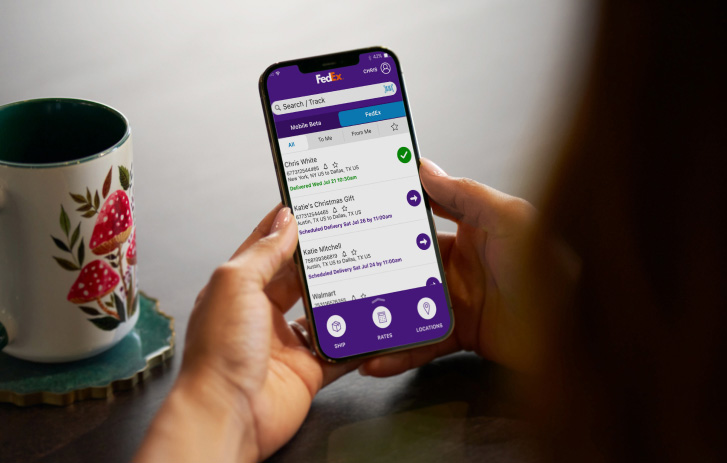
Enable Push Notifications on the FedEx Mobile App – Stay informed instantly.
Turn on Email/SMS Updates – Opt in via the tracking page.
Use the Mobile App for Real-Time Map View – Available for some FedEx Express shipments.
Check Estimated Delivery Windows – View your 2-hour delivery window.
Schedule or Reroute Deliveries – Hold or redirect to a FedEx location.
Track Packages by Nickname – Label shipments inside your FedEx account.
Tracking Multiple Packages at Once
Create a FedEx.com account
Use the tracking dashboard to manage multiple parcels
Export tracking data if needed — ideal for small businesses
How to Use FedEx Delivery Manager for Custom Alerts
📞 Call: 1-800-GoFedEx (1-800-463-3339)
💬 Live Chat: Available at fedex.com
FAQ: Real-Time FedEx Tracking
Is FedEx tracking really real-time? Yes — especially for Express and app users.
Why is my package stuck “In Transit”? It’s likely between facilities. Wait 24–48 hours before escalating.
Can I get push notifications for FedEx updates? Yes — turn them on in the mobile app.
How do I add delivery instructions? Use FedEx Delivery Manager.
Can I track by address or name? No — only tracking numbers are supported.
Is FedEx tracking global? Yes — with continuous updates through customs.
Conclusion: Stay Ahead with Smart FedEx Tracking
With the right tools and settings, FedEx tracking becomes a real-time, stress-free way to monitor your shipments. From mobile app alerts to custom delivery instructions, these tips help you track smarter, react faster, and receive with confidence.
Take a few minutes to set up your preferences — and you’ll never miss a delivery again.