Tag: International Shipping

Why Did My FedEx Package Stop Moving in Transit?

If you’ve ever asked yourself, “Why did my FedEx package stop moving?”, you’re not alone. Thousands of customers experience delays every year, where packages appear to stall in transit with no updates for days. While this can feel frustrating, it doesn’t always mean your shipment is lost.

In fact, most delays are caused by common, temporary issues such as weather conditions, customs clearance checks, or transfer delays between facilities. By understanding how FedEx’s tracking system works and what might be holding up your package, you’ll be better prepared to handle the situation calmly and proactively.

How FedEx Tracking Works

The Scanning Process Explained

Each FedEx package goes through multiple checkpoints where it’s scanned. These scans provide the updates you see online, such as “In Transit”, “At FedEx Location”, or “Out for Delivery.”

Why Tracking Updates May Pause

If your FedEx package hasn’t moved, it could simply mean it’s between scanning facilities. Packages can travel long distances by truck, plane, or ship, and during that time, they may not generate updates until the next scan is recorded.

Common Reasons Why a FedEx Package Stops Moving

Weather-Related Disruptions

Severe storms, hurricanes, floods, or snow can ground flights and delay trucks. Safety takes priority, so bad weather often means shipments are temporarily held.

Customs Clearance Delays

If you’re shipping internationally, customs can slow things down. Missing paperwork, duty assessments, or inspections can cause your FedEx package to stop moving for several days.

High Shipping Volumes During Peak Seasons

Holidays like Christmas, Black Friday, or Chinese New Year result in massive spikes in shipments. Sorting facilities may become overwhelmed, leading to longer processing times.

Transfer and Hub Delays

FedEx packages often move through multiple hubs. A delay at one hub—due to staffing shortages, mechanical breakdowns, or rerouting—can create a temporary pause in movement.

Mechanical or Technical Issues

Sometimes planes, trucks, or sorting equipment malfunction. In such cases, FedEx must hold packages until equipment is repaired or replacements are arranged.

Is It Normal for a FedEx Package to Not Move for Days?

Why Hasn’t My FedEx Package Moved in 3 Days?

Three days without movement can be frustrating but is often normal. If the package is crossing international borders or moving through multiple hubs, scans may take longer.

Why Has My FedEx Package Not Moved in a Week?

A week without updates usually signals a bigger issue, such as customs clearance, weather disruptions, or rerouting. In such cases, contacting FedEx Customer Service is recommended to check if additional information is available.

What To Do If Your FedEx Package Stops Moving

Contacting FedEx Customer Service

The fastest way to get answers is to call FedEx directly. Provide your tracking number and ask if they can see updates not yet visible on the public tracking system.

Using Third-Party Tracking Apps

Tools like 17Track, Parcel Monitor, and AfterShip track multiple carriers worldwide. They sometimes show more frequent updates than the FedEx site.

Checking for FedEx Service Alerts

FedEx regularly posts service alerts on its official website and social media accounts. If delays are widespread, they’ll usually update customers with estimated recovery times.

How to Prevent Future Delivery Delays

Scheduling Shipments in Advance

If you know you’ll be shipping during the holiday season, plan ahead and send packages earlier. This reduces the chance of your shipment getting stuck in a backlog.

Choosing Alternative Shipping Routes

When available, select express shipping services that use faster and more direct transport routes. This lowers the risk of your package pausing for long stretches.

Logistics Alternatives: GoNest Shipping Solutions

How GoNest Logistics Helps Avoid Disruptions

While FedEx is a trusted global carrier, businesses sometimes need backup options. GoNest Logistics offers international shipping with competitive pricing and reliable transit times, making it a solid alternative during FedEx delays.

GoNest UK Shipping Prices and Options

  • By air: £8.70 per shipment + £3.56 for each additional 0.5 kg
  • By sea: £43.98 (up to 15 kg) + £3.26 per additional kg

You can explore detailed shipping prices for multiple countries directly on the GoNest website.

GET IN TOUCH

Let us Send You a Quote

FAQs on FedEx Packages That Stop Moving

How long does FedEx hold packages in transit?

FedEx may hold packages for several days if weather, customs, or clearance issues occur. Most delays resolve within 2–7 days.

Can FedEx packages get lost while in transit?

It’s rare, but it can happen. If your package hasn’t updated for over 10 business days, contact FedEx to open an investigation.

What’s the best way to avoid shipping delays?

Ship early, double-check paperwork for international shipments, and use alternative providers like GoNest Logistics during peak demand seasons.

How Long Does USPS Tracking Take to Update

One of the most frustrating parts of online shopping or shipping is waiting for USPS tracking updates. Sometimes your tracking number works instantly, while other times, it seems stuck for days. If you’ve been wondering “why has my package not moved USPS?” or dealing with “USPS no update for 5 days”, this guide will walk you through the timelines, reasons, and quick fixes.

Understanding USPS Tracking Updates

USPS scans packages at different points along the delivery journey. Each scan updates the tracking system, but not every facility logs scans in real time.

What USPS tracking actually shows

The system reflects when your package is accepted, processed, in transit, out for delivery, and delivered.

How often USPS scans packages

Most packages are scanned 2–5 times during shipping. However, missed scans are common.

Typical Timeframes for USPS Tracking Updates

  • Same-day updates – If your package is scanned at the post office, you’ll usually see tracking activity right away.
  • 24–48 hours delay in updates – Some packages aren’t scanned until they reach the next facility.
  • When tracking may take longer – International shipments, holidays, or severe weather can delay updates for days.

Common Problems: USPS Tracking Not Updating

USPS hasn’t updated in 3 days

This usually means your package is moving between facilities but hasn’t been scanned.

USPS no update for 5 days

Check if there are regional delivery delays this week. Sometimes, packages sit in transit longer than expected.

USPS no update for 10 days

At this point, it’s worth filing a USPS Missing Mail request.

Why Has My Package Not Moved USPS?

Several factors can explain a stalled tracking update:

  • Missed scans – Packages sometimes skip facility updates.
  • Weather or natural disasters – Severe conditions halt transport.
  • Staffing shortages and seasonal demand – During peak times, delays are common.
  • Customs clearance for international shipments – Packages may be held at borders for inspection.

Quick Solutions When USPS Tracking Hasn’t Updated

  1. Double-check the tracking number – Typos are common.
  2. Use USPS alternative tracking tools – Try third-party apps like 17Track.
  3. Contact USPS customer service – Call 1-800-ASK-USPS or visit your local post office.
  4. File a USPS Missing Mail request – If your package hasn’t moved in 7–10 days, submit a claim.

How Many Days Until a USPS Package Is Considered Lost?

  • Domestic packages – Considered lost if not delivered within 15 business days.
  • International packages – Considered lost if no update for 30 business days.
  • Escalation – File a Missing Mail claim to trigger an investigation.

Preventing Future USPS Tracking Delays

  • Choose faster USPS servicesPriority Mail Express offers more reliable tracking.
  • Correct packaging and labeling – Ensure barcodes aren’t smudged or hidden.
  • Use third-party logistics providers – Companies like GoNest Logistics provide better tracking visibility.

GoNest Logistics: A Smarter Shipping Alternative

If you’re tired of waiting for USPS updates, GoNest Logistics provides dependable global delivery services.

Reliable international shipping

Ship to multiple countries worldwide with guaranteed updates.

Transparent UK shipping rates

  • By air: £8.70 + £3.56 per 0.5 kg additional weight
  • By sea: £43.98 (up to 15 kg) + £3.26 per kg additional weight

Why GoNest is better for time-sensitive deliveries

With competitive pricing, faster delivery, and accurate tracking, GoNest reduces the stress of lost or delayed packages.

👉 Compare USPS and GoNest shipping services here

GET IN TOUCH

Let us Send You a Quote

FAQs About USPS Tracking Updates

1. Why has my package not moved USPS?
Your package may be moving but hasn’t been scanned at its latest facility.

2. How many days until a USPS package is considered lost?
15 days for domestic mail, 30 days for international shipments.

3. Can USPS tracking be wrong?
Yes, missed scans and system delays happen.

4. What if USPS says delivered but no package?
Check with neighbors, your property, and then file a Missing Mail claim.

5. How long should I wait before contacting USPS?
Wait at least 3–5 days before escalating.

6. Does USPS update on weekends and holidays?
Yes, but updates may appear slower during peak times.

How to Track Packages When FedEx Tracker Is Down

When you’re eagerly waiting for a delivery, few things are more frustrating than discovering the FedEx tracker is down. Whether you’re a business owner shipping to clients or simply waiting for a personal package, being unable to see updates can create unnecessary stress.

FedEx tracking usually works smoothly, but outages do happen. When FedEx tracking is not working, it’s important to know what other tools and resources you can use to stay updated. In this guide, we’ll explore why the tracker may be unavailable, what steps you should take first, and the best alternative solutions to keep track of your package in real-time.

Why FedEx Tracking May Not Work

Common Causes of FedEx Tracker Outages

FedEx’s tracking system relies on multiple touchpoints across warehouses, scanning stations, and delivery hubs. Outages can occur due to:

  • System maintenance or server downtime.
  • High package volumes during peak seasons.
  • Incorrect or delayed package scans.
  • Network disruptions caused by weather or logistics issues.

Is It Normal for FedEx to Not Update Tracking?

Yes, it happens. Sometimes a package is moving within the FedEx network but hasn’t been scanned at each stop. This doesn’t mean your parcel is lost—it simply hasn’t updated in the system yet.

What Is Causing FedEx Delays Today?

Delays may stem from severe weather, staffing shortages, customs clearance, or global shipping disruptions. FedEx posts service alerts on its official website, so checking there should be one of your first steps.

First Steps When FedEx Tracking Is Not Working

Refreshing and Checking the Official FedEx Site

Before assuming there’s a major outage, refresh the page or try a different browser. Sometimes, the issue is temporary.

Verifying Tracking Number Accuracy

It’s easy to mistype a number. Double-check your email confirmation or shipping receipt to ensure you’re entering the correct digits.

Checking System Outage Reports

Websites like Downdetector provide real-time outage information. If many users are reporting the same problem, it’s likely a FedEx system-wide issue.

Alternative Ways to Track Packages During FedEx Tracker Down

When the FedEx tracker is down today, you’re not stuck. Several backup methods can help.

Using FedEx Customer Service by Phone

FedEx Customer Service remains one of the fastest ways to get real-time updates. Call their hotline, provide your tracking number, and an agent can confirm your shipment’s status.

Contacting FedEx via Email Notifications

FedEx offers email-based tracking. You can send your tracking number to their designated email service and receive the latest updates in your inbox.

Third-Party Package Tracking Platforms

Websites and apps like Parcel Monitor, 17Track, and AfterShip consolidate tracking data from multiple carriers. If FedEx’s site is down, these platforms can often still display your package movement.

Mobile App vs Website Tracking

Sometimes the FedEx website is down, but the FedEx mobile app remains functional. Downloading the app ensures you have another option handy.

Proactive Communication With FedEx

Live Chat Options

FedEx’s live chat support can help with quick tracking updates, even during outages.

Social Media Updates (Twitter, Facebook)

FedEx often posts service updates on Twitter and Facebook. Following their official accounts ensures you’re among the first to know about outages and delays.

Preventing Delays and Miscommunication

Setting Up Delivery Alerts

FedEx allows you to set up SMS or email alerts, so you don’t have to manually check tracking. Even during system glitches, you may still receive notifications when scans update.

Scheduling Deliveries

Using the FedEx Delivery Manager, you can schedule delivery times or reroute packages to avoid missed deliveries.

Exploring Logistics Alternatives

Partner Carriers and Reshipping Solutions

Some shipments use multiple carriers. If you have a tracking number from another partner carrier (like USPS or DHL), you may be able to track progress through their system instead.

How Companies Like GoNest Logistics Provide Alternatives

When FedEx experiences delays, businesses often turn to alternative logistics providers like GoNest Logistics. GoNest ships globally with competitive pricing and reliable service, making it a strong option when FedEx experiences disruptions.

GoNest UK Shipping Prices and Options

  • By air: £8.70 + £3.56 per additional 0.5 kg
  • By sea: £43.98 (up to 15 kg) + £3.26 per additional kg

You can view detailed shipping rates for multiple countries directly on their website.

FAQs About FedEx Tracker Down Issues

Why hasn’t my FedEx package moved in 3 days?

Packages may remain at sorting facilities due to weather, customs, or high package volumes. This doesn’t mean it’s lost—just delayed.

What can I do if FedEx tracking is stuck on “Label Created”?

This means FedEx has received shipping details but hasn’t yet scanned the package. Contact the sender to confirm if the parcel has been physically handed over to FedEx.

How long do FedEx outages usually last?

Most outages are temporary and resolved within hours, though severe disruptions (like weather-related events) can last longer.

Top Tips for Overcoming USPS Tracking Issues

Shipping delays and missing updates can frustrate both senders and recipients. If you’ve ever experienced USPS tracking difficulties, you’re not alone. From service disruptions to international shipment complexities, understanding why issues happen and how to resolve them is crucial. In this guide, we’ll break down the technical side of USPS tracking, highlight troubleshooting steps, and share practical strategies to make shipping smoother—whether locally or across borders.

Understanding USPS Tracking Difficulties

How USPS Tracking Works

USPS tracking relies on barcode scans at different transit points. Each time a package is scanned—whether at a sorting facility, customs checkpoint, or delivery truck—the system updates the tracking status. However, technical errors, missed scans, or network delays can result in gaps that confuse customers.

Common Reasons for USPS Service Disruptions Today

  • Severe weather events delaying scanning and transport
  • High seasonal shipping volumes (holidays, sales events)
  • Network or system outages in USPS scanning infrastructure
  • Local staffing shortages

USPS International Tracking by Tracking Number: Why Delays Happen

International shipments face extra hurdles:

  • Customs inspections that hold packages for days
  • Different scanning standards across countries
  • Limited data sharing between USPS and foreign carriers

This makes international tracking less predictable, often showing “in transit” for days or weeks without updates.

Technical Best Practices for Monitoring Shipments

Using Third-Party Tracking Tools Effectively

Relying only on USPS.com can sometimes limit visibility. Third-party tools allow you to:

  • Multi-carrier dashboards: Track USPS, UPS, FedEx, and international couriers in one place.
  • Automated alerts: Get notifications when a package is scanned or delayed.

Keeping Shipping Information Accurate and Updated

Accuracy reduces tracking issues:

  • Address accuracy: Ensure proper formatting and avoid abbreviations.
  • Customs forms: For international shipments, correct HS codes and declared values prevent delays.

Contacting USPS Customer Service the Smart Way

  • Escalate unresolved cases: If your package shows no update after 7 business days, file a service request.
  • Choose the right channel: Use USPS digital support first, then escalate via local post office if needed.

Troubleshooting USPS Tracking Not Updating

Why does USPS tracking sometimes not update?

This is one of the most common questions. It usually happens due to:

  • A missed scan at a facility
  • Packages moving between hubs without intermediate updates
  • Delays at customs for international shipments

When to Worry vs. When to Wait

  • Normal delay: 24–72 hours with no update is often routine.
  • Action required: More than 5–7 business days with no update usually needs investigation.

Step-by-Step Process to Resolve Delayed Updates

  1. Check your tracking number on both USPS.com and a third-party tool.
  2. Verify the address and shipping details.
  3. Contact USPS customer service with your tracking number.
  4. If international, reach out to the foreign carrier partner.

Case Study: USPS Tracking Challenges in International Shipping

Imagine a customer shipping a care package from New York to London. The tracking shows “In Transit” for 10 days with no further updates. After contacting USPS, the customer learns the package is held at UK customs due to incomplete documentation. Once corrected, the package clears in 48 hours.

Lesson: Double-check customs forms and consider third-party dashboards to see updates from the destination country’s carrier.

Alternatives and Enhancements to USPS Tracking

  • Private courier tracking: FedEx and DHL provide more frequent scans.
  • Third-party logistics tools: Sync USPS data with automated dashboards for better visibility.

Spotlight on GoNest Logistics

When USPS tracking challenges become too frequent, businesses may look for alternatives.

GoNest Logistics offers:

  • Shipping to multiple countries worldwide
  • Superior service and competitive pricing
  • Transparent shipping rates

Current shipping prices for UK routes:

  • By Air: £8.70, plus £3.56 per 0.5 kg additional weight
  • By Sea: £43.98 (up to 15 kg), plus £3.26 per additional kg

For businesses shipping regularly, GoNest provides a cost-effective and reliable option.

GET IN TOUCH

Let us Send You a Quote

FAQs on USPS Tracking Difficulties

Does USPS tracking sometimes not update?

Yes. This happens when packages miss scans or move between facilities without updates.

Can I track USPS international shipments with the tracking number?

Yes, but data sharing depends on the foreign carrier. Third-party tools often provide more visibility.

How long should I wait before contacting USPS about a package?

If no update appears for more than 5–7 business days, contact USPS support.

What’s the difference between “In Transit” and “Out for Delivery”?

“In Transit” means the package is still moving through the system, while “Out for Delivery” means it’s on the final leg to the recipient.

Can service disruptions affect international tracking?

Yes. Weather, customs, and global events can delay international tracking updates.

Are third-party tools more reliable than USPS’s official site?

They’re not “more reliable” but often more comprehensive, since they integrate multiple carriers.

Why Is USPS Tracking Not Updating Properly?

Package tracking has become an essential part of online shopping and global shipping. For millions of people, USPS tracking provides reassurance that their parcel is on the way. However, customers frequently encounter a USPS tracking problem where updates freeze or disappear.

This article explores why USPS tracking may not update properly, real-world examples of tracking issues, and practical steps to fix them. We’ll also introduce GoNest Logistics as a reliable international shipping alternative.

How USPS Tracking Works

The Scanning Process

Each USPS parcel is assigned a tracking number. As the package moves through sorting centers, vehicles, and delivery hubs, it is scanned. These scans generate status updates such as:

  • Label Created
  • In Transit
  • Out for Delivery
  • Delivered

Live USPS Tracking: What to Expect

While live USPS tracking provides near real-time updates, it’s not flawless. Missing scans, delays, or system errors can result in outdated or missing information.

Common Reasons USPS Tracking Doesn’t Update

Missed Scans at Sorting Facilities

If a package isn’t scanned at a checkpoint, the system won’t update. The parcel might still be moving but appear “stuck.”

Packages in Transit Without Scans

Some shipments travel long distances without intermediate scans, especially if they’re consolidated for bulk shipping.

Technical Glitches in Live USPS Tracking

System outages or slow updates can cause USPS tracking problems today, leaving customers without real-time updates.

USPS Tracking Problem During Holidays and Weather Events

Bad weather, peak seasons (like Christmas), and national holidays often delay scanning and data uploads.

Delivery Confirmation Delays

Sometimes, delivery is completed, but the confirmation is uploaded hours—or even days—later.

Real-World Cases of USPS Tracking Problems

Case 1: “Label Created, Not Yet in System”

A customer sees “Label Created” for several days. In reality, USPS hasn’t scanned the package yet, even though it’s en route.

Case 2: Tracking Stuck “In Transit”

Packages often get stuck in the “In Transit, Arriving Late” stage due to sorting backlogs.

Case 3: Wrong or Confusing Tracking Updates

Occasionally, a package may appear to travel backward (e.g., from your city to another state) due to misrouted scans.

What To Do When USPS Tracking Isn’t Updating

Step 1: Verify Tracking Information

Ensure the number is correct and entered without spaces or errors.

Step 2: Wait 24–48 Hours

Tracking often updates within two days, especially during peak shipping times.

Step 3: Contact USPS Tracking Support

Visit USPS Tracking Support for official updates.

Step 4: Use the USPS Customer Service Number 24/7

Call 1-800-ASK-USPS for live assistance, available 24/7 for urgent issues.

Alternatives to USPS: GoNest Logistics

Why Businesses Choose GoNest Logistics

GoNest Logistics provides fast, reliable tracking and competitive pricing for international shipments. Benefits include:

  • Live tracking with fewer disruptions
  • Flexible air and sea shipping options
  • Worldwide coverage

GoNest Logistics Shipping Prices (UK Routes)

  • By Air: £8.70 + £3.56 per 0.5 kg additional weight
  • By Sea: £43.98 (up to 15 kg) + £3.26 per kg beyond 15 kg

For businesses and individuals shipping overseas, GoNest Logistics offers transparent pricing and consistent delivery times.

GET IN TOUCH

Let us Send You a Quote

FAQs About USPS Tracking Problems

Why is post office tracking not working?

It may be due to missed scans, delays, or technical glitches in the USPS system.

Is the USPS having tracking issues today?

Yes, outages occasionally happen. Check USPS service alerts for real-time updates.

How long does it take USPS tracking to update?

Most updates appear within 24–48 hours, though some take longer.

Can USPS tracking be wrong?

Yes, mis-scans or delayed uploads can result in inaccurate information.

What is the fastest way to get USPS tracking support?

Calling USPS customer service number 24/7 (1-800-ASK-USPS) is the quickest option.

Are there better alternatives to USPS for global tracking?

Yes, GoNest Logistics provides reliable, transparent tracking for international shipments.

Why FedEx Tracking Sometimes Doesn’t Work

We live in an age where real-time package tracking feels like a basic expectation. Whether you’re waiting for a birthday gift, business supplies, or international shipments, you want to know exactly where your package is. But sometimes, FedEx tracking leaves customers scratching their heads.

If you’ve wondered why FedEx tracking problems occur, you’re not alone. Many people ask questions like “Why isn’t my FedEx package moving?” or “Why hasn’t my FedEx package moved in 3 days?”. Let’s dive into the science and logic behind these glitches.

Introduction to FedEx Tracking Problems

FedEx handles millions of packages daily across multiple continents. Their tracking system is built to keep up with this volume, but like any large-scale technology, it’s not perfect. Problems often show up as missing scans, delayed updates, or app malfunctions—leading customers to believe their package has vanished.

How FedEx Tracking Technology Works

To understand why tracking sometimes fails, we need to peek behind the scenes.

Barcode Scanning System

Every FedEx package carries a barcode. As the parcel moves through warehouses, airports, and trucks, scanners read the barcode and update the system.

Data Transmission to Central Servers

Those scans are transmitted to FedEx’s central servers, where they’re processed and made available online.

Customer-Facing Tracking Interface

The data is then displayed through FedEx’s website and app. If anything breaks down along the way—scanning, data transfer, or display—tracking appears inaccurate.

Common FedEx Tracking Problems Explained

Delayed Tracking Updates

The most common issue is delays in updates. A package may already be in transit, but the system takes hours—or days—to refresh.

Packages Not Scanned at Certain Points

If a barcode is missed, the system skips that step, making it seem like your package is “stuck.”

FedEx App Not Working Today

When customers complain that the FedEx app is not working today, it’s often due to temporary outages or server overloads.

FedEx Tracking No Longer Shows Sent Items

Sometimes, older shipment data disappears due to system resets or archiving policies.

The Science Behind Delayed Updates

Why Isn’t My FedEx Package Moving?

Often, your package is moving—it just hasn’t been scanned at the latest checkpoint.

Why Hasn’t My FedEx Package Moved in 3 Days?

This usually means either a customs delay (for international packages), a missed scan, or temporary holding due to weather or high volume.

Time Gaps Between Scans

Packages aren’t scanned at every single mile. Instead, scans happen at major transit points, leaving gaps in the timeline.

Server Processing Delays

Even after scanning, the data has to sync with servers. Delays here can make it look like your package is idle.

Human Factors in Tracking Errors

Missed Scans at Warehouses

Busy facilities may sometimes overlook scanning, especially during peak seasons.

Mislabeling or Damaged Barcodes

If a barcode is torn, smudged, or mislabeled, the system may reject it.

Technical Glitches in FedEx Tracking

System Outages and App Errors

Like any large IT system, FedEx’s platform experiences downtime, causing blank or inaccurate tracking.

Network Connectivity Issues

In some regions, weak connectivity slows down data uploads from handheld scanners.

Why Tracking Sometimes Shows Wrong or No Information

“Label Created” But No Movement

This status means the seller generated a label, but FedEx hasn’t received the package yet.

Mismatched Data Between Systems

Sometimes, international data systems don’t sync smoothly, leading to missing updates.

Real-World Examples of Tracking Problems

Delayed International Shipments

Customs inspections can stall packages for days, without updates showing in the system.

Weather-Related Service Interruptions

Storms, floods, or extreme conditions disrupt transport schedules and tracking accuracy.

Solutions for FedEx Tracking Problems

Using Third-Party Tracking Apps

Tools like 17Track and AfterShip sometimes provide clearer shipment timelines.

Checking FedEx Service Alerts

FedEx publishes daily updates on service delays caused by weather or technical outages.

Contacting Customer Service

Calling FedEx directly can help resolve unclear or missing tracking.

Alternatives to FedEx for Reliable Tracking

The Case for Multi-Courier Shipping Solutions

Relying solely on one courier can increase risk. Multi-courier solutions diversify options and provide backup tracking.

How GoNest Logistics Solves Tracking Issues

GoNest Logistics offers reliable worldwide shipping with transparent pricing and competitive rates, reducing uncertainty and frustration.

GoNest Logistics: Transparent Global Shipping Rates

UK Air Shipping Prices

  • £8.70 per shipment
  • Additional weight: £3.56 per 0.5 kg

UK Sea Shipping Prices

  • £43.98 (up to 15 kg)
  • Additional weight: £3.26 per kg

By providing clear pricing and dependable updates, GoNest Logistics ensures smoother international shipping experiences.

GET IN TOUCH

Let us Send You a Quote

FAQs on FedEx Tracking Problems

Q1. Why isn’t my FedEx package moving?
It may be moving, but the last scan hasn’t updated yet.

Q2. Why hasn’t my FedEx package moved in 3 days?
Likely due to customs clearance, missed scans, or service disruptions.

Q3. Why does FedEx tracking no longer show sent items?
Old records may be archived or cleared from the system.

Q4. Is the FedEx app not working today?
Check service alerts—app downtime is common during system maintenance.

Q5. Can weather affect FedEx tracking?
Yes, weather disruptions often lead to delayed scans and updates.

Q6. What can I do if FedEx tracking is stuck?
Contact FedEx directly or use third-party tracking apps for additional details.

FedEx Tracking Problems: Common Issues Explained

In today’s fast-paced e-commerce world, tracking packages has become just as important as the delivery itself. Customers expect real-time updates, while businesses rely on accurate tracking to maintain trust. However, FedEx tracking problems remain a common frustration for both individual shoppers and companies. From delayed updates to confusing error messages, understanding these issues is the first step toward finding solutions.

Introduction to FedEx Tracking Problems

FedEx is one of the largest logistics companies in the world, handling millions of shipments every day. But with such volume comes the risk of technical glitches, scanning errors, and system overloads. Customers often search online for FedEx tracking problems today because tracking tools sometimes fail to provide accurate updates.

Whether it’s a business shipment or a personal parcel, a delay or error in tracking can cause unnecessary stress. Let’s break down the most common issues and their root causes.

Why Tracking Matters in Modern Logistics

Tracking is no longer a luxury; it’s a necessity. Customers want visibility over their orders from checkout to doorstep. For businesses, reliable tracking prevents disputes, reduces refund requests, and enhances customer satisfaction. When tracking fails, it undermines this trust and can even hurt business revenue.

Common FedEx Tracking Problems Today

Delayed Tracking Updates

One of the most frequent complaints is that tracking updates appear late. A package may have been shipped, but the system doesn’t update for hours—or even days.

“Shipment Exception” Status Errors

Sometimes, FedEx systems show confusing statuses like “Shipment Exception.” This can mean customs delays, incorrect addresses, or even weather-related disruptions.

FedEx App Not Working Today

Many customers rely on the FedEx app for real-time tracking. However, technical outages or app crashes often leave users without updates.

Incorrect Delivery Information

Another common issue is when tracking shows a delivery attempt at the wrong time or even marks a package as “delivered” when it hasn’t arrived.

Tracking Number Not Found

When customers enter their tracking number and see “not found,” it usually means the package hasn’t been scanned into the system yet.

Causes Behind FedEx Tracking Issues

Technical Glitches in FedEx Systems

FedEx’s tracking system depends on multiple digital platforms. Outages, bugs, or slow updates can cause delays in information.

High Shipping Volume & Seasonal Delays

During peak times like holidays or sales events, FedEx handles millions of additional packages. This overwhelms the system and slows down updates.

Customs and International Shipping Hold-ups

For international shipments, customs clearance often causes delays in tracking updates. Packages may be stuck in inspection, but the tracking system doesn’t provide details.

Human Errors in Scanning Packages

Sometimes, workers simply miss scanning a package. This results in inaccurate or missing tracking information.

How Customers Experience FedEx Tracking Problems

Business Impact of Delayed Deliveries

Companies that rely on timely deliveries face customer complaints and possible loss of reputation when FedEx tracking isn’t accurate.

Frustration Among Online Shoppers

For individuals, the inability to see where their package is causes stress, especially when waiting for essential goods.

FedEx Customer Service Number: How to Reach a Real Person

When tracking fails, customers turn to FedEx support. The challenge is often reaching a real person instead of automated responses.

Is FedEx 24-Hour Customer Service Available?

FedEx does provide customer support, but availability may depend on region and service type. In the USA, certain lines operate 24/7, though reaching a live agent can still take time.

Solutions for FedEx Tracking Issues

Using Alternative Tracking Tools

Websites like AfterShip and 17Track allow customers to track FedEx shipments using the same tracking number, sometimes offering more detailed updates.

Contacting FedEx Directly

For urgent issues, calling the FedEx customer service number is the fastest way to resolve problems.

Checking Local Service Alerts

FedEx posts real-time alerts about weather disruptions or system issues on their website. Checking these can clarify delays.

Is FedEx Having Issues Today in USA?

When customers ask, “Is FedEx having issues today in USA?” they usually want to know about widespread outages. FedEx does occasionally experience regional or nationwide issues, which can be verified via:

  • FedEx service alerts page
  • Social media updates
  • Customer reports on outage-detection websites

Preventing FedEx Tracking Problems as a Business

Proactive Communication with Customers

Businesses should send updates to customers when delays occur, even if tracking is inaccurate.

Partnering with Reliable Shipping Providers

Some companies, like GoNest Logistics, provide alternative solutions with transparent pricing and superior service, reducing dependency on one courier.

GoNest Logistics: A Better Shipping Alternative

Worldwide Shipping with Transparent Pricing

At GoNest Logistics, we specialize in international shipping with competitive rates and reliable updates. Customers can view real-time shipping prices for different countries directly on our website.

Air & Sea Shipping Rates for UK Routes

  • By Air: £8.70 per package | Additional weight: £3.56 per 0.5 kg
  • By Sea: £43.98 (up to 15 kg) | Additional weight: £3.26 per kg

This ensures businesses and individuals have cost-effective, reliable alternatives to avoid tracking frustrations.

GET IN TOUCH

Let us Send You a Quote

FAQs on FedEx Tracking Problems

Q1. Why is my FedEx tracking not updating?
Most often, this is due to missed scans or system delays.

Q2. What does “Shipment Exception” mean?
It usually indicates a delay caused by customs, address errors, or weather.

Q3. Is FedEx having issues today in USA?
Check FedEx service alerts or outage reports to confirm real-time problems.

Q4. How do I reach a real person at FedEx customer service?
Call the FedEx helpline and press the right options to bypass the automated system.

Q5. Is FedEx 24-hour customer service available?
Yes, certain FedEx helplines in the USA operate 24/7.

Q6. Can I use other tools to track FedEx shipments?
Yes, platforms like 17Track and AfterShip can provide additional insights.

FedEx Package Stuck in Italy Lonate: What to Do

Few things are more frustrating than tracking your FedEx shipment and seeing it stuck in Italy Lonate. Many customers wonder: What does it mean? How long will it stay there? What can I do?

If your FedEx package is stuck in Italy Lonate, don’t panic. This guide will explain the meaning of this status, possible reasons for the delay, and practical steps you can take to get your package moving again. We’ll also compare FedEx with GoNest freight shipping options to help you plan future shipments more effectively.

Understanding Why FedEx Packages Get Stuck in Italy Lonate

What does “FedEx package stuck in Italy Lonate” mean?

When your tracking says your package is stuck at Lonate Pozzolo (near Milan, Italy), it usually means your shipment is being processed at FedEx’s major hub for customs clearance and international transit.

It does not always mean something is wrong. Instead, it could simply be waiting for inspection, paperwork review, or space on the next flight.

Common reasons for delays at Lonate hub

  • Customs inspections – Italy is strict on imports/exports, especially for electronics, food, or luxury items.
  • Incomplete documentation – Missing invoices, incorrect HS codes, or unclear recipient info.
  • Volume surges – Seasonal peaks (e.g., holidays) cause backlogs.
  • Security checks – Packages flagged for additional verification.

How Long Does a FedEx Package Stay Stuck in Lonate, Italy?

Average processing times for customs

Most shipments clear Lonate customs in 24–72 hours, provided documents are correct.

Factors that can extend delays

  • Incorrect or missing paperwork
  • High package volume during peak seasons
  • Goods requiring special inspection
  • Payment of duties and taxes not yet processed

Step-by-Step Solutions When Your FedEx Package is Stuck

Step 1: Check your FedEx tracking updates

Log into the FedEx tracking portal and carefully review all updates. Look for messages like “Clearance delay” or “Awaiting documentation”.

Step 2: Contact FedEx customer service

Call FedEx Italy or your local FedEx branch with your tracking number. They can provide details on the specific reason for the delay.

Step 3: Verify customs clearance requirements

Ensure all required documents (commercial invoice, packing list, ID, tax codes) have been submitted.

Step 4: Confirm recipient information and documents

Sometimes delays happen because the recipient’s tax ID (Codice Fiscale) or phone number is missing.

Step 5: Consider alternate shipping solutions

If FedEx delays are frequent, you might explore freight forwarding services like GoNest, which offers competitive rates for Italy.

Comparing Shipping Options: FedEx vs. GoNest Freight to Italy

Shipping costs and delivery speed vary depending on the method. Below is a quick comparison:

Shipping MethodCostWeight/VolumeTransit Time
FedEx (Express)Varies by sizeSmall/medium parcels2–7 days (customs may add delay)
GoNest Air Freight€18.81/kgIdeal for lightweight urgent cargoFastest, but higher cost
GoNest Sea Freight$54.57/21kgBulk/heavy shipments30–35 days
GoNest Truck Freight€57.02/12kgMedium loads across Europe25–35 days

👉 For urgent parcels, FedEx Express is best.
👉 For large shipments, GoNest sea or truck freight may save money.

How Long Does FedEx Take From Italy to the US?

Express vs. Economy shipping times

  • FedEx International Priority (Express): 2–4 business days
  • FedEx International Economy: 5–7 business days

Impact of customs clearance on delivery speed

Customs is often the slowest part of the journey. A package may arrive in the US quickly but be held in Italy for inspection first.

Tips to Avoid Future Package Delays in Lonate

Accurate labeling and documentation

Always double-check invoices, product descriptions, and HS codes.

Choosing the right shipping method

Match your shipment’s urgency with the right carrier—don’t send bulk cargo via FedEx if you can save with sea freight.

Working with freight forwarding companies

Companies like GoNest handle customs paperwork for you, reducing the risk of clearance delays.

GET IN TOUCH

Let us Send You a Quote

FAQs About FedEx Package Stuck in Italy Lonate

Q1: How long does FedEx take from Italy to the US?
Express takes 2–4 days; Economy takes 5–7 days, not including customs delays.

Q2: What to do when a FedEx package is stuck?
Check FedEx tracking, contact customer service, and ensure customs paperwork is complete.

Q3: Why does my tracking say “In transit at Lonate”?
It means your package is waiting for customs clearance or the next available flight.

Q4: Can I speed up customs clearance in Italy?
Providing accurate documents and paying duties quickly can reduce hold times.

Q5: Is it better to use FedEx or GoNest for Italy shipments?
FedEx is faster for small urgent parcels; GoNest is cheaper for bulk cargo.

Q6: How do I know if my package is lost or just delayed?
If there’s no update for more than 7–10 days, contact FedEx support for investigation.

Step-by-Step Hoobuy QC Process Explained

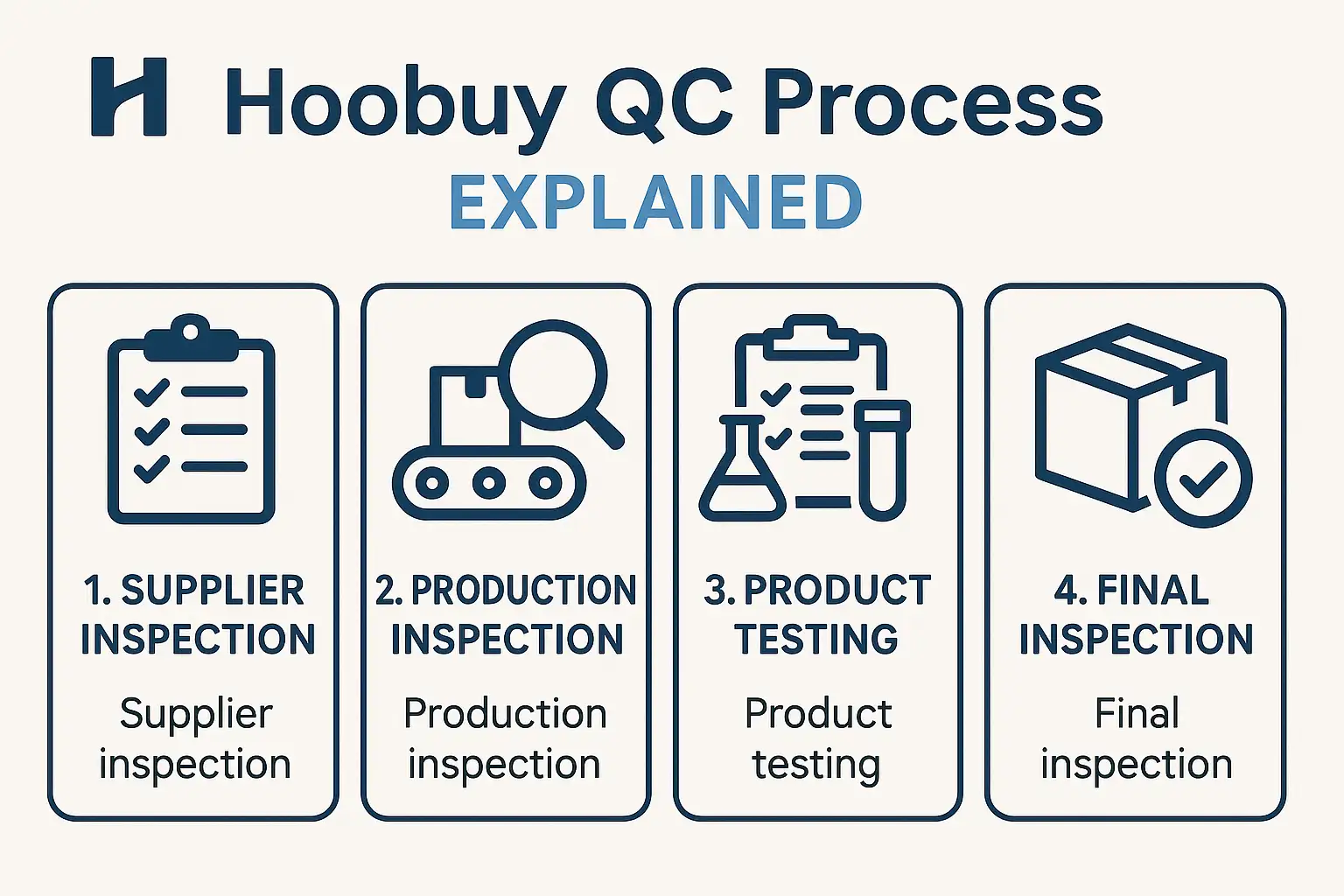
Navigating the world of international shopping agents can seem complex, but at the heart of a successful purchase lies one critical process: the quality check. The Hoobuy QC (Quality Check) is a systematic, multi-step inspection designed to give you ultimate control over your items before they ever leave the warehouse. It is your first line of defense against quality issues, sizing errors, and seller mistakes. Understanding this process is not just helpful—it’s essential for a stress-free and rewarding shopping experience.

This comprehensive guide will walk you through every single stage of the Hoobuy QC process. We will begin with the moment you place your order, follow your item as it arrives at the warehouse, go behind the scenes of the detailed inspection, and finally, empower you to analyze the resulting Hoobuy qc pics to make a confident decision. Whether you are purchasing your first item or your fiftieth haul of Hoobuy reps, this step-by-step breakdown will provide the clarity you need to use this service to its fullest potential and ensure you receive the quality you expect.

What is the Hoobuy QC Process and Why is it Essential?

Before diving into the “how,” it’s crucial to understand the “what” and the “why.” The Hoobuy QC process is a value-added service where Hoobuy’s warehouse staff act as your personal inspectors. After an item you’ve ordered from a third-party seller arrives at their facility, they don’t just put it on a shelf. Instead, they carefully unpack it, perform a detailed visual inspection, take a series of high-quality photographs, and upload them to your account. This gives you a virtual, in-hand look at your product before you commit to the expensive and often final step of international shipping.

The importance of this process cannot be overstated. Online shopping, especially from vast marketplaces, comes with inherent risks. The seller’s photos might be of a different batch, the sizing information could be inaccurate, or there could be unforeseen manufacturing defects. The QC process is your safety net. It transfers the risk of discovery from your doorstep—thousands of miles away and weeks later—to the Hoobuy warehouse, where returns and exchanges are still a simple, viable option. It is the single most important tool for ensuring buyer satisfaction and protection.

GET IN TOUCH

Let us Send You a Quote

The Core Function of a Quality Check (QC) in Your Order

At its core, the function of the Hoobuy QC is verification. It serves to verify three critical things:

  • Identity: Is this the correct item you ordered? Does the model, color, and size match what you requested?
  • Quality: Does the item have any noticeable flaws? This includes stains, tears, poor stitching, scuffs, or any other manufacturing defects.
  • Accuracy: Do the physical measurements of the item align with the seller’s provided size chart?

By performing this pre-shipment inspection, Hoobuy provides you with the crucial data needed to make an informed decision. It moves the transaction from a blind purchase to a verified one, giving you the power to accept or reject the item based on tangible evidence.

Why You Shouldn’t Skip the Hoobuy QC, Especially for Hoobuy Reps

While the QC process is vital for any purchase, it is absolutely non-negotiable when dealing with the world of Hoobuy reps. The quality of replica items can vary dramatically from seller to seller, and even from batch to batch from the same seller. What one buyer receives could be vastly different from what you get. The seller’s stock photos almost always show a perfect example of the product, which may not reflect the actual quality of the item you receive.

Skipping the Hoobuy QC in this context is a significant gamble. You could receive an item with glaringly obvious flaws, incorrect sizing that renders it unwearable, or a product that is a lower-tier version than what was advertised. The cost and complexity of an international return from your home country are often so high that you are simply stuck with the disappointing product. The QC process is your low-cost insurance policy against this outcome, ensuring you can vet the quality and accuracy of every single piece before it’s truly yours.

Stage 1: Setting Up for Success – From Hoobuy Login to Warehouse Arrival

The quality check process doesn’t just begin when the item is being unpacked. Your active involvement starts much earlier. This first stage covers the foundational steps you take as a buyer, from creating your account and placing an order to the moment your item arrives at the Hoobuy facility. Getting these initial steps right ensures a smooth transition into the hands-on inspection stage. Think of this as setting the stage for a successful performance; the work you do here lays the groundwork for everything that follows.

This phase is all about clear instructions and diligent tracking. It starts with your Hoobuy login, which is your portal to the entire ecosystem. From there, every action you take—pasting a product link, adding notes to your order, and monitoring its status—contributes to the overall process. Understanding how Hoobuy handles your order from the moment of purchase to the point of reception is key to appreciating the logistical chain that enables the detailed QC process.

Placing Your Order and Awaiting Seller Shipment

Your journey begins on the Hoobuy website. After using your Hoobuy login, you will use the search bar to input the URL of the product you wish to buy from a platform like Weidian, Taobao, or Yupoo. Hoobuy’s system will fetch the product information. Here, you will select the correct size, color, and quantity. It is also where you can add specific notes to the agent, though these are typically for the purchasing process, not the QC stage.

Once you submit and pay for the item, Hoobuy’s purchasing agents place the order with the seller on your behalf. The order status in your dashboard will change to “Ordered.” The seller then ships the item domestically to the Hoobuy warehouse. You can track this domestic leg of the journey through the order details. This period is a waiting game, but it’s an active one where you can monitor the progress as your item makes its way to the inspection point.

The Moment of Arrival: How Hoobuy Receives and Logs Your Item

When the package from the seller arrives at the Hoobuy warehouse, it triggers a precise check-in procedure. The warehouse staff first inspect the outer packaging for any damage during domestic transit. They then scan the shipping label to match the package to your order in the system. Your order status will be updated to “Arrived” or “Stored.”

Each item is assigned a unique barcode and is entered into Hoobuy’s inventory management system. This electronic tagging is crucial for ensuring your item is never mixed up with another customer’s. It creates a clear, traceable path for your product as it moves from the receiving dock to the QC station, and finally to its storage location. You will receive an automated notification that your item has been received, signaling that it is now in the queue for Stage 2: the detailed QC inspection.

Stage 2: The Main Event – A Look Inside the Hoobuy QC Examination

This is the heart of the entire Hoobuy QC operation. Once your item is checked in and queued, it is moved to a dedicated inspection station where the real work begins. This stage is methodical, detailed, and focused on one thing: generating a clear, unbiased record of your product’s condition and specifications. The warehouse inspectors are trained to be systematic, looking at each item with a critical eye and documenting their findings through a standardized photography and measurement process.

The goal here is not to judge the item’s style but to assess its objective quality. The bright, even lighting of the photography stations and the use of high-resolution cameras are all designed to capture details that might be missed in a casual glance. This meticulous process ensures that the Hoobuy qc pics you receive are a true and accurate representation of the item that has arrived, providing you with the best possible information to make your decision.

Step 1: Unpacking and Initial Verification Against Your Order

The first step of the physical inspection is to carefully unpack the item. The inspector immediately cross-references the product with your order details. They check the fundamentals: Did the seller send the correct size? Is it the right color? Does the product model match what was ordered? This initial verification is crucial for catching the most basic—and surprisingly common—seller errors. The inspector will also perform a quick visual scan of the entire item to spot any major, immediately obvious defects like large stains, tears, or significant damage. This preliminary check ensures that the item is the correct one before proceeding to the more time-consuming detailed documentation.

Step 2: Meticulous Photography for Your Hoobuy QC Pics

This is arguably the most important step in the process. The inspector places the item in a well-lit area, typically a light box, to ensure color accuracy and clarity. They then take a series of standardized, high-resolution photographs. A typical set of Hoobuy qc pics includes:

  • An overall shot: A photo of the entire item from the front and back to show its general appearance.
  • Detail shots: Close-up photos of key features like logos, tags, buttons, zippers, and hardware.
  • Stitching and material shots: Magnified views of the stitching on seams and the texture of the fabric.
  • Flaw shots: If any defects are found (e.g., a stain, a scuff, a loose thread), the inspector will take a specific, clear close-up to highlight the issue for you.

These photos are not meant to be glamorous product shots; they are documentary evidence. Their purpose is to be as informative and objective as possible.

Step 3: Documenting Measurements and Other Key Details

Alongside photography, taking measurements is a vital part of the Hoobuy QC process, especially for clothing and footwear. Sizing can be inconsistent between sellers, and their charts are not always reliable. The inspector will lay the garment flat and use a tape measure to record key dimensions, such as the bust/chest width, the overall length, and the shoulder width. For shoes, they will often measure the insole length. These measurements are photographed with the tape measure clearly visible in the frame. This provides you with hard data that you can compare against the seller’s size chart and your own body measurements to confirm the fit, which is one of the biggest challenges in remote shopping.

Stage 3: Your Decision – How to Analyze Hoobuy QC Pics and Take Action

Once the warehouse team has completed their meticulous inspection and photography, the focus of the Hoobuy QC process shifts to you. This is the interactive stage where you, the buyer, step in to review the evidence and make the final call. Hoobuy has provided you with all the necessary information; now it is your responsibility to analyze it carefully and decide the fate of your item. This stage is arguably the most empowering part of the entire process, as it puts you in complete control of the quality of your haul.

Your decision will determine whether the item is stored in your warehouse to await international shipping or is sent back to the original seller for a return or exchange. Taking this step seriously is the key to a successful shopping experience. A thorough analysis of the Hoobuy qc pics can save you from the disappointment of receiving a flawed product, while a hasty approval could lead to regret. Let’s break down the steps you need to take to make a well-informed decision.

GET IN TOUCH

Let us Send You a Quote

Accessing and Interpreting Your QC Photo Gallery

After the inspection is complete, you will receive a notification. By using your Hoobuy login and navigating to the “My Warehouse” or “My Orders” section of your dashboard, you will find the item with its status updated to “QC Photos Available.” Clicking on it will open a gallery of the high-resolution images taken by the inspection team.

Interpreting these photos is a skill. Here’s how to do it effectively:

  • Don’t Rush: Take your time. Open each image and use the zoom function to inspect details closely.
  • Compare and Contrast: Open a new tab with the original seller’s product page. Compare the Hoobuy qc pics to the seller’s stock photos. Look for discrepancies in color, material, pattern placement, and logo quality.
  • Create a Checklist: Mentally check off key areas. Examine the stitching, scrutinize the logos, verify the tags, and assess the overall symmetry and construction. For Hoobuy reps, this level of detail is paramount.
  • Verify Measurements: Look at the measurement photos. Compare the numbers shown on the tape measure to the seller’s size chart and your own requirements. Confirm that the size you received is what you need.

This systematic review will allow you to build a complete picture of the item’s quality and accuracy.

The ‘Green Light’ (GL): Approving Your Item for International Shipment

If, after a thorough review of the Hoobuy qc pics, you are satisfied with the item’s quality and it meets your expectations, you will give it the “Green Light” (GL). This is the term used in the community for approving an item. Within the QC photo gallery on the Hoobuy website, there will be a clear button to “Accept” or “Approve” the product.

Once you click this button, you are confirming your satisfaction. The Hoobuy QC process for this specific item is now complete. The warehouse staff will receive this confirmation, carefully repackage your item, and move it to its designated storage location in your virtual warehouse. The item’s status will update to “Stored” or “Available for Shipment.” It will now wait securely until you are ready to create a new parcel, consolidating it with other items you have purchased to be shipped internationally to your doorstep.

The ‘Red Light’ (RL): How to Initiate a Return or Exchange

If your analysis of the QC photos reveals a significant flaw, a sizing error, or that you’ve received the wrong product entirely, you will give it the “Red Light” (RL)—community slang for rejecting an item. Instead of clicking “Accept,” you will choose the option to “Return/Exchange.”

The system will prompt you to provide a reason for the return. It is crucial to be clear, concise, and specific. Refer directly to the flaws shown in the Hoobuy qc pics. For example: “The logo on the chest is crooked (see photo #3)” or “The bust measurement is 110cm, but the seller’s chart stated 120cm for this size (see photo #5).” This clear communication helps the Hoobuy agent effectively argue your case to the seller. Once you submit the request, the agent will handle all communication to arrange the return based on the seller’s policy. This is the critical function of the Hoobuy QC process: catching problems when they are still easy and affordable to fix.

Pro Tips for Getting the Most Out of Your Hoobuy QC Experience

  • Research Sellers First: The best QC experience is one that finds no flaws. Before you even buy, use community resources like Reddit or Discord to find sellers known for consistent quality. This reduces the likelihood of needing to return items.
  • Understand Product Tiers: Especially in the reps market, understand that quality often correlates with price. Don’t expect perfection from a budget batch. Set your expectations realistically before the Hoobuy qc pics even arrive.
  • Communicate Clearly: When requesting returns, be polite and factual. The agent is your ally. Providing them with clear, objective reasons helps them resolve your case successfully.
  • Consider Value-Added Services: If you have a very specific quality concern about an item (e.g., the glow-in-the-dark feature on a pair of sneakers), consider paying the small fee for a specific extra photo request. It’s a small investment for guaranteed peace of mind.
  • Keep Your Own Records: Take a screenshot of the seller’s size chart when you order. This way, you have your own record to compare against the measurement photos you receive, preventing any confusion later.

Frequently Asked Questions (FAQs)

  1. What is the difference between a standard Hoobuy QC and a value-added inspection? The standard Hoobuy QC is the free service that includes a set of general photos and basic measurements. A value-added inspection is a paid service where you can request specific, additional photos or measurements, such as a close-up of a particular seam or an insole measurement.
  2. How long do I have to make a decision after receiving my Hoobuy qc pics? While there isn’t a strict time limit, it is highly recommended to review your photos and make a decision within a few days. This is because a seller’s return window (typically 7 days from warehouse delivery) is limited. The sooner you act, the more likely a return will be processed smoothly.
  3. Will Hoobuy tell me if an item has a flaw? Hoobuy inspectors are trained to photograph any visible flaws they notice. However, they do not make a judgment call for you. Their job is to provide objective photographic evidence; the final decision to accept or reject the item based on those photos is yours.
  4. Can I get a refund for shipping if I return an item? When you return an item from the Hoobuy warehouse, you will be refunded the cost of the item itself. The domestic shipping fee paid to the seller is often non-refundable, as the shipping service was already rendered.
  5. What should I do if the color in the QC pics looks different from the seller’s photos? Be aware that the bright, white lighting in the warehouse can sometimes make colors appear slightly different. However, if the difference is dramatic (e.g., you ordered navy blue and received black), you should absolutely initiate a return. For minor shade differences, you will have to use your judgment.
  6. Is it possible to talk to the person taking my QC photos? You cannot speak directly to the warehouse inspector. All communication should be done through the messaging system in your order details, where you can contact your assigned agent with any specific requests or questions about your return.

Conclusion

The step-by-step Hoobuy QC process is the cornerstone of a secure

and successful international shopping strategy. It demystifies the process of buying from remote sellers and places the power of quality control directly into your hands. From the initial Hoobuy login and order placement to the critical analysis of your Hoobuy qc pics, each stage is designed to protect your investment and ensure your satisfaction.

By familiarizing yourself with this workflow and actively participating in the decision-making stage, you transform from a hopeful buyer into an empowered consumer. You are no longer gambling on quality; you are verifying it. This systematic approach allows you to build your hauls with confidence, knowing that every item you approve has met your personal standard, making the final unboxing at your home an exciting and rewarding experience every time.
GoNest Europe Shipping: Freight Price List for 1-50 KG

GoNest provides shipping services to numerous countries across Europe, including Italy, France, Germany, Romania, Lithuania, Slovakia, and more. Our transportation network covers nearly the entire European continent.

Shipping Options and Transit Times

We offer three shipping options to Europe: Air Freight, Sea Freight, and Truck Freight. Due to the significant distance between China and Europe, Air Freight is the fastest method, while Sea Freight is the slowest. The estimated transit times are as follows:

  • Air Freight: 8-15 days
  • Truck Freight: 25-35 days
  • Sea Freight: 45-60 days

Shipping Rate Charts

Air Freight Price List: 1-12kg

GoNest’s Air Freight service to Europe accommodates both general goods and special goods. “Special goods” primarily refer to branded products, replica items, and certain foodstuffs.

Important Notice: We currently do not accept shipments of branded products from seller clients due to the high volume, which presents a shipping risk we cannot undertake.

Air Freight rates are calculated based on a Base Weight of ¥135.00 per 0.5kg and an Additional Weight of ¥42.50 per 0.5kg. A 10% discount is also provided for reference.

Current Exchange Rate: 1 CNY ≈  0.131 EUR

Weight (kg)Original Price (CNY)Discounted (10% OFF) (CNY)Original Price (EUR)Discounted Price (EUR)Price Per KG (EUR)
1 kg¥ 180.00¥ 162.00€ 23.58€ 21.22€ 21.22 /kg
2 kg¥ 266.00¥ 239.40€ 34.85€ 31.36€ 15.68 /kg
3 kg¥ 352.00¥ 316.80€ 46.11€ 41.50€ 13.83 /kg
4 kg¥ 438.00¥ 394.20€ 57.38€ 51.64€ 12.91 /kg
5 kg¥ 524.00¥ 471.60€ 68.64€ 61.78€ 12.36 /kg
6 kg¥ 610.00¥ 549.00€ 79.91€ 71.92€ 11.99 /kg
7 kg¥ 696.00¥ 626.40€ 91.18€ 82.06€ 11.72 /kg
8 kg¥ 782.00¥ 703.80€ 102.44€ 92.20€ 11.53 /kg
9 kg¥ 868.00¥ 781.20€ 113.71€ 102.34€ 11.37 /kg
10 kg¥ 954.00¥ 858.60€ 124.97€ 112.48€ 11.25 /kg
11 kg¥ 1040.00¥ 936.00€ 136.24€ 122.62€ 11.15 /kg
12 kg¥ 1126.00¥ 1013.40€ 147.51€ 132.76€ 11.06 /kg

Truck Freight Price List: 12-21kg

This table outlines the cost for Truck Freight for general goods from 12kg to 21kg, including a 10% discount and conversion to EUR.

Current Exchange Rate: 1 CNY ≈  0.131 EUR.

Weight (kg)Original Price (CNY)Discounted (10% OFF) (CNY)Original Price (EUR)Discounted Price (EUR)Price Per KG (EUR)
12 kg¥ 468.00¥ 421.20€ 61.31€ 55.18€ 4.60 /kg
13 kg¥ 507.00¥ 456.30€ 66.42€ 59.78€ 4.60 /kg
14 kg¥ 546.00¥ 491.40€ 71.53€ 64.37€ 4.60 /kg
15 kg¥ 585.00¥ 526.50€ 76.64€ 68.97€ 4.60 /kg
16 kg¥ 624.00¥ 561.60€ 81.74€ 73.57€ 4.60 /kg
17 kg¥ 663.00¥ 596.70€ 86.85€ 78.17€ 4.60 /kg
18 kg¥ 702.00¥ 631.80€ 91.96€ 82.77€ 4.60 /kg
19 kg¥ 741.00¥ 666.90€ 97.07€ 87.36€ 4.60 /kg
20 kg¥ 780.00¥ 702.00€ 102.18€ 91.96€ 4.60 /kg
21 kg¥ 819.00¥ 737.10€ 107.29€ 96.56€ 4.60 /kg

Sea Freight Price List: 21-50kg

This table provides the Sea Freight pricing for shipments to Europe from 21kg to 50kg, inclusive of a 10% discount and conversion to EUR.

Current Exchange Rate: 1 CNY ≈ 0.119 EUR.

Weight (kg)Original (CNY)Discounted (CNY)Original (EUR)Discounted (EUR)Price Per KG (EUR)
21 kg¥ 750.00¥ 675.00€ 98.25€ 88.43€ 4.21 /kg
22 kg¥ 784.50¥ 706.05€ 102.77€ 92.49€ 4.20 /kg
23 kg¥ 819.00¥ 737.10€ 107.29€ 96.56€ 4.20 /kg
24 kg¥ 853.50¥ 768.15€ 111.81€ 100.63€ 4.19 /kg
25 kg¥ 888.00¥ 799.20€ 116.33€ 104.70€ 4.19 /kg
26 kg¥ 922.50¥ 830.25€ 120.85€ 108.76€ 4.18 /kg
27 kg¥ 957.00¥ 861.30€ 125.37€ 112.83€ 4.18 /kg
28 kg¥ 991.50¥ 892.35€ 129.89€ 116.90€ 4.17 /kg
29 kg¥ 1026.00¥ 923.40€ 134.41€ 120.97€ 4.17 /kg
30 kg¥ 1060.50¥ 954.45€ 138.93€ 125.03€ 4.17 /kg
31 kg¥ 1095.00¥ 985.50€ 143.45€ 129.10€ 4.16 /kg
32 kg¥ 1129.50¥ 1016.55€ 147.96€ 133.17€ 4.16 /kg
33 kg¥ 1164.00¥ 1047.60€ 152.48€ 137.24€ 4.16 /kg
34 kg¥ 1198.50¥ 1078.65€ 157.00€ 141.30€ 4.16 /kg
35 kg¥ 1233.00¥ 1109.70€ 161.52€ 145.37€ 4.15 /kg
36 kg¥ 1267.50¥ 1140.75€ 166.04€ 149.44€ 4.15 /kg
37 kg¥ 1302.00¥ 1171.80€ 170.56€ 153.51€ 4.15 /kg
38 kg¥ 1336.50¥ 1202.85€ 175.08€ 157.57€ 4.15 /kg
39 kg¥ 1371.00¥ 1233.90€ 179.60€ 161.64€ 4.14 /kg
40 kg¥ 1405.50¥ 1264.95€ 184.12€ 165.71€ 4.14 /kg
41 kg¥ 1440.00¥ 1296.00€ 188.64€ 169.78€ 4.14 /kg
42 kg¥ 1474.50¥ 1327.05€ 193.16€ 173.84€ 4.14 /kg
43 kg¥ 1509.00¥ 1358.10€ 197.68€ 177.91€ 4.14 /kg
44 kg¥ 1543.50¥ 1389.15€ 202.20€ 181.98€ 4.14 /kg
45 kg¥ 1578.00¥ 1420.20€ 206.72€ 186.05€ 4.13 /kg
46 kg¥ 1612.50¥ 1451.25€ 211.24€ 190.11€ 4.13 /kg
47 kg¥ 1647.00¥ 1482.30€ 215.76€ 194.18€ 4.13 /kg
48 kg¥ 1681.50¥ 1513.35€ 220.28€ 198.25€ 4.13 /kg
49 kg¥ 1716.00¥ 1544.40€ 224.80€ 202.32€ 4.13 /kg
50 kg¥ 1750.50¥ 1575.45€ 229.32€ 206.38€ 4.13 /kg

Requesting a Manual Quote

If you cannot find a corresponding quote in our shipping calculator, you will need a manual quote from our team. Please use the contact link below to get in touch with us.

GET IN TOUCH

Let us Send You a Quote

Explanation of Surcharges

The prices listed in this document are estimates calculated based on the weight of the goods. Surcharges are calculated only after the parcel is packed and will be communicated to you during the final confirmation step. These potential fees include:

  • Oversize Surcharge: If a single side of your parcel exceeds a certain length (e.g., 1 meter), an oversize surcharge will apply. This fee is typically between ¥100 and ¥200.
  • Over-Girth Surcharge: If your parcel’s calculated girth exceeds the carrier’s limit, an additional fee will be charged. This fee is approximately ¥200 to ¥300.
  • Remote Area Surcharge: If your delivery address is outside the standard courier service area, this fee will be applied. It generally ranges from ¥150 to ¥300.
  • Re-delivery Fee: If you are not available to sign for the parcel on the first attempt, a second delivery attempt will incur a fee from the carrier (e.g., UPS, DPD). This fee is typically between ¥150 and ¥250.

We will always notify you of any applicable surcharges. There are no hidden fees.

Regarding the Two-Step Freight Payment

Some customers have noted that GoNest sometimes requires a second payment. We would like to clarify this process:

Our billing operates on a “pay the difference or get a refund” principle. This means the initial payment is an estimated shipping fee. The actual shipping cost is determined after the parcel is packed, which may result in a second transaction.

Why not charge the actual fee from the start?

We cannot pack orders before a shipping plan is submitted. Once packed, parcels cannot be returned to storage, as this would involve removing a significant amount of protective packaging. Therefore, the most efficient method is to collect an estimated pre-payment. If the actual shipping cost after packing is less than the pre-paid amount, we will issue a refund. If it is greater, you will be required to pay the remaining balance.

Shipping and Handling Time

We offer a 48-hour shipping guarantee. If you submit your parcel and complete the second payment (if required) on the same day, we will dispatch your shipment within 48 hours. Please understand that delays caused by time zone differences are not within our control and you should account for potential shipping delays.

How to choose the right route?

Seamless connection and cheaper

  • In the previous stage (12-21kg), the original price of 21kg was ¥819.
  • At this stage (starting price for 21kg), the price for 21kg is directly set at ¥750.

This means that as long as the weight reaches 21kg, the customer will immediately save ¥69.

When the package weighs 12 kilograms, the freight cost is directly saved by nearly 60%.

In this range, whether sending 12kg or 21kg, the shipping cost per kilogram remains stable at around €4.60. This is highly suitable for those customers who want to make group purchases or purchase a large quantity of clothes for one-time decoration.

For business customers or bulk purchasers, the all-inclusive air freight price of €4.13/kg is highly competitive in the market (usually the international express price is 2-3 times this).