Category: Shopping from China Guide

How to Register for Alipay

Alipay, one of China’s most popular digital payment platforms, is now accessible to international users. Whether you’re planning to visit China, shop on Chinese platforms, or just want to explore its services, this guide will walk you through the complete registration and setup process.

I. What You Need Before You Begin

Before registering for Alipay, make sure you have the following materials ready:

1. Alipay App

  • Download the latest version of the Alipay app from your mobile app store (available on both Android and iOS).
  • Open the app, register with your mobile phone number (international numbers are supported), and sign in.

2. Valid Identity Document

Choose one of the following documents based on your nationality or region:

  • Passport (recommended for most overseas users)
  • Mainland Travel Permit (for Hong Kong, Macao, or Taiwan residents – can also use a passport)
  • Foreigner’s Permanent Residence Identity Card (if applicable)

3. International Bank Card

To make transactions, you will need an international debit or credit card. Alipay supports:

  • Visa
  • Mastercard
  • JCB
  • Discover
  • Diners Club
  • Other major international cards

4. Mobile Number for Verification

Make sure your phone can receive SMS, as Alipay will send verification codes. International numbers are fully supported.

II. How to Set Up Your Alipay Account

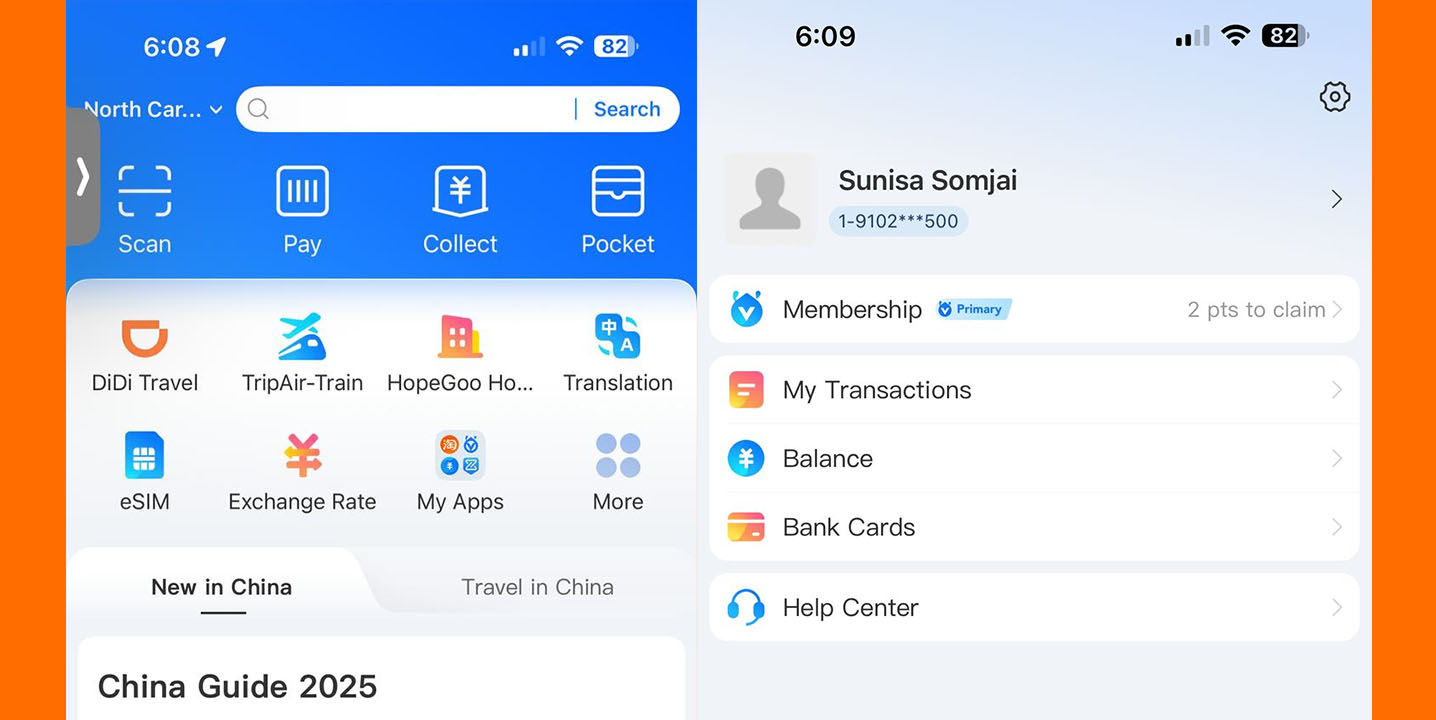
How to Set Up Your Alipay Account Guide

Follow these step-by-step instructions to complete registration and start using Alipay services:

Step 1: Complete Real-Name Authentication

Real-name verification is essential to unlock key features, especially for transactions over ¥200.

1. Navigate to the Verification Page

  • Open the Alipay app.
  • Tap “Me” in the bottom-right corner.
  • Tap the gear icon (⚙) in the upper-right corner to open settings.
  • Select “Account and Security”“Identity Information.”

2. Fill In Your Personal Information

You will be prompted to enter:

  • Full name (as on your ID)
  • Gender
  • Type of identity document
  • Document number and expiration date
  • Nationality
  • Occupation
  • Residential address

3. Upload a Verification Photo

  • Go back to the “Identity Information” page.
  • Tap “Verification Photo” and upload a clear photo of your identity document (e.g., passport).

Tip: Ensure your photo is well-lit and all details are readable. This speeds up the verification process.

Step 2: Link an International Bank Card

Once your identity is verified, the next step is adding your payment method.

1. Go to the Card Linking Section

  • Tap “Me”“Bank Cards”“Add Bank Card.”

2. Enter Your Card Details

Provide the following:

  • Card number
  • Expiration date
  • CVV or CVC security code (usually on the back of your card)
  • Select the issuing country of your card

🔒 Security Note: Alipay uses high-level encryption to ensure your financial information remains secure.

III. Final Checks and Tips

  • After successful registration and card linking, you can begin using Alipay for QR code payments, online shopping, public transport, and much more in China.
  • Some features, like investment or peer-to-peer transfer, may not be available to international users.
  • If your transaction exceeds ¥200, make sure your real-name authentication is completed to avoid restrictions.

IV. Common Troubleshooting Tips

  • Verification Failed? Double-check that your passport or ID image is clear and matches the entered details exactly.
  • Card Not Accepted? Make sure the card is supported internationally and is not restricted by your issuing bank.
  • Can’t Receive SMS? Ensure your phone number is entered correctly with the international code (e.g., +1 for USA, +44 for UK).

Can’t understand the Chinese content? Need help?

From registration to shopping, it turns out that buying things in online shopping stores in China is so easy.

How to Shop Through the Taobao China Online Shopping Store

Shopping online has become a favorite pastime for many, and Taobao stands out among the vast options available. As a leading online China store, Taobao offers a unique platform for shoppers worldwide, packed with a multitude of products. For anyone interested in buying from China, it’s essential to understand how to navigate this vibrant marketplace effectively.

Understanding Taobao

What is Taobao?

Taobao is one of the largest online shopping platforms in China. Owned by Alibaba Group, it allows individual sellers and businesses to set up virtual shops and sell directly to consumers. Unlike platforms like Amazon or eBay, Taobao focuses on the Chinese market, providing a wide array of unique products that may not be available elsewhere. The interface is tailored for local shoppers, making it both a treasure trove and a bit challenging for international users.

Benefits of Shopping on Taobao

One of the primary advantages of shopping at an online China store like Taobao is the incredible variety of products available. From trendy clothing to quirky gadgets, the selection is astounding. Furthermore, competitive pricing is another significant benefit. Many products on Taobao are priced lower than similar items on Western shopping sites, allowing for cost-effective purchasing options.

Setting Up Your Taobao Account

Creating an Account

To start enjoying the benefits of Taobao, you need to create an account. Here’s a simple step-by-step guide:

  1. Visit the Taobao website or download the app.
  2. Click on “Sign Up” and fill out the required information, including your mobile number.
  3. You will receive a verification text; enter the code to validate.
  4. Complete your profile, and you’re ready to shop!

Language and Currency Settings

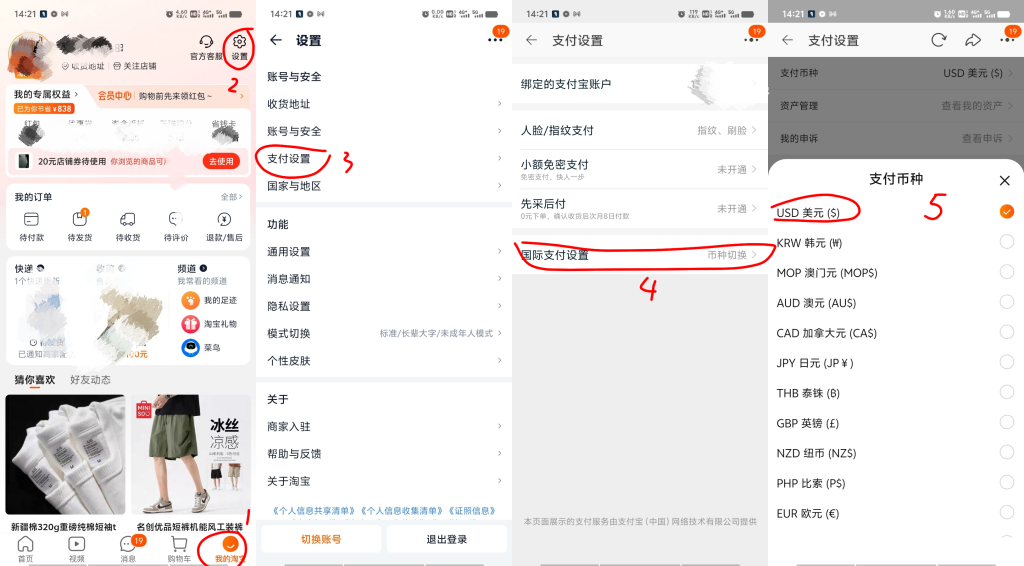
Steps to switch currency units on Taobao

Navigating Taobao can be daunting due to the language barrier. To make your experience smoother, consider adjusting your language settings. Use browser extensions or translation tools for real-time translation. Additionally, switching currency settings can help you keep track of your spending in your home currency, making it easier to compare prices.

Navigating the Taobao Store

Browsing for Products

Effective searching on Taobao is key to a successful shopping experience. Utilize the search bar at the top of the page, and consider using keywords in both English and Chinese for better results. Exploring categories can also reveal hidden gems you might not have thought to search for.

Understanding Product Listings

Product listings on Taobao often include essential details such as product descriptions, pricing, and customer reviews. Pay close attention to reviews, as they can give you insight into the product quality and the seller’s reliability. Make sure to glance at the seller’s ratings too. A higher rating often means a better shopping experience.

Buying from Taobao

Adding Items to Your Cart

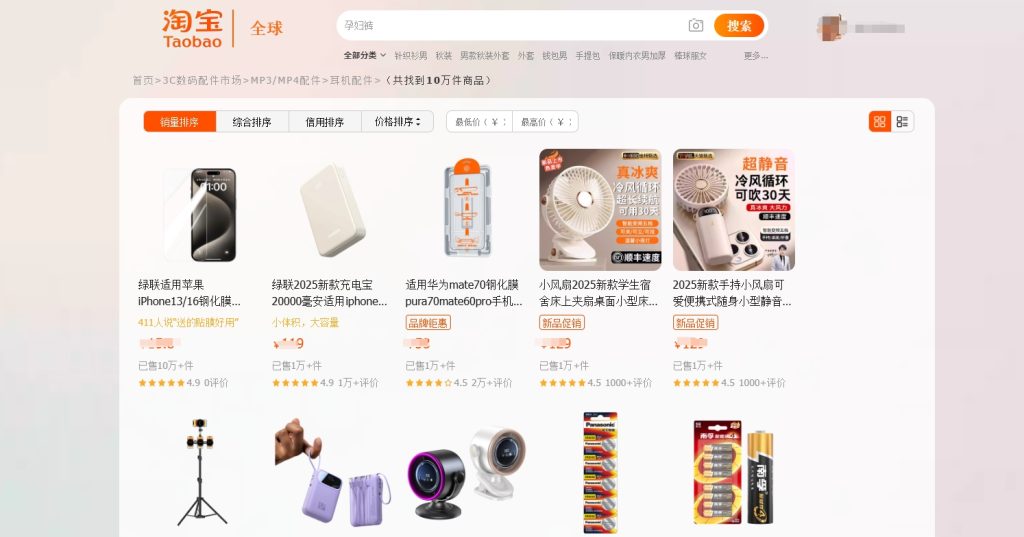
The shopping page of Taobao

Once you have found products you like, adding them to your cart is simple. Click on the item, select any options (like size or color), and hit the “Add to Cart” button. You can continue shopping and return to your cart when you’re ready to check out.

Choosing Payment Methods

Taobao offers various payment options, including Alipay and credit cards. Alipay is widely used and preferred by many users for its security features. Make sure to choose a payment method that suits your comfort level and is accessible in your country.

Please note that Alipay is very likely to disable your payment function. Before using it, please verify your identity and bind your bank card.

Shipping Options and Logistics

Choosing a Shipping Method

When it comes to shipping, Taobao offers a range of methods, from express options to standard shipping. The shipping time may vary significantly based on your chosen method and location. Be sure to check the shipping costs associated with each option, as they can vary widely.

Most merchants offer free shipping and delivery, so you can shop with peace of mind without having to bear the shipping cost.

Working with Gonest Consolidated Logistics

The homepage of Gonest official website

If you’re looking for a reliable shipping partner, consider working with Gonest Consolidated Logistics. They are known for helping international shoppers manage their orders more effectively. Their services include package consolidation, where multiple orders are combined to save on shipping costs. This can be particularly useful when buying from various sellers on Taobao.

GET IN TOUCH

New Users Claim Discounts

Taobao Shopping Tips

Finding the Best Deals

To make the most out of your shopping experience, keep an eye out for discounts, flash sales, and promotions. Taobao hosts various sales events throughout the year, like Singles’ Day on November 11, so plan your shopping around these times for maximum savings.

Avoiding Common Pitfalls

When buying from Taobao, be cautious about low-priced items. A significantly lower price might indicate poor quality. Always read reviews and seller ratings. Additionally, be wary of sellers who lack a strong reputation. If something feels off, it’s better to look for another option.

Conclusion

Shopping through the Taobao online China store can be a rewarding experience if you know how to navigate it. From setting up your account to understanding product listings and choosing payment methods, following the tips provided can enhance your shopping journey. So, dive into this unique online marketplace and discover what treasures await you! Happy shopping!

Register an Alipay account

How to Register for Alipay with an American Identity

Alipay has made waves as one of the leading digital payment platforms globally. It’s known for its convenience, security, and a range of services that cater to users’ daily needs. For those in the US, understanding how Alipay works and how to register for an American identity is crucial. This guide aims to walk you through the Alipay registration process and enhance your user experience in the US.

Understanding Alipay

What is Alipay?

Alipay is a digital wallet platform founded by Alibaba Group. It started primarily as a means to facilitate transactions within the Chinese market but has grown to serve users globally. Key features include online payments, money transfers, and various financial services ranging from loans to investment products.

How Alipay Works

Alipay processes payments through its secure platform, allowing users to link their bank accounts or credit cards. With Alipay, users can pay for goods, send money to friends, and even pay bills seamlessly. Its benefits include swift transactions, a wide acceptance across merchants, and robust customer support.

Alipay Registration Process

Eligibility Criteria

So, can one register for Alipay with an American identity? Yes, American users can register. The main eligibility requirement is a phone number from the United States. You’ll also need an identification document, such as a driver’s license or passport, that verifies your identity.

Step-by-Step Registration Guide

To get started with Alipay, follow these simple steps:

  1. Downloading the app: Go to the App Store or Google Play Store and search for Alipay. Download and install the app.
  2. Creating an account: Once installed, open the app. Click on “Sign Up” to start the registration. You’ll need to enter your phone number and verify it through a code sent via SMS.
  3. Filling in your information: After verification, you can enter your personal details, including name, email, and identification. Be sure to provide accurate information to avoid issues later.
  4. Setting up payment methods: Link your bank account or card to your Alipay account for easy transactions.

Common Registration Issues

Although the registration process is straightforward, some users face issues. Common problems include not receiving the verification SMS or being unable to enter certain required fields. If you run into problems, check your internet connection first. For persistent problems, reach out to Alipay’s customer support through their official website or app for assistance.

Alipay User Experience in the US

User Interface and Accessibility

Alipay is designed with user experience in mind. The layout is intuitive, making it easy to navigate through its services. Moreover, the app supports multiple languages. Although originally in Chinese, you can switch to English, ensuring accessibility for American users.

Popular Features Among US Users

American users love various features Alipay offers. The ability to make quick payments at retail stores is a favorite. Sending money to friends in seconds is another popular option. Users appreciate the ability to maintain order histories and track their expenses, enhancing overall financial management.

What’s the problem?

Can’t complete the registration on Alipay?Perhaps you have tried many methods but still failed to register. Come and seek help from our customer service.

Alipay Security Features

Data Protection Measures

With growing concerns about online security, Alipay prioritizes user safety. It employs advanced encryption technologies to protect user data throughout transactions. The platform also utilizes secure servers to ensure that your sensitive information is safeguarded from any unauthorized access.

User Fraud Prevention

While Alipay is secure, users should also take proactive steps to stay safe. Here are some tips:

  • Always enable two-factor authentication (2FA) for an extra layer of security.
  • Regularly monitor your account for unauthorized transactions.
  • Be cautious of unsolicited messages claiming to be from Alipay, and avoid clicking unknown links that could lead to scams.
    Recognizing these warning signs and staying vigilant can help you protect your Alipay account.

Conclusion

In summary, registering for Alipay with an American identity is entirely feasible. This digital payment platform offers a variety of features that enhance the user experience in the US. From easy navigation to robust security measures, Alipay is worth considering for anyone looking to simplify their payment processes.

Take the time to explore Alipay’s offerings after signing up. Utilizing its features can dramatically change how you conduct transactions. Following the tips mentioned will help ensure a smooth registration and enjoyable experience. Happy payments!

Taobao Payment Failed? How to Fix the Payment Restriction Issue

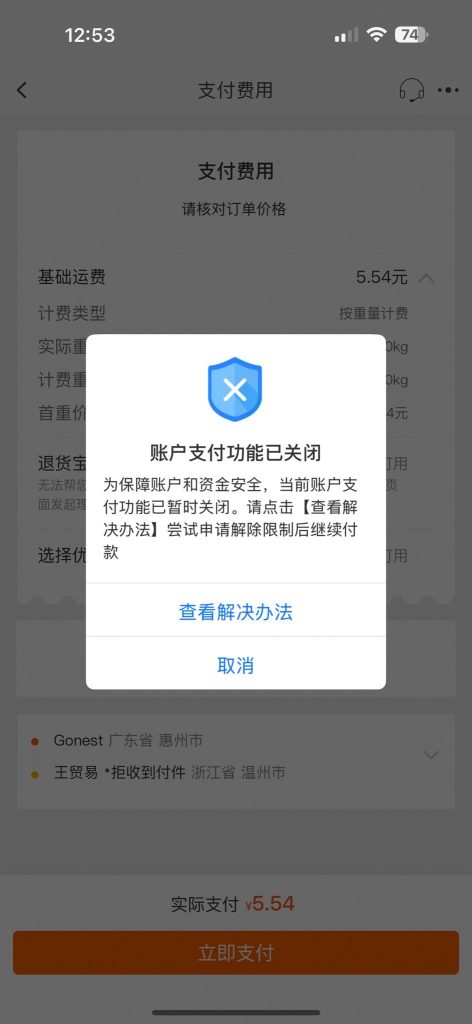
Have you ever encountered this message when trying to make a payment on Taobao?

“为了您的账户和资金安全,此账户的支付功能已暂时禁用。在继续付款之前,请点击查看解决方案尝试申请解除限制。”

The English translation of this message is:

“For the safety of your account and funds, the payment function of this account has been temporarily disabled. Please click to view the solution and try to apply for lifting the restriction before continuing payment.”

This indicates that your Taobao account’s payment function has been suspended due to security concerns. But how can you resolve this issue? Fortunately, the solution is quite simple — you just need to go through a few steps to identify what caused the restriction.

Step 1: Check Your Account’s Real-Name Verification

The first thing you need to do is check whether your Taobao account has completed the real-name verification process. If you didn’t complete this step after registration, it could be the reason your account is restricted.

Here’s how to check and verify your identity:

  • Open the Taobao App, tap on “My Taobao” at the bottom right corner.
  • Tap the gear icon at the top right to enter the Settings page.
  • Find and tap “Account and Security.”
  • You’ll see the Real-Name Verification status there.

Check whether the status says “Verified.”

  • ✅ If yes, you’re good.
  • ❌ If not, tap to continue the verification process.

Use your passport information to complete the verification. Just follow the on-screen instructions to upload your identification documents and passport photo.

Once the process is completed and approved by Alipay, the restriction should be lifted.

Step 2: Ensure Your Taobao and Alipay Accounts Match

Sometimes, registering multiple Taobao or Alipay accounts can trigger Taobao’s security system, which may suspend your payment function for safety reasons.

To prevent this:

  • Make sure your Taobao and Alipay accounts are properly linked and belong to the same person.
  • If you have multiple Alipay accounts, consider closing the extra ones you don’t need.

Step 3: Cancel Pending Transactions and Switch Alipay Accounts

If the steps above didn’t solve the issue, the next solution (which comes directly from Taobao customer service) is to switch to a different Alipay account — preferably one that has already completed real-name verification. This method can be a bit more involved, but it’s effective.

Here’s what to do:

  1. Cancel all pending transactions linked to your current account.
  2. Go to your order history and cancel any unpaid orders you find.
  3. If you can’t cancel the order through Taobao, open the Alipay app instead.
  4. Go to the Bills section, find the pending transactions, and cancel them there.
  5. Return to Taobao > Payment Settings, and unlink your current Alipay account.
  6. Now, link a different Alipay account that has already passed real-name verification.

Final Step: Verify If It Works

Once you’ve completed all the steps above, try making a payment again. If everything has been done correctly, your payment function should now work without any problems.